


 Log In

Free gifts available with your purchase

Harmonic Creativity
Elevate your sound to new heights with TriVox, the revolutionary audio effect plugin from W. A. Production. Designed to bring the power of harmonies to any type of sound, TriVox opens up a world of sonic possibilities. Whether you're a producer, musician, or sound designer, TriVox is your ultimate tool for creating lush harmonies that captivate listeners.
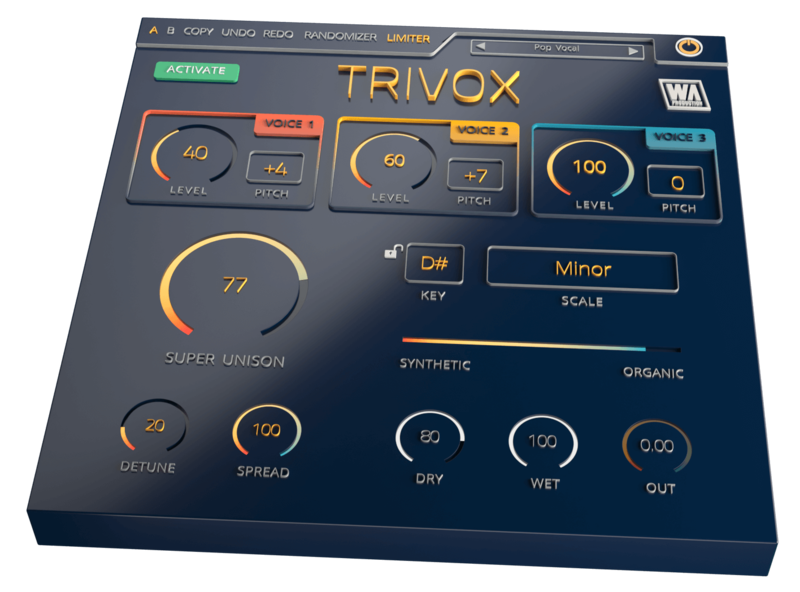
TriVox features three harmony voices that can be precisely tuned anywhere from -12 semitones to +12 semitones. With independent level controls for each voice, you have full control over the blending of harmonies to achieve the perfect balance. Take your harmonies to the next level by locking them to your choice of 20 different scales, or unleash your creativity in chromatic mode for endless harmonic exploration.
Unleash the power of your harmonies with the Super Unison feature, complemented by the Detune and Spread settings. Create captivating and wide stereo soundscapes that envelop your listeners. With the slider to toggle between synthetic-sounding and organic-sounding voices, you can customize the character of your harmonies to suit your artistic vision.
Fine-tune your mix with the dry, wet, and output gain knobs, allowing you to seamlessly blend the original sound with the harmonies. Preserve the integrity of your mix while enhancing it with the magic of harmonies.
TriVox empowers your creative workflow with convenient features like copy, paste, undo, and redo options. Experiment fearlessly, knowing that you can easily revert or replicate your previous settings. Take advantage of the global limiter to maintain control over your output levels and prevent any unwanted clipping.
Inject randomness into your harmonies with the randomizer option, adding an element of surprise and uniqueness to your sound. Discover unexpected combinations that spark inspiration and set your productions apart.
Effortlessly navigate through your presets with the preset browser, allowing you to audition and load presets with ease. Use the A/B test option to compare different effect settings and fine-tune your harmonies until they shine.
TriVox comes with a full range of supporting features to enhance your experience. Dive into the comprehensive PDF manual and tutorial video to unlock the full potential of TriVox. Enjoy responsive performance and CPU-friendly operation, ensuring smooth integration into your workflow.
Join the ranks of real-life producers who trust W. A. Production to deliver top-quality plugins that streamline the creative process. TriVox is here to help you create harmonies that inspire and captivate your audience. Step into the world of harmonic creativity and let your sound soar with TriVox. Elevate your productions today!
Features
- 3 harmony voices
- 20 scales to choose from
- Super Unison knob with Detune and Spread controls
- Dry, Wet, & Output Gain controls
- Randomizer feature
- Character slider for organic and synthesized sound
- Global Limiter toggle
- Factory presets
- Full PDF Manual & Tutorial video
System Requirements
- Windows 8 or higher (64 bit)
- macOS 10.10 or higher (64 bit)
- AAX - ProTools 11 or higher
Important Note for Mac Apple Silicon users: Before purchasing, please review the current compatibility status of this plugin on your system here.
Reviews Summary
While it aims to provide a helpful overview, it may not capture every perspective or detail. We encourage you to read individual reviews to make an informed decision.
Users find this product extremely easy, fast, and uncomplicated to use, delivering consistently good-sounding results. It is highly effective for adding harmonizing vocals, brainstorming musical ideas, and producing crisp drum sounds.


