


 Log In

Free gifts available with your purchase
Flagship Orchestral Brass recorded at Newman Scoring Stage | Fox Studios
Cinesamples is proud to present Industry Brass - Core Recorded by Damon Tedesco on the Newman Scoring Stage at Fox Studios, this Orchestral Brass library captures the brilliant and articulate sound that has made many of our favorite films and TV shows come to life. Boasting both classic and modern titles, including The Mandalorian, Avatar, Thor: Love & Thunder, The Matrix, Pinocchio, 1917, Pirates of the Caribbean, Jaws, Westside Story and countless others, the Newman Scoring Stage has established its presence in the industry, and now that sound is available to you. Industry Brass Core includes Trumpet, Trombones, French Horn and Tuba patches, with a robust set of articulations and FX that include everything you need to score anything from a personal short, to a AAA video game or Feature Film.
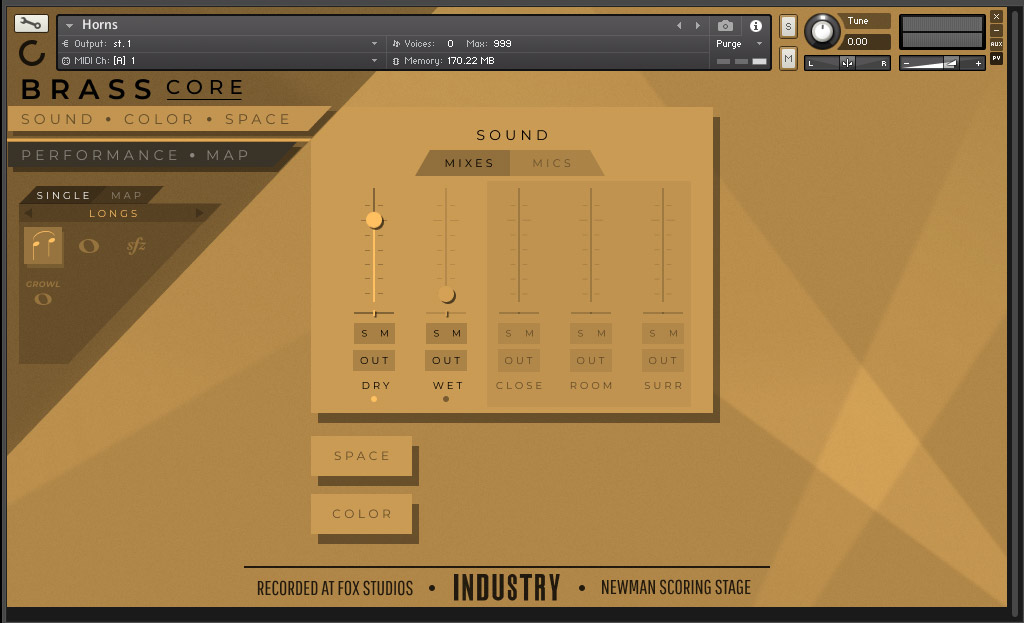
Cinesamples have included 5 unique mixes and mic positions for ultimate flexibility: Dry Mix, Wet Mix, Close Mics, Room Mics, and Surround Mics. These mixes and mic positions will help Industry Brass Core sit well in any mix, any environment, on any track. To help you get started they've also included a set of custom articulation mapping presets, so you can spend your time writing music, instead of tweaking knobs.
The Newman Scoring Stage has a bright and immediate sound, maintaining clarity even when the largest sections are playing detailed scores, making it perfect for high-intensity action sequences, detailed intimate scores, and any piece of music that benefits from a flexible brass section.
Colors
To properly reflect the impact the Newman Scoring Stage has made on our industry, and on music in-general throughout the years, Cinesamples included 'color' presets. These presets are designed to shift the sound of Industry Brass to more accurately reflect the different eras of film score that the Stage has helped define.
- GOLDEN ERA: 30s The iconic Hollywood sound of the 1930s is the product of the technology available at that time, with all its quirks: recording tools, devices, and formats with narrower frequency ranges and higher noise floors than we have today. Lack of multi-track recording meant the entire ensemble recorded with a single microphone resulting in a monophonic recording, this also meant the balance between instruments was achieved via room balancing.
- TIMELESS: 50s Even though recording was still monophonic, some improvements over the 1930s technology allowed for multi-track stereo playback, lower noise floors, and small improvements in frequency range fidelity.
- BLOCKBUSTER: 80s The 80s sound is defined by the introduction of Dolby Stereo and THX systems. Dynamic ranges, frequency response, and overall fidelity expanded exponentially.
- MODERN: Now Represents the sound of the stage today as Damon Tedesco has shaped it.
Patch List
- 3 Trumpets
- Legato
- Sustain
- Sustain Straight Mute
- Sustain Harmon Mute
- Sforzando
- Tenuto
- Staccato
- Staccato Straight Mute
- Staccato Harmon Mute
- Staccatissimo
- Rip Fifth FX
- Fall Long FX
- Cluster FX
- Crescendo Cup Growl FX
- Fall Cup Growl FX
- Cup Wah Long FX
- Cup Wah Short FX
- Crescendo Long FX
- Crescendo Short FX
- Doit Long FX
- Doit Short FX
- Doit Valve FX
- Fall Short FX
- Growl FX
- Rip To Nothing FX
- Shake Long FX
- Shake Short FX
- 6 Horns
- Legato
- Sustain
- Sustain Stopped
- Sforzando
- Tenuto
- Staccato
- Staccato Stopped
- Staccatissimo
- Crescendo Short FX
- Crescendo Long FX
- Fall FX
- Growl FX
- Breath FX
- Rip Fifth FX
- Rip Octave FX
- 3 Trombones
- Legato
- Sustain
- Sustain Mute
- Sforzando
- Tenuto
- Staccato
- Staccato Mute
- Staccatissimo
- Cluster FX
- Crescendo Cup Growl FX
- Crescendo Long FX
- Crescendo Short FX
- Cup Wah Tritone FX
- Cup Wah Long FX
- Cup Wah Short FX
- Cup Wah Sad Bone FX
- Doit FX
- Fall FX
- Growl FX
- Rip Long FX
- Rip Short FX
- Cross Tone FX
- Solo Tuba
- Legato
- Sustain
- Sforzando
- Tenuto
- Staccato
- Staccatissimo
System Requirements
- Mac OS X 10.12 or higher
- Windows 7 or later
- At least 4 GB of RAM, 8 GB is recommended
- At least 20 GB of free drive space, 40 GB hard drive space required for installation
- FREE Kontakt Player 6.7.1 or higher
- 64 bit DAW is recommended for optimized performance
This instrument requires the FREE or FULL version of Kontakt 6.7.1+























