Log In

Free gifts available with your purchase
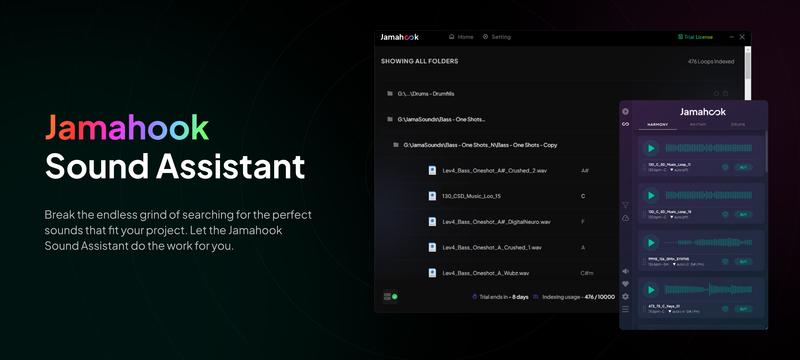
Please Note: This is the Basic Pack edition of Jamahook Sound Assistant, which can accommodate up to 10,000 musical elements from your library. For unlimited access, the Pro Pack edition is also available here.
The Jamahook Sound Assistant is an AI-driven plugin that enables music producers to instantly find musical content that perfectly complement their music projects by using the world’s first and only sound-matching artificial intelligence. Either from their personal audio libraries or from the Jamahook cloud of royalty-free loops.
The Sound Assistant Offline Agent is the perfect tool for music producers who have collected many loops, instrumentals, stems, samples, beats or other audio content throughout the years. It makes it easy to find long-forgotten musical treasures by connecting personal audio libraries with the Jamahook sound-matching technology.
By providing the plugin with access to locally stored music and audio libraries, the Jamahook Offline Agent analyzes, categorizes and structures all the content in those folders. The plugin then deeply analyses dozens of acoustic and psychoacoustic properties in the song a producer is working on and creates data sets for every element. The Jamahook AI then connects this data to the rhythmically and harmonically resonating elements within a producer's personal library. It can then recommend the right sounds that complement the current project, matching key, tempo and other parameters. The algorithm can even incorporate matches that are in different keys by using pitch shifting to suit the current music project. Producers can audition the selections and drag out their favourites to include them in their creations, or further narrow down the search by filtering instruments, mood, genres, or loops with similar groove.
Additionally, music producers can get inspirations from the ever-growing Jamahook cloud loop with hundreds of thousands of sounds that complement the given musical arrangements with a simple subscription.
The Sound Assistant plugin is aimed at empowering producers to supercharge their creativity by providing a production assistant that can be seamlessly integrated into their workflow.
Whether music producers want to use the Sound Assistant to shortlist melodic loops or other audio content for their tracks or are simply looking for inspiration, the Jamahook Sound Assistant plugin makes it easier to compose, produce, and remix music.
The Jamahook sound matching plugin has been crafted to integrate effortlessly with all major DAWs. While it supports both VST and AU formats, an AAX version tailored specifically for ProTools users is slated for release in 2024.
Process
Listen:
The Sound Assistant plugin can listen to any part of the mix you want from your current project and analyze the melodic and rhythmic qualities of your song.
Match:
It suggests harmonically and rhythmically matching loops and samples that complement your current project perfectly. These matches can come be from your own loops in your hard drive or from the Jamahook cloud.
Audition:
Audition your matches, drag out your owned loops directly onto your track, or even buy new sounds from the cloud library.
Filter:
Get further tailored results by filtering instruments, moods, genres or sounds with a similar groove.
Powerful Features
Pitch Shifted Matching
The algorithm incorporates matches from other keys which will be automatically transposed to suit your project.
Harmonic & Melodic Matching
Shortlist loops that are harmonically compatible with your project. Audition them and drag them out into your project.
Rhythmic & Drum Matching
Search for loops with a similar groove. Quickly shortlist supporting percussion, drums, or even harmonic content.
Instrument & Genre Filter
Further narrow your search by Match Source (Cloud/Local). Apply instrument, genre and mood filters to fine-tune your matches. Use different combinations for unique results.
New Features
- Soft Deletion: Implementing a soft deletion feature for quicker file/folder removal, alongside a background process for clearing items flagged for deletion.
- Rhythm and Drum Matching: A new matching strategy focusing on rhythm as well as a dedicated section to get drum matches
- Mac OS 10.15 Support: Expanding compatibility with support for Mac OS 10.15.
- Drag-and-Drop Support: Simplifying the process of adding and syncing folders with drag-and-drop functionality.
System Requirements
- Windows 7 and above.
- MacOS version 12 and higher.