


 Log In

Free gifts available with your purchase


Groundbreaking Bass
Bloom Bass Impulse merges an extensive array of modern synth bass loops, samples, and one-shots into a versatile and dynamic instrument, meticulously crafted to inject your tracks with low-end and tailored to fuel genres that demand contemporary bass sounds.
From the pulsating energy of Drum and Bass’s Reese Bass to the acid squelch of 303s, the gritty growl of distorted basses, the depths of Sub-Bass, the precision of Tech, to the wobble of Dubstep, this tool is a treasure trove for anyone looking to anchor their tracks with a spectrum of cutting-edge bass.

What Can Bloom Bass Impulse Do?
- Elevate your tracks with a spectrum of modern, powerful basslines.
- Seamlessly blend between bass styles for genre-defying productions.
- Shape and sculpt unique bass layers with expressive modulation.
- Form dynamic sequences from a rich library of contemporary bass sounds.
- (New!) Allow you to import your own samples and personalise the instrument.
Bloom Bass Impulse offers an intuitive path to finding the perfect bass sound, providing you with high-quality, royalty-free loops and one-shots ready to be morphed and manipulated. Switch between bass styles with ease, enhance their character with extensive effect modulation and tailor them to fit any mix with an array of focused processing options.
Crafting the ideal bassline is now an intuitive and engaging process, allowing for hands-on control over sample triggering and sound shaping. Four macro controls offer instant tonal adjustments, while the Edit page unveils detailed customisation tools, giving you complete control over sample manipulation, sequence creation, modulation and effects across 250 presets.
How it Works
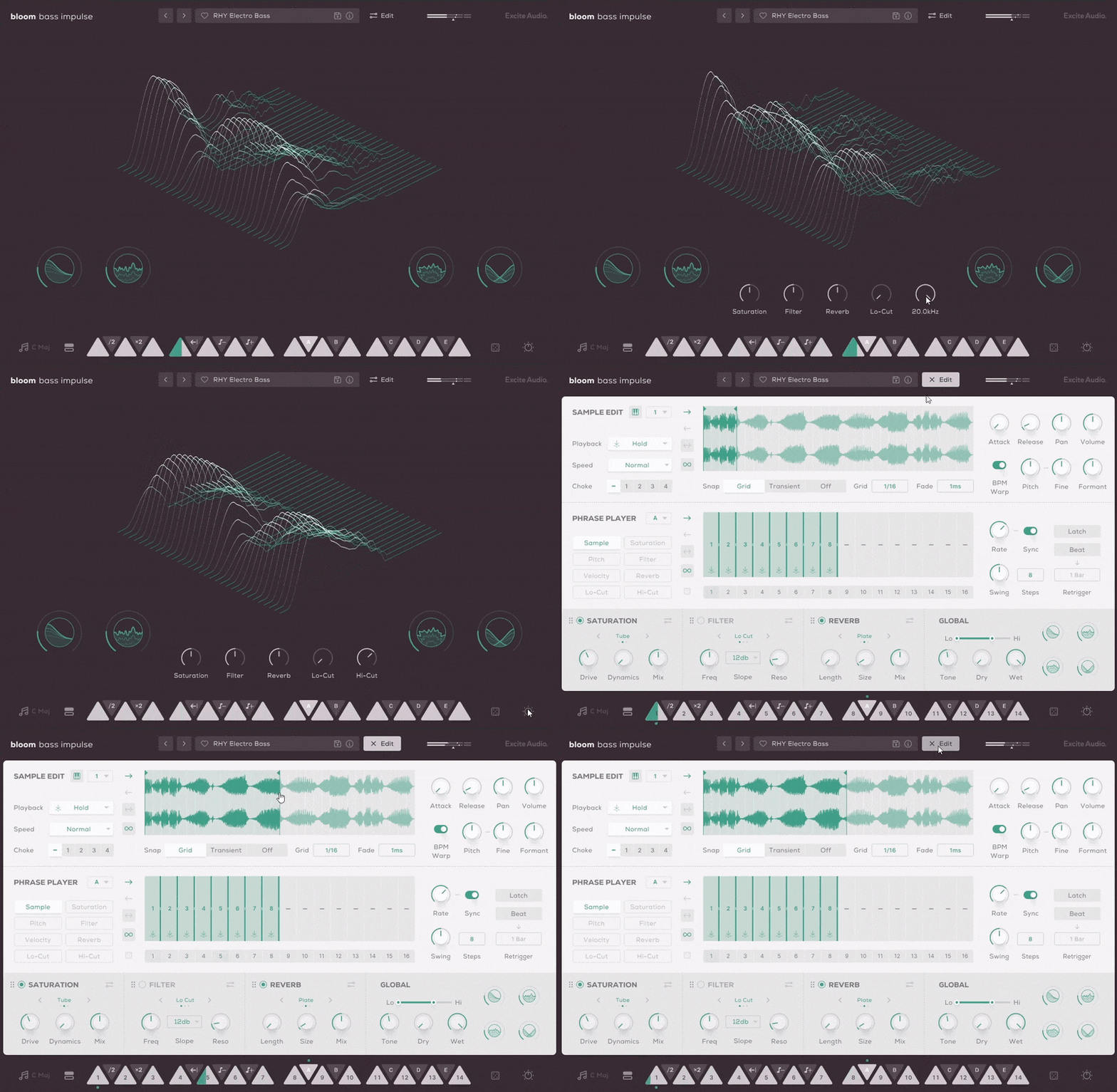
Choose a key to work in, pick a preset or sample bank, and ignite one of 14 bpm-synced bass loops across two octaves. White keys initiate bass samples and loops, while black keys adjust characteristics such as playback speed and pitch, besides triggering bespoke sequences and effect modulation.
The four innovative macro controls: Sub-EQ for additional low-end tone shaping, Noise for texture, Crush for sample-rate reduction, and Width for subtle to extreme stereo expansion - steer a bespoke chain of effects, fine-tuned for the curated selection of bass samples that form the instrument.
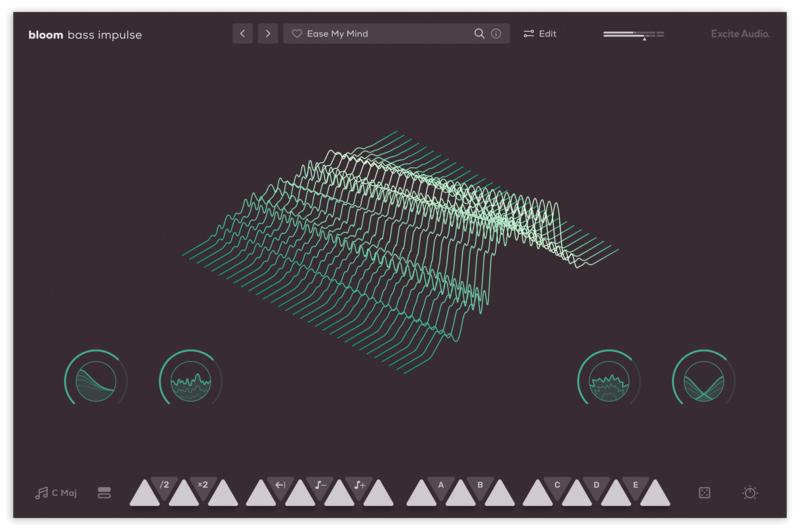
The Main Page
With eight banks of sounds, each dedicated to a different type of bass, Bloom Bass Impulse provides a versatile foundation for any project. Trigger a sample with a MIDI white note to add bass to your track instantly, or utilise the Phrase Player to weave the sample into a complex bassline. The Phrase Player does more than just playback samples; it's a creative tool for modulating and morphing effect properties, enabling each sound bank to offer a broad spectrum of tonal possibilities.
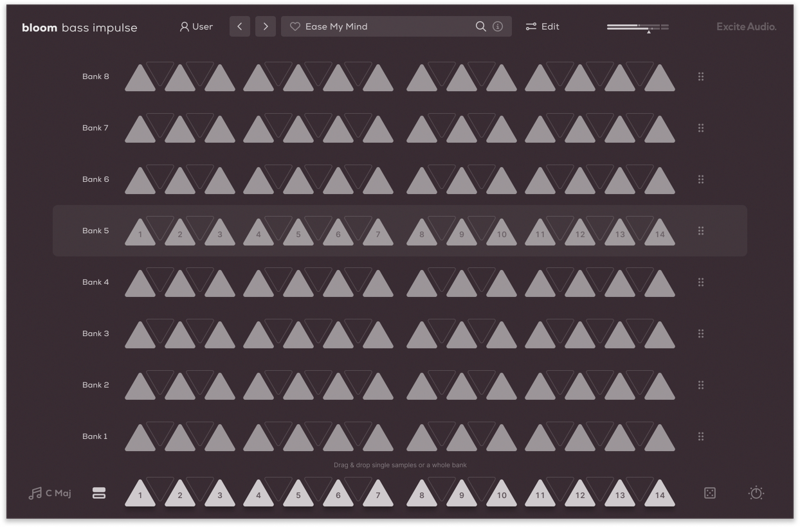
Audition and Load Samples & Banks
The Edit Page: Shape Your Sound
Bloom Bass Impulse's Edit page is where you take full control over its bass content, allowing for the precise tailoring of the existing samples to craft something truly individual.
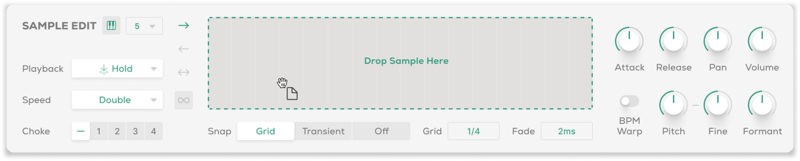
In the Sample Edit section, modify the 14 source samples in each bank. Set sample start and end points, and adjust trigger types, playback direction and speed. Refine pitch, formant settings, and the envelope's attack and release, alongside setting up choke groups for dynamic bass interactions.
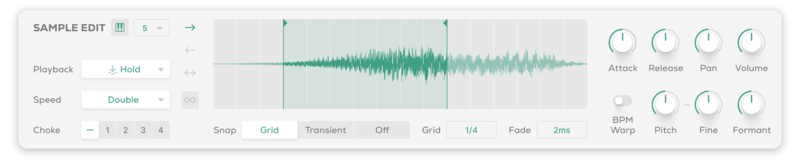
Sample Edit Section
Import Your Own Samples
Make the Bloom instrument your own with the ability to drag and drop audio files into it. You can do this via the waveform view on the edit page or any empty slot on the banks page. Set the key and BPM of your samples to make them integrate seamlessly with the Bloom engine.
Sample Import
Sequencing Reimagined
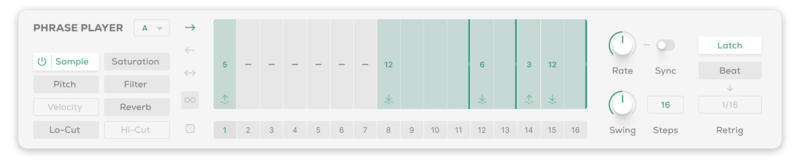
The Phrase Player lets you sequence bass samples with precision. Assign one of the five black keys to trigger a pattern of samples, modulate pitch, velocity, hi-cut/lo-cut filters and dive deep into the three effects: Saturation, Filter and Reverb. Familiar arpeggiator features like Rate, Latching, and Swing provide a familiar but powerful foundation for your workflow.
Phrase Player Section
Bloom Bass Impulse incorporates three bespoke effects modules: Saturation for warmth and edge; an Envelope Filter for audio-responsive frequency sculpting; and Reverb for adding spatial dimensions. These configurable effects modules are crucial for transforming and refining your bass sounds, presenting primary controls for quick adjustments and advanced options for deeper exploration.

Effects Section
Features
- 14 Sample Keys
- 5 Factory Modifiers: Half-time, Double-Time, Reverse, Octave Down, Octave Up
- 5 Custom Modifiers
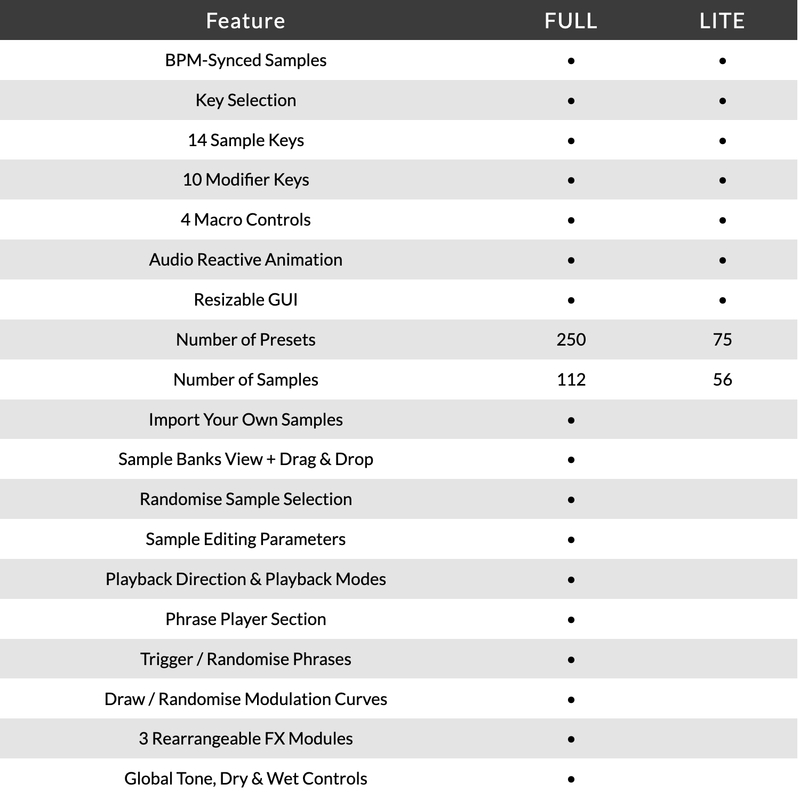
- 8 Sample Banks / 112 Bass Samples
- Samples Synced to Host BPM
- Key Selection
- Sample Randomise
- 4 Macros: Sub-EQ, Noise, Crush, Width
- 5 Main FX Parameters: Saturation, Reverb, Filter, Lo-Cut, Hi-Cut
- Global Bypass
- 250 Presets
- All samples that come with Bloom Bass Impulse are royalty-free
- Import up to 112 of your own samples (these can be swapped at any time)
Edit Page - Sample Edit
- Waveform Display
- Playback Direction: Forwards, Backwards, Pendulum, Loop
- Playback Modes: Hold, Latch, Relative
- Playback Speed: Normal, Double, Half
- 4 Choke Groups
- Start / End Markers with Snap to Grid, Snap to Transient
- Sample Crossfade, Attack, Release, Pan, Volume
- Sample Pitch, Fine, Formant, Pitch Warp
Edit Page - Phrase Player
- Sample Mode for triggering sequences
- FX Modulation: Saturation, Reverb, Filter, Lo-Cut, Hi-Cut, Pitch, Velocity
- Playback Direction: Forwards, Backwards, Pendulum, Loop
- Sample / Modulation Randomise
- Phrase Rate, Sync, Swing, Steps, Latch, Beat Retrigger controls
Edit Page - FX
- 3 Rearrangable Effects: Saturation, Filter, Reverb
- Saturation Mode: Tube, Tape, Fuzz
- Saturation Parameters: Drive, Dynamics, Mix, Feedback Amount / Frequency, Tone
- Reverb Mode: Plate, Hall, Spring
- Reverb Length, Size, Mix, Pre-Delay, Duck, Lo-Cut, Hi-Cut, Input, Output
- Filter Mode: Lo-Cut, Hi-Cut, Peak
- Filter Parameters: Frequency, Slope/Peak Gain, Resonance, Env Amount, Env Threshold, Env Attack, Env Release, Mix
- Global Lo-Cut, Hi-Cut, Tone, Dry, Wet
Learn More About Bloom Bass Impulse
Version Comparison
System Requirements
macOS
- macOS 10.15 or higher (Intel / Native Apple Silicon supported).
- Plugin Formats: VST, VST3, AU, AAX, Standalone.
- DAW's Supported: Ableton Live, Pro Tools, Logic Pro, FL Studio, Cubase, Nuendo, Reaper, Reason + more.
- Compatibility: 64-bit compatible only.
Windows
- Windows 7 or higher
- Plugin formats: VST, VST3, AAX, Standalone
- DAWs supported: Ableton Live, Pro Tools, FL Studio, Cubase, Nuendo, Reaper, Reason + more.
- Compatibility: 64-bit compatible only.
Please Note: An internet connection is required to authorise this software.
Important note: When accessing this software via a Rent to Own plan or the Beatport Studio membership, it's installed and run through the Beatport Access portal. An internet connection is required every 30 days to validate your license.
.jpg?t=1791623095)
Dokkodo Sounds
Composer, producer and sound designer with releases on Inner Ocean Records, Ninja Tune Music & EMI.
"The ability to combine multiple different bass timbres and phrases within a single sequence makes Bloom Bass Impulse an essential tool for so many electronic genres."

Attack Magazine
A magazine dedicated to dance music production and culture.
"The Bloom series will help your music blossom. It's a great addition to your setup when looking for that extra spark."

GEST
Top-tier, industrially-minded Drum & Bass duo on Shogun Audio.
"Bloom Bass Impulse has become a real secret weapon of ours. Having all these high-quality basslines plus the FX and modulation options means we can get the tones we need fast."
Reviews Summary
While it aims to provide a helpful overview, it may not capture every perspective or detail. We encourage you to read individual reviews to make an informed decision.
Customers highly praise the plugin for its impressive sound quality, especially its punchy, heavy, and musical bass tones that excel at quickly generating low-end ideas. The variety of presets and creative concept are widely appreciated. However, opinions on usability are mixed; while many find it fun and accessible, others note that the editor interface can feel clunky, custom sample setup could be more intuitive, and the reliance on premade samples can feel somewhat restrictive.


