/ Stereo Width / Lifeline Width
Excite Audio

Lifeline Width

4.5 (22 Reviews)
$8.00 $19.00

57% off until Dec 07

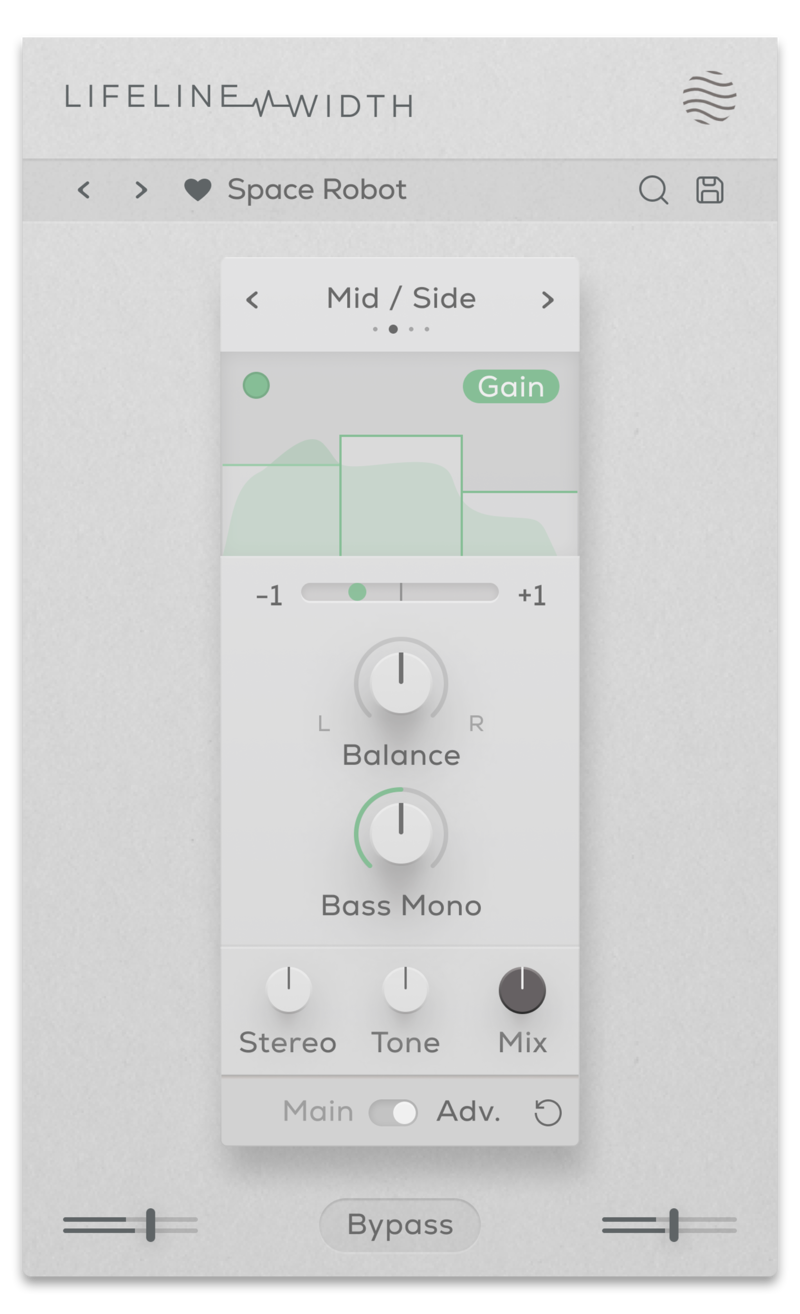
Lifeline Width - Main View
Lifeline Width - Advanced View
Lifeline Width - Dream in Stereo gallery thumbnail
Buy Now
Product information

Dream in Stereo

Manipulating stereo width is a vital processing technique in modern music production and allows producers to explore the full reaches of the sonic landscape.

Lifeline Width's unique controls can help you create vast soundscapes, captivating leads and intimate vocal takes and is designed to give your recordings depth, and immersion.
Whether it’s through panning, pitching, signal boosting or detuning, Expanse offers balanced and detailed control over your mix. Access the full spectrum of your audio’s potential by utilising effective, streamlined parameters to produce any kind of stereo-width processing. 

  • Haas: Creates stereo width by duplicating the audio signal.
  • Mid / Side: Alters the balance between the mid and side signal.       
  • Detune: Adds pitch variation for a wide, chorusing effect.
  • Mono: Reduces the width of the audio

Features

  • 4 Stereo Width algorithms
  • Stereo control (With Adv. Multiband processing)
  • L/R Balance & Bass Mono controls
  • Phase correlation meter
  • Dry/Wet Mix, Output Gain & Tone controls
  • Multiband functionality for Gain and Effect processing
  • Input/Output Gain Controls
  • Global Bypass
  • Resizeable UI
  • Zero Latency
  • 50 Presets

System Requirements

macOS

  • macOS 10.15 or higher (Intel / Native Apple Silicon supported).
  • Plugin Formats: VST, VST3, AU, AAX, Standalone
  • DAW's Supported: Ableton Live, Pro Tools, Logic Pro, FL Studio, Cubase, Nuendo, Reaper, Reason + more.
  • Compatibility: 64-bit compatible only.

Windows

  • Windows 7 or higher
  • Plugin formats: VST, VST3, AAX, Standalone
  • DAWs supported: Ableton Live, Pro Tools, FL Studio, Cubase, Nuendo, Reaper, Reason + more.
  • Compatibility: 64-bit compatible only.
Testimonials

Beat Magazine

"This plugin really shines as a versatile tool for breathing more life into static sounds, creating lo-fi sounds or giving sounds more character and three-dimensionality."

CAZZETTE

"Lifeline is excellent for pushing and expanding any sound source."

Freemasons

"This plugin goes above and beyond the call. It is just wonderful and an absolute pleasure to use."

Installation Instructions

Please Note: Lifeline EQ is used as an example. You will recieve either Lifeline Console or Lifeline Expanse in your download depending on the plugin. The process is the same for both.

Mac 

Installation

1. Download the .pkg file from your Plugin Boutique account > Open it to start the installation process (Note: This will install all available modules of Lifeline Console) > Click 'Continue'.

2. Read the Software License Agreement > Click 'Continue'.

3. Click 'Agree'.

4. Click 'Continue'.

5. If you wish to customise the installation to only install specific Lifeline modules or components, click 'Customise'. Otherwise, click 'Install'.

6. Lifeline Console is now installed on your Mac > Click 'Close'.

Activation

1. Copy the serial number found in your Plugin Boutique account.

2. Open Lifeline EQ in your DAW > Paste your serial number > Click 'Activate Plugin'.

3. Lifeline EQ is now activated > Please restart your project or DAW.

Lifeline EQ is now ready to use in your DAW!

Windows

Installation

1. Download the .zip folder from your Plugin Boutique account > Double-click it to extract the .exe installer file.

2. Double-click the installer file to start the installation process (Note: This will install all available modules of Lifeline Console) > Read the License Agreement > Select 'I accept the agreement' > Click 'Next'.

3. Select which plugin formats you would like to install > Click 'Next'. If you're unsure, please leave all boxes ticked, or check out our Help Centre article for more information - Plugin Formats Explained (VST, AU, AAX, etc)

4. Click 'Install'. 

5. Click 'Finish'.

Activation

1. Copy the serial number found in your Plugin Boutique account.

2. Open Lifeline EQ in your DAW > Paste your serial number > Click 'Activate Plugin'.

3. Lifeline EQ is now activated > Please restart your project or DAW.

Lifeline EQ is now ready to use in your DAW!

Plugin Boutique Rewards

Discover the most rewarding loyalty programme among all plugin retailers.

  • Free Loopmasters Samplepacks
  • Discounts on products and courses
  • Extra Virtual Cash claimed immediately at checkout
Find out more

Follow us:

X (Twitter) Facebook YouTube Instagram
Logo Logo

Plugin Boutique Limited, Part of the Beatport Group LLC.

Copyright © 2011-2025 Plugin Boutique. All rights reserved
