


 Log In

Free gifts available with your purchase
Waves Harmony
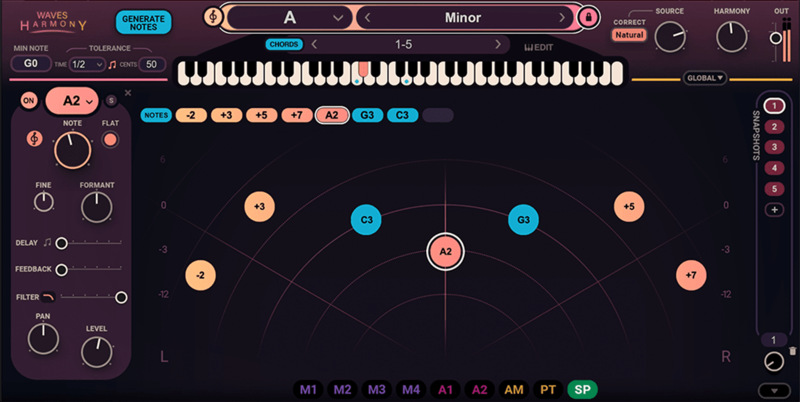
Introduce Harmony to Your Music—It’s That Simple
Create instant vocal harmonies—up to 8 voices generated from a single voice—and quickly craft your dream vocal production. Waves Harmony gives you three choices of workflow, so whether you’re a producer, songwriter, mix engineer or composer, it’s easily adaptable to your creative process.
Easily personalize the character and texture of each voice with built-in pitch, formant, panning, delay, filtering and drag-and-drop modulation, to back up your vocal leads with creative color. In seconds, audition Jacob Collier, Ty Dolla $ign and Imogen Heap-style sounds in your song. Better yet—perform them live in real-time.
Features
- Real-time vocal harmonies, immediately in your tracks
- Instant generation of up to 8 voices from a single vocal
- Automatic mode: Generate instant harmonies with chord presets
- MIDI mode: Play harmonies live on your keyboard as you sing
- Graphic mode: Draw harmonies graphically and tweak each voice
- Adjust pitch, formant, panning, delay, filtering, modulation
- 450+ creative artist and factory presets to get you started
- Perfect for the studio and performing on stage
- Easy-to-use interface: No music theory knowledge needed
- Powerful vocal FX toolkit for harmonization, layering, mod FX
System Requirements
Mac
- macOS Monterey 12, Ventura 13, Sonoma 14, Sequoia 15
- VST / AU / AAX
PC
- Windows 10+
- VST / AAX












Reviews Summary
While it aims to provide a helpful overview, it may not capture every perspective or detail. We encourage you to read individual reviews to make an informed decision.
Overall, customers praise the plugin for its impressive quality and creative versatility in processing vocals and instruments, especially for generating harmonies and background layers. While one reviewer noted an unintuitive interface and uneven presets, users generally consider it a powerful and valuable tool, particularly when purchased on sale.


