/ EQ / Abbey Road RS56 Passive EQ
Waves

Abbey Road RS56 Passive EQ

4.0 (1 Reviews)
$29.99 $149.00

79% off until Dec 07

Waves Abbey Road RS56 Passive EQ
Waves Abbey Road RS56 Passive EQ gallery thumbnail
Buy Now
Product information

Abbey Road RS56 Passive EQ
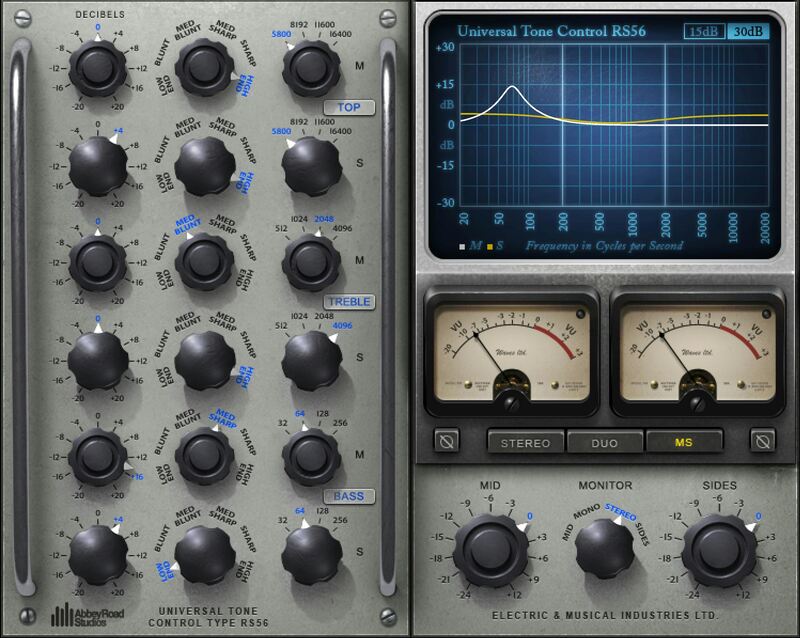
The Abbey Road EQ that Guides You to Musical Decisions

Even the most modern productions revere the classic sounds of the 50s and 60s—like those from the RS56, the very first parametric EQ. A silky smooth, powerful and musical stereo EQ, RS56 is perfect for loops, drums and synths, or the entire mix bus.

Created in the early 50s for mastering, the RS56 was used extensively in the vinyl cutting rooms. But before long, Abbey Road’s recording engineers realized it was superior to the basic tone controls found in that era’s consoles—and it quickly became a go-to option, famously heard on the Beatles’ recordings.

Features

  • Developed in close collaboration with Abbey Road Studios
  • Precise modeling of the rare gear used on classic recordings
  • 3 bands, 4 frequencies per band, 6 filter types per band
  • Stereo, dual mono, or mid-side processing
  • Models the velvety, transparent sound of passive equalization
  • EQ graph provides visual frequency response confirmation
  • 37 presets showcase the RS56’s classic qualities
  • Includes helpful, modern enhancements to the original

System Requirements

Mac

  • macOS Monterey 12, Ventura 13, Sonoma 14, Sequoia 15
  • VST / AU / AAX

PC

  • Windows 10+
  • VST / AAX
Installation Instructions

1. Head to https://www.waves.com/create-account

2. Enter your email and choose a password to create an account (if you already have a Waves account, choose Log in, enter your details and head to Step 5) > click 'Submit'

3. Open your email inbox > click the activation link in the email from Waves

4. Click 'Log in here' > Log in to your Waves account

5. Click 'Register New Products'

6. Enter the Serial Number found in your Plugin Boutique user account > click 'Submit'

7. Click download in your Plugin Boutique user account or head to https://www.waves.com/downloads/central > download the Waves Central app for your operating system

8. Install Waves Central > Open Waves Central

9. Click 'Log in' > enter your log in details

10. Click the 'Install Products' tab

11. Tick the blue dot on all products you wish to install or click the top dot to install all products > click 'Install & Activate'

12. Click 'OK'

13. Open your DAW > open the Waves plugin

Your Waves plugins are installed and ready to use, enjoy!

Plugin Boutique Rewards

Discover the most rewarding loyalty programme among all plugin retailers.

  • Free Loopmasters Samplepacks
  • Discounts on products and courses
  • Extra Virtual Cash claimed immediately at checkout
Find out more

Follow us:

X (Twitter) Facebook YouTube Instagram
Logo Logo

Plugin Boutique Limited, Part of the Beatport Group LLC.

Copyright © 2011-2025 Plugin Boutique. All rights reserved










