Log In
![AudioThing RES-09 - RS-09 Emulation - Presets Overview [no talking] gallery thumbnail](https://www.pluginboutique.com/rails/active_storage/blobs/redirect/eyJfcmFpbHMiOnsibWVzc2FnZSI6IkJBaHBBeUp0Q0E9PSIsImV4cCI6bnVsbCwicHVyIjoiYmxvYl9pZCJ9fQ==--b8de441436ac84f45cb8011e05906931b7ebc8a5/res09%20plugin%20boutique.jpg)
Free gifts available with your purchase
Analog Organ & Strings Machine
1970s Organ & Strings Synth
The RES-09 is a faithful emulation of a classic analog organ and strings machine from the late 1970s, the Roland RS-09. Though not as widely known as some classic vintage synths, it remains a sought-after gem for its lush ensemble effect, rich divide-down organ tones, and warm analog strings. Our recreation captures the original character while offering modern enhancements, making it an essential tool for vintage-inspired sound design.
You can fine-tune each oscillator separately and shape your sound even further with four effects that you can mix and match to your liking.
Roland RS-09
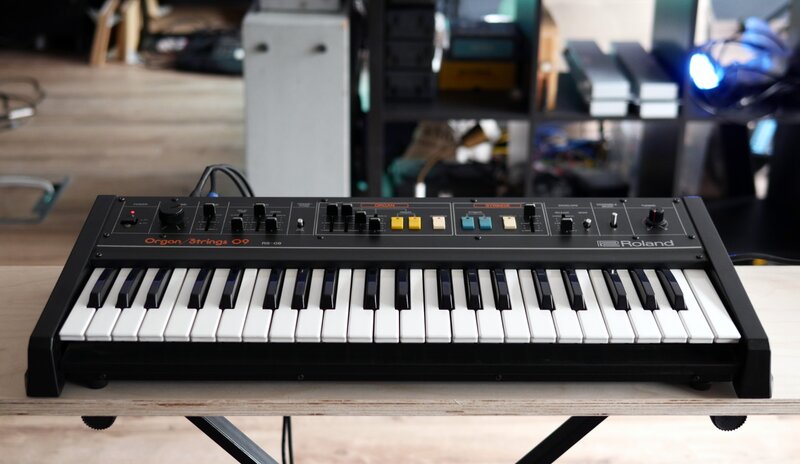
The Roland RS-09 was an analog organ and strings synthesizer, closely related to the Saturn-09, which was limited to organ sounds. Released in the late 1970s, it uses a classic Top Octave Generator with 12 oscillators for the highest octave, while octave divider circuits generate the lower notes, enabling full polyphony across both sections. The Mark I model was launched at the end of 1978 and was refreshed as a Mark II model in May 1980.
The string and organ sounds can be used separately or together, with the ensemble effect adding movement and stereo depth, similar to the classic JUNO 6/60 chorus, but with a distinctive sound.
It also included an external audio input, a rare feature for synths of its type. While limited in scope, the RS-09 delivered warm, classic analog textures, making it a practical and characterful instrument for its time.
Top Octave Generator
The RS-09 utilizes a Top Octave Synthesizer circuit for both organ and strings, featuring 12 oscillators for the upper octave notes, with ‘octave divider’ circuits generating lower octaves. This technology ensures that the same notes on different octaves are in sync and won’t generate the classic phasing issues of sample-based instruments. The organ section can mix 4 square waves, while the strings sections uses a saw-like waveform generated by layering multiple squares at different octaves and volumes. The bias controls the mix between these layers.
BBD Ensemble Chorus
As with other classic synthesizers of that era, the RS-09 features a rich and warm BBD-based ensemble chorus effect. While it can be a bit noisy, the ensemble effect is essential for adding a stereo width and dynamic modulation to the otherwise static synth sounds. We have also provided a rate multiplier to adjust the speed of the internal modulator LFOs. The RS-09 early model used SAD512 BBD chips, while the later models used MN3004 chips, both have the same amount of stages (512) but the early models had higher background noise.
Effects

RES-09 includes a set of four high-quality effects, inspired by classic gear and designed to complement the synth’s character.
The effects section features:
- Tape Echo, based on AudioThing's Space Echo emulation Outer Space
- Spring Reverb, adding classic vintage reverb
- Overdrive, for rich harmonic distortion inspired by classic guitar pedals
- Phaser, delivering deep, swirling modulation inspired by vintage analog phase shifters
You can rearrange the effects in any order using drag and drop.
Features
- Organ and Strings Generators
- Ensemble Effect
- Vibrato with Delay
- 4 Effects (echo, spring reverb, overdrive, phaser)
- Oscillator Tunings
- Resizable Window
- Brightness and Contrast Controls
- Preset system with randomizer
System Requirements
Windows
- Windows 7 – 11
- 2GHz CPU, 4 GB RAM
- VST2, VST3, AAX, CLAP, Standalone (64-bit)
Mac
- macOS 10.13 – macOS 15
- 2GHz CPU, 4 GB RAM
- VST2, VST3, AU, AAX, CLAP, Standalone (64-bit)
- Universal 2 Binary
Linux
- Ubuntu 20.04 LTS
- 2GHz CPU, 4 GB RAM
- VST2, VST3, CLAP, Standalone (64-bit)