Log In
Free gifts available with your purchase
The Sound Of A Habitat In Constant Tension
Professional Swamp Sound Effects
SWAMPS captures the acoustic complexity of wetlands where land and water constantly overlap. Recorded across two expeditions to Florida over three years, the library documents frog sounds, alligator behaviour, shifting insect beds, reed movement and natural squelch sound textures using SCHOEPS microphones. Field recordist Matt Mikkelsen dedicated extended periods to capturing natural wildlife behaviour rather than staged activity, providing material that behaves reliably in post. The collection offers audio professionals a technically consistent set of swamp sound effects suited to detailed and immersive work.
Recording the threshold between land and water
Swamps shift continuously throughout the day, with acoustic signatures that rise and fall across different sub ecosystems. Before placing any microphones, Matt spent time learning how each area behaves, from cypress groves to open wetlands. Frog sounds, alligator movement and dense insect layers were captured using calibrated ORTF 3D arrays to maintain spatial accuracy. Clean, unprocessed recordings ensure predictable behaviour in both realistic atmosphere building and creative sound design.
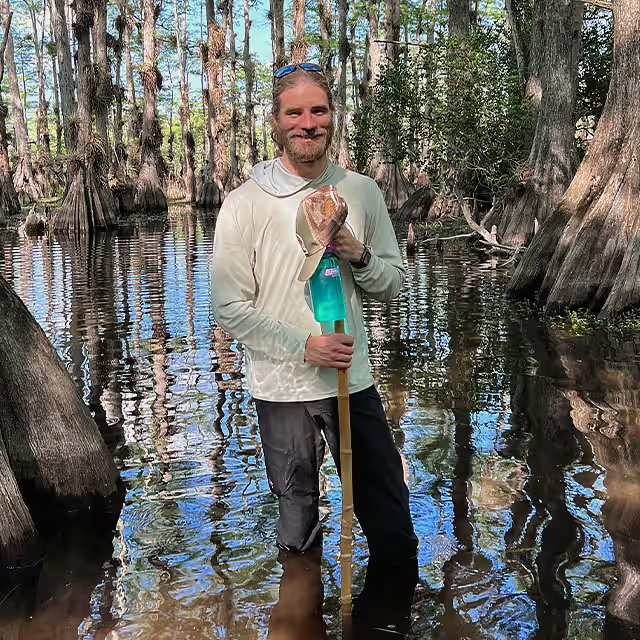
“In a swamp, even silence seems to move“ - Matt Mikkelsen
Accurate 3D Field Recordings for Professional Workflows
SWAMPS was recorded using BOOM’s ORTF 3D configuration, ensuring stable localisation and phase integrity in immersive formats. Long stretches of natural behaviour were documented, from shifting insect beds to alligator bellows at a range of distances. The combination of SCHOEPS microphones and Sound Devices recorders maintains clarity despite extreme humidity and heat. Editors can work with confidence knowing the material behaves consistently in complex multi-channel sessions.
Wildlife in natural behaviour
These recordings document wildlife exactly as it behaves in the wild. Frogs appear at several distances, wading birds such as egrets and ibises are captured feeding, and alligator calls include close and distant territorial bellows. Matt notes that many alligator recordings used in media come from controlled environments, whereas these captures reflect natural behaviour in the field. The result is material with authentic dynamics and a strong environmental anchor.
Recorded through heat, humidity and real-world challenges
Swamps present extreme humidity, oppressive heat and relentless insect pressure, alongside the presence of larger animals. Equipment failures were a regular challenge, including humidity-related shutdowns and fogged optics. Multiple days of continuous recording produced more than 150 hours of raw material. Only the strongest and most stable takes were selected for the final library.
Natural acoustics, no synthetic reinforcement
The recordings are free from heavy processing or noise reduction. Their natural tonal identity has been preserved, offering a clean baseline for EQ, dynamics and spatial work. Because no artefacts have been baked in, the material holds up well when stretched, layered or repitched.
From detailed textures to full environmental beds
SWAMPS includes close-up mud movement and squelch sound textures, as well as wide ambiences covering dawn, night and passing storm conditions. Long-form recordings across varied environments allow layers to combine naturally without looping fatigue or repeated patterns. Each file works as a self-contained environmental bed.
True ORTF 3D spatial accuracy
Consistent ORTF 3D placement ensures stable localisation across the entire library. Matching array spacing and gain structure throughout the sessions allows recordings to intercut cleanly in longer scenes.
Optimised for Atmos and VR
Natural elevation and width cues from vegetation, insects and water movement translate well into Atmos and VR workflows. The recordings sit cleanly in immersive beds without requiring corrective object manipulation.
Consistent environmental movement
Insect beds shift naturally, water textures remain coherent when rotated and alligator movement maintains clear positional identity across surround, Atmos and binaural formats.
What was recorded
Recording took place across cypress groves, open wetlands, soft mud zones and areas with dense wildlife presence. The material includes frog sounds at multiple distances, wild alligator behaviour such as movement, feeding and territorial bellows, extended insect beds, reed movement, canopy wind and natural squelch sound textures. More than 150 hours of raw recordings were gathered and refined into a curated final selection.
What’s so special about this library?
High quality swamp recordings are rare due to the challenging conditions involved. SWAMPS captures wild animal behaviour, evolving sub ecosystems and the constant tension between land and water. With consistent ORTF 3D arrays, SCHOEPS microphones and disciplined field craft, the library offers a best in class approach to sound effects recording that delivers consistent results in professional workflows. For audio teams needing dependable, high quality swamp sound effects, this is a comprehensive and reliable resource.
Rich Metadata Embedded
To provide you with the fastest and easiest workflow possible, all files contain extensive metadata like file description & keywords to quickly find the sounds you’re looking for. Metadata can be read and processed by audio management tools. Some digital audio workstations feature an included search tool that can also read embedded metadata.
Enter A New Era of Surround Sound FX Libraries
Suitable for any surround application, even and especially immersive audio like Auro 3D, Dolby Atmos, 360° Videos and VR
SWAMPS is the next product of Boom's famous new sound effect series 3D SURROUND. It continues a new era of surround sound FX libraries with unprecedented precision, spatial impression and clarity. 3D Surround delivers better results where conventional surround techniques reach their limits. This occurs especially, although not exclusively, in VR, where events must sound 100% convincing depending on the rotation and tilt of the user’s head. With Boom's new 3D SURROUND series, you are ideally equipped for not only VR, but any other application that requires high-definition and crystal-clear surround sound.
What is so special about 3D Surround?
3D Surround has two enormous advantages over conventional surround sound. On the one hand, individual sound sources can be located much better and more clearly with 3D Surround. On the other hand, 3D Surround also reflects height differences much better. This results in a more extensive and much clearer sound image in a quality that cannot be achieved with conventional surround sound.
Recorded with the most advanced technology
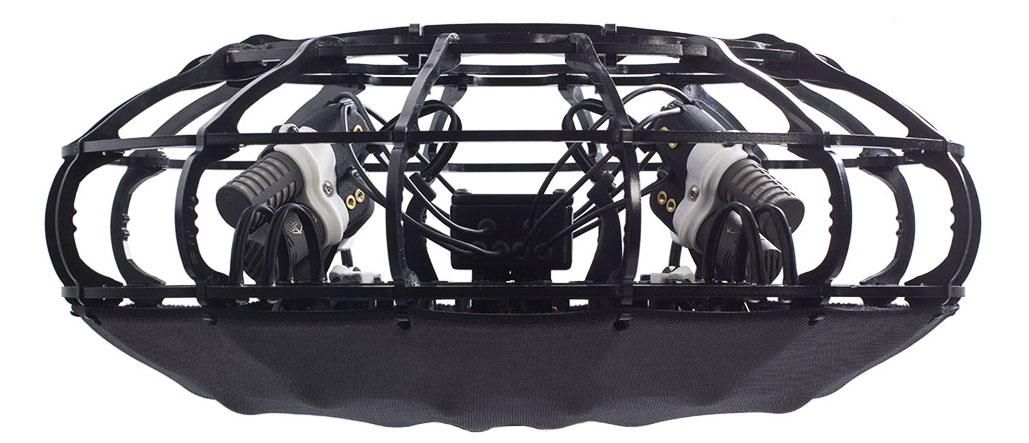
Boom's 3D Surround libraries are recorded with the highly-acclaimed Schoeps ORTF-3D setup, a cuboid 8ch level/time difference ambience setup. The main benefit is an additional height layer compared to regular surround recording setups. It consists of 8 supercardioid microphones.
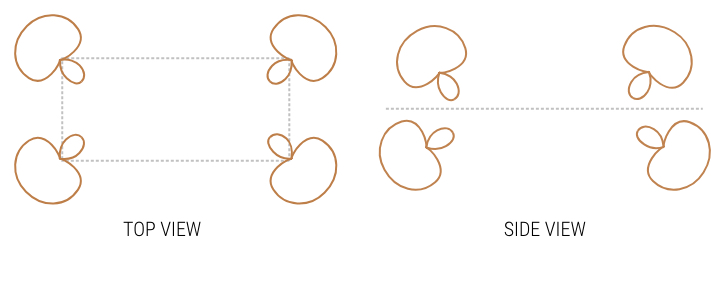
The height layer offers a much wider range of spatial sound effects and a more realistic three-dimensional reproduction. Therefore, it provides a clearer representation of spatial depth, a more natural surround impression, improved envelopment, and an authentic feel.
This library is also available in Stereo.
- BOOM Library sound FX come as WAV files. This means you can import and work with them in any software that can handle this file type.
- 40 GB of free disk space required.