


 Log In

Free gifts available with your purchase

If music is the spice of life, then a good mixdown is its salt and pepper - mostly undetectable to the consumer, but absolutely crucial to every producer/engineer in bringing out a track's potential flavour.
The Mixing Bundle gets you access to FabFilter's tried-and-tested effect plugins, established by millions of users as a must-have for every mixing engineer: the best EQ, compressor, de-esser, gate/expander, distortion/saturation and delay plugins, from one of the world's favourite plugin manufacturers.
Pro-R 2
Give your music some space
Pro-R 2 brings a raft of new next-gen features to what was already a widely respected reverb plug-in, including comprehensive multichannel compatibility, two brand-new reverb algorithms, IR import and replication, ducking and gating functions, analog-style saturation, and much more. It is a huge technological and functional leap forward for the plug-in, and one made without any compromise to the slick workflow and stellar sound quality that Pro-R users already know and love.
Features
- Versatile, user-friendly, and sonically superlative professional reverb with three core algorithms for simulating realistic physical spaces, retro digital hardware, and electromechanical plates
- Unified room model and decay time (Space) knob, facilitating smooth transitions between reverb sizes and styles, from tiny boxes to vast arenas and everything in between
- Innovative Decay Rate EQ for incredibly precise shaping of tail frequencies over time, and six-band Post EQ for output equalization
- NEW! Full immersive audio support up to 9.1.6 Dolby Atmos, with per-band Decay Rate and Post EQ channel routing, and a dedicated panel for balancing individual reverb parameter levels between the front and back of the image
- NEW! ‘Vintage’ reverb algorithm, replicating the sound and character of early digital reverbs
- NEW! ‘Plate’ reverb algorithm, replicating the sound and character of vintage plate reverbs
- NEW! IR import function (WAV and AIFF): algorithmically recreate and manipulate the sounds of favorite impulse responses within Pro-R 2
- NEW! Ducking control for effortless separation of dry and wet signals
- NEW! Thickness control for dialing in program-dependent density and saturation
- NEW! Intelligent Auto Gate
- NEW! Freeze button for endless playback of the captured reverb buffer at the point of activation
- NEW! Full-featured preset browser, with tags, favorites, search and filter functions, and new factory preset library
- NEW! Optional piano scale in the interactive reverb display for ‘musical’ EQ frequency referencing and snapping
- NEW! Output level meters
- IMPROVED! Increased Decay Rate range (25-400%)
- IMPROVED! Mid/Side option added to Post EQ
- IMPROVED! Speakers settings added to Decay Rate and Post EQ for channel selection in immersive channel layouts
- IMPROVED! Predelay knob moved to top section
Learn more about FabFilter Pro-R 2
Pro-Q 4
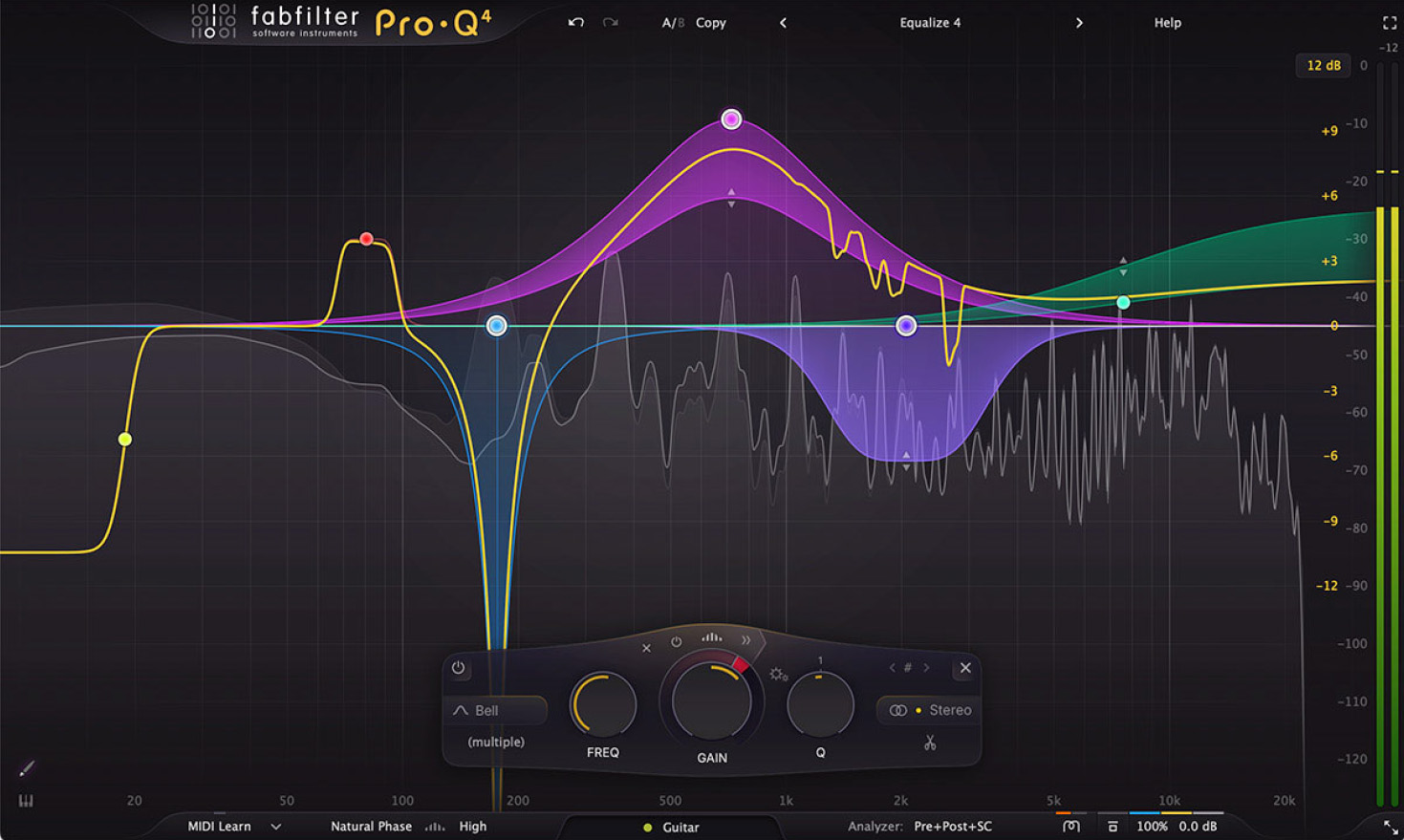
24-band industry standard EQ.
Since its original release in 2009, FabFilter Pro-Q has become the trusted workhorse EQ plug-in for many engineers and producers around the world, widely praised for its workflow, sound quality and feature set. With version 4, FabFilter are bringing exciting new features to Pro-Q, introducing spectral dynamics, the instance list, EQ Sketch, vintage saturation and much more.
FabFilter Pro-Q 4 gives you the highest possible sound quality, a complete feature set, and a gorgeous, intelligent interface that is designed to help you get 'that' sound quickly and easily.
Mixing and mastering features
Pro-Q 4 offers everything that a demanding engineer could wish for: top-quality linear phase operation in addition to the zero latency and unique Natural Phase modes, smooth dynamic EQ, per-band mid/side processing, full surround support (up to Dolby Atmos 9.1.6), an intelligent solo feature, optional Auto Gain and a built-in, fully customizable spectrum analyzer.
Effortlessly sculpt your sound
Unique features like Spectrum Grab, Full Screen mode and EQ Match will speed up your workflow even more. Try it yourself!
FabFilter Pro-Q 4 is designed to help you achieve your sound in the quickest way possible. Via the large interactive EQ display, you can create bands where you need them, enable dynamic EQ for any band, and select and edit multiple bands at once.
FabFilter goodies
All the goodness of the Pro-Q 3 is still here: highest possible sound quality, dynamic EQ, Natural and Linear Phase processing, universal slope support for all EQ shapes, EQ match, a gorgeous, resizeable interface with full screen mode for easy and precise editing, up to 24 EQ bands, intelligent band solo mode, stereo or mid/side processing, intelligent multi-band selection and editing for maximum ease of use and efficiency, spectrum grab, GPU-powered graphics acceleration, double-click text entry of parameter values, different display ranges: 3 dB and 6 dB ranges for mastering, 12 dB and 30 dB for mixing, Pro Tools hardware control surfaces support, MIDI Learn, undo/redo and A/B comparison, and an extensive help file with interactive help hints.
New in version 4
- Usability improvements and EQ Sketch. Wondered if you could ever just draw the curves you'd like? Now you can!
- The new Instance list lets you control all instances in your session via a single plug-in interface.
- Use Spectral dynamics to treat problem frequencies more precisely and efficiently.
- Setup your mixes with one of the Character modes to add that analog, vintage feel.
- The Dynamic EQ section has been improved, with Attack and Release settings, but also optional free side-chain filtering.
- You can now choose to use fractional slope settings if you need to, e.g. a 3.5 dB/oct LP or HP filter.
- Improved dynamic EQ processing for less distortion and cleaner sound.
- Improved precision in linear phase processing.
- New All Pass filter shape.
- You can now copy and paste EQ bands or presets, also between instances or via the new instance list.
- Improved analog matching in zero latency and natural phase mode.
- Change parameters directly via the value display in the EQ controller by dragging or with the mouse wheel.
- Overall new and fresh design.
Learn more about Pro-Q 4
Pro-C 3
Professional compression for everyone
FabFilter Pro-C 3 is a high-end compressor plug-in for the most demanding engineers. Compression is one of the most essential tools in modern production — and Pro-C 3 is not just a great-sounding compressor, it’s a superb stereo and surround compressor with all the tricks up its sleeve that you will ever need. Whether you need transparent mastering control, punchy mixbus glue, classic opto warmth, modern upward dynamics or aggressive pumping, Pro-C 3 delivers results with unmistakable style.
Features
- 14 compressor styles across Modern, Classic and Utility categories, including six new algorithms in version 3: Versatile, Smooth, Upward, TTM, Op-El and Vari-Mu
- Character modes with analog saturation, coloring and drift, including Tube, Diode and Bright options, with adjustable Drive and Pre/Post routing
- Auto Threshold mode for input level-independent compression behavior (ideal for inconsistent sources like dialog)
- Host tempo pulse triggering (Host Sync) with customizable Sync, Offset (50–200%) and Pulse Length control
- Upward compression and combined upward/downward multiband dynamics processing (TTM)
- Highly advanced side-chain EQ with freely configurable multi-band filtering, Pro-Q shapes including all-pass, plus slopes up to 96 dB/oct and brickwall HP/LP options
- Full immersive surround/Dolby Atmos® support up to 9.1.6, with customizable linking behavior across stereo pairs and all-channel linking
- Surround linking controls including Center (C) linking and adjustable all-channel groups (Sides, Tops and LFE)
- Oversampling up to 32x to reduce aliasing during aggressive/fast compression and heavy Character Drive usage
- New preset browser with folders, easy search, tags, metadata and favorites
- Copy/paste plug-in settings across instances directly from the preset browser
- Preset management enhancements including Save As Default and MIDI Program Change preset loading
- Pro-Q 4 Instance List integration (from Pro-Q 4.10), controlling Pro-C 3 alongside Pro-G and Pro-DS in one ecosystem
- Animated level display showing incoming/processed audio and gain reduction, with optional knee display for visualizing Threshold/Ratio/Knee/Range behavior
- Accurate peak and loudness level metering (Momentary EBU R128 / ITU-R 1770 compliant)
- Lookahead up to 20 ms with global Maximum Lookahead control for managing overall latency
- Hold control for transparency or pumping behavior
- Range control to limit maximum gain reduction
- Variable knee up to 72 dB soft knee
- External side chain triggering, MIDI triggering and auditionable triggering monitoring
- Intelligent Auto Gain (including mid-only/side-only awareness)
- Auto Release with program-dependent behavior
- MIDI Learn
- Undo/redo and A/B comparison
- Smart Parameter Interpolation
- Sample-accurate automation of all parameters
- Available in VST, VST3, CLAP, Audio Units, AAX Native and AudioSuite formats
Learn more about Fabfilter Pro-C 3
Pro-DS
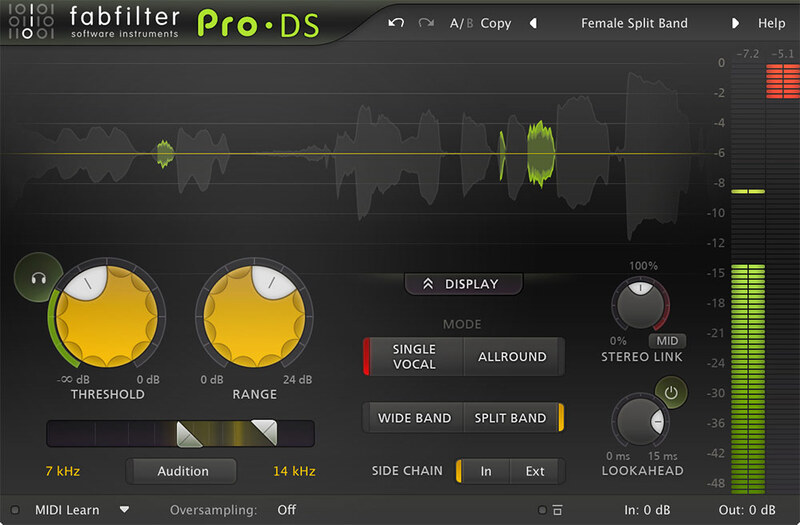
Intelligent and transparent
Even when using the best mics, pre-amps and converters, sibilance in vocal recordings can easily get over-accentuated during post-processing like compression or saturation. But don't worry, FabFilter Pro-DS comes to the rescue!
With its highly intelligent 'Single Vocal' detection algorithm, FabFilter Pro-DS accurately identifies sibilance in vocal recordings and attenuates it transparently.
When using the 'Allround' mode, Pro-DS becomes a great tool for high-frequency limiting of any material, like drums or even full mixes.
Features
- Highly intelligent 'Single Vocal' detection, and classic 'Allround' detection
- Real-time de-essing display, clearly showing the affected parts of processed audio
- Adjustable Threshold, Range and detection HP and LP filtering settings
- Transparent program-dependent compression/limiting
- Wide Band or linear-phase Split Band processing
- Optional look-ahead time up to 15 ms
- Freely adjustable stereo linking
- Optional mid-only or side-only processing
- Up to four times linear-phase oversampling
- Side-chain input meter, making it easy to choose a good Threshold value
- Real-time spectrum analyzer built into the HP/LP filter controller
- GPU-powered graphics acceleration
- High-quality 64-bit internal processing
- Double-click text entry of parameter values
- Large and compact interface sizes
- Stereo and mono plug-ins available
- Supports common Pro Tools hardware control surfaces
- MIDI Learn
- Undo/redo and A/B comparison
- Smart Parameter Interpolation
- Sample-accurate automation of all parameters
- Extensive help file with interactive help hints
Learn more about FabFilter Pro-DS
Pro-G
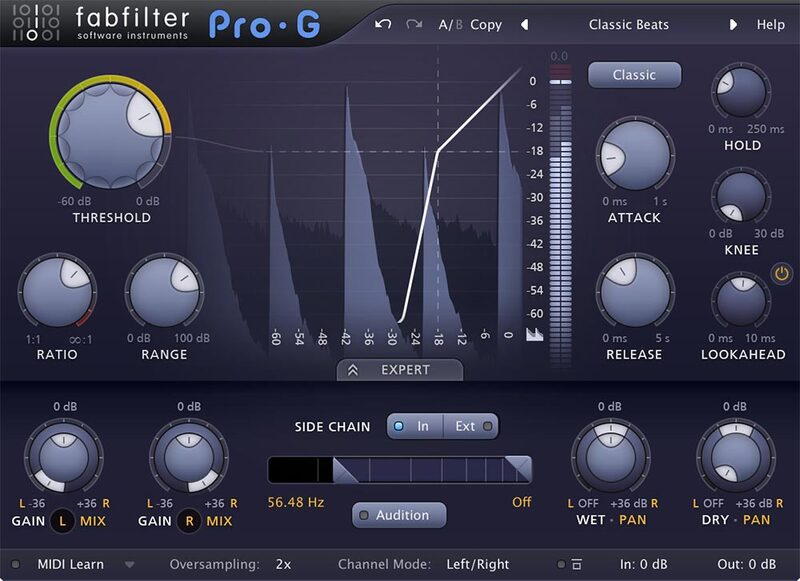
Expand in style
A good gate/expander is an indispensable tool in any mixing or live situation. FabFilter Pro-G offers everything you could wish for: perfectly tuned algorithms, complete control over the side chain and channel linking, excellent metering and great interface design.
Apart from excellent sound, FabFilter Pro-G also provides very flexible routing. You can choose between mono, stereo or mid/side processing and in expert mode, external side chain input is available with completely customizable channel linking and routing.
FabFilter Pro-G combines smart input/output level meters with a real-time level display and transfer curve. Everything was specifically designed to give clear feedback on the current gate/expander settings and processing, letting you set them up easily.
Features
- Six meticulously tuned expander/gate algorithms, including upward expansion and ducking
- Program dependent attack and release curves
- Low CPU usage
- Adjustable range, hold time and knee settings
- Optional look-ahead time up to 10 ms
- Precise and helpful metering, including a real-time level display
- Expert mode that offers highly customizable side chain options
- Mono, stereo or mid/side processing
- Up to four times linear-phase oversampling
- Zero-latency operation mode
- MIDI triggering: open the gate/expander with your MIDI keyboard
- External side chain option
- Separate dry/wet level settings
- Easy to set up for common gating / expansion scenarios with the included factory presets
- GPU-powered graphics acceleration
- Double-click text entry of parameter values
- Stereo and mono plug-ins available
- Supports common Pro Tools hardware control surfaces
- MIDI Learn
- Undo/redo and A/B comparison
- Smart Parameter Interpolation
- Extensive help file with interactive help hints
Learn more about FabFilter Pro-G
Saturn 2
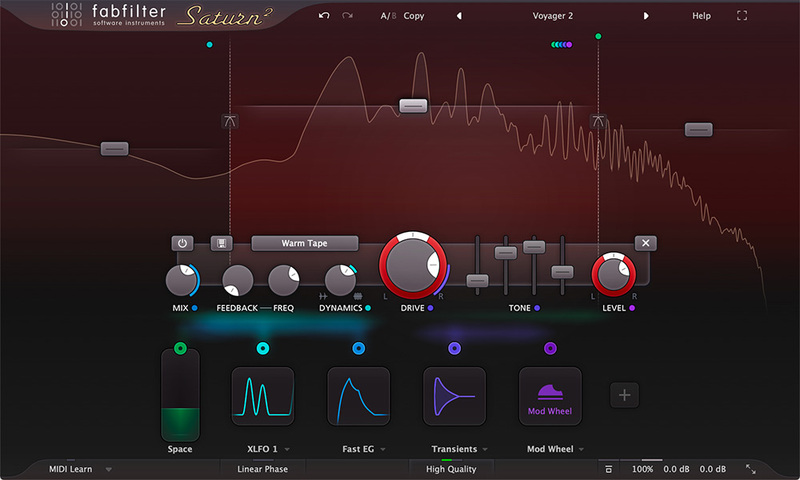
Take your music to the outer limits...
Distortion and saturation play a very important role in music production. From subtle, clean and warm tube or tape saturation to the wildest multiband guitar amp effects: FabFilter Saturn 2 delivers.
Saturn 2 introduces a host of new features such as a redesigned interface with modulation visualization, new subtle saturation and linear phase processing for mastering, many new distortion styles, and more.
FabFilter Saturn 2 offers a range of different high quality distortion models, inspired by the vintage sound of tubes, tape, transformers and guitar amps. In addition, you get five creative FX distortion styles to mangle your sounds in weird and unexpected ways.
With its multiband design and per-band feedback, dynamics, drive, tone and modulation options, Saturn 2 will bring a unique flavor to your music.
Features
- 28 different distortion styles, from subtle tube saturation to heavy guitar amps and bit crushing
- Multiband processing (up to 6 bands), with optional linear phase processing
- Adjustable slope for the crossovers, offering 6, 12, 24 and 48 dB/oct options
- Per-band drive, mix, feedback, dynamics, tone and level controls
- Live modulation visualization for targets and sources
- Optional HQ modes: Good (8x oversampling) and Superb (32x oversampling)
- Fully redesigned, easy-to-use interface, including a new design of modulation sources and floating slot panel
- Interactive multiband display
- Endless modulation options, with all the 16-step XLFOs, XY controllers/sliders, envelope generators, envelope followers, and MIDI sources you will ever need
- Curve control in EGs and transient detection in EFs
- Easy drag-and-drop modulation with 50-slot modulation matrix
- Supports common Pro Tools hardware control surfaces
- Mid/side processing
- Various interface sizes and Full Screen mode
- GPU-powered graphics acceleration
- Unique per-component presets
- Interactive MIDI Learn
- Carefully designed and curated Factory Presets, plus support of V1 presets
- Per-band solo and mute options
- Smart Parameter Interpolation
- Extensive help file with interactive help hints
- Undo, redo and A/B switch features
Learn more about FabFilter Saturn 2
Timeless 3
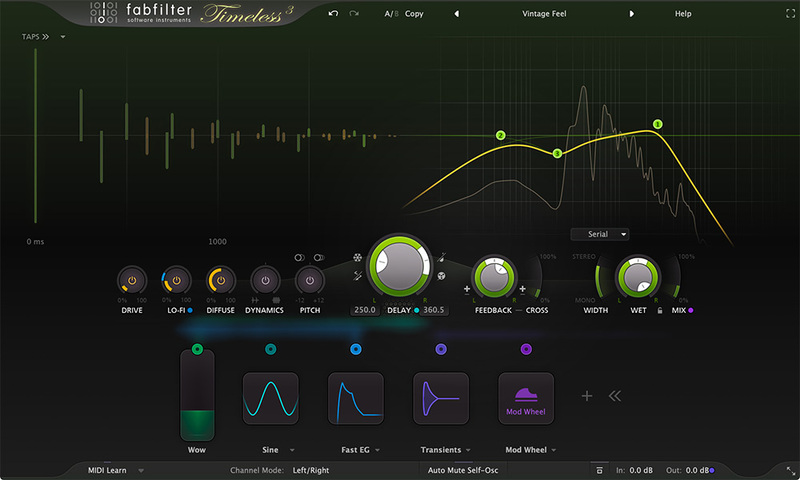
From everyday echos to lush modulation
FabFilter Timeless 3 is a versatile, vintage-sounding tape delay, which will fully satisfy your everyday delay needs. And with its unique effects, filters, tap patterns and unlimited modulation options, you can just as easily turn it into the ultimate sound-mangling machine!
The stereo delay signal is routed through five unique effects and up to six analog-sounding filters and then routed back to the input with adjustable feedback. Easily program your own delays using the well-laid-out controls and interactive delay and filter displays.
Easily setup ducking, wow and flutter, dynamic diffusion or more creative effects, using Timeless's unique and versatile modulation system. Creating new modulation connections could not be easier: just drag and drop.
Features
- Fully redesigned, highly simplified interface, with an easy workflow and new modulation engine
- Optional Drive, Lo-Fi, Diffuse, Dynamics and Pitch effects to creatively color the feedbacked delay sound
- Analog tape delay or smooth time-stretching behavior when changing the delay time
- Up to 6 filters, which can be either the original, vintage LP/HP/BP filters or Bell/Shelving/Notch EQ filters
- Create rhythmic patterns using up to 16 delay taps, which can be controlled and modulated individually
- Improved the sound quality of overall feedback, the filters, and internal saturation
- Feedback and cross-feedback, and modulatable freeze option
- Mid/side processing
- Ping-pong modes
- Live modulation visualization for targets and sources
- Carefully designed and curated factory presets, plus support for earlier Timeless presets
- Interactive delay and filter displays
- GPU-powered graphics acceleration
- Various interface sizes and Full Screen mode
- Curve control in EGs and transient detection in EFs
- Easy drag-and-drop modulation with 50-slot modulation matrix
- Supports common Pro Tools hardware control surfaces
- Interactive MIDI Learn
- Extensive help file with interactive help hints
- Unique per-component presets for modulation sources and tap patterns
- Endless modulation options, with all the 16-step XLFOs, XY controllers, envelope generators, envelope followers and MIDI sources you will ever need
- Smart Parameter Interpolation
- Undo, redo and A/B switch features
Learn more about Fabfilter Timeless 3
Awards


Jeff Ellis
Grammy Award-winning engineer.
"FabFilter Pro-DS is my new favorite vocal de-esser. [...] The intelligent detection and transparency of the plug-in is second to none and again the interface is beautiful and efficient."

Dave Pensado
Grammy Award-winning mix engineer
"I believe FabFilter Pro-R is truly ground breaking! You guys have revolutionized audio plugins. I can't wait to see what's next!"

Tony Maserati
Grammy Award-winning engineer, producer.
"The way the Pro-C shows you the compression is ingenious. All of the FabFilter plug-ins seem to be designed to be simple to use and easy to get results while sounding incredible."
Cut, boost, spit ‘n’ shine… Fab Filter’s mixing bundle offer’s it all… Three products are on test here the Pro-L, the Pro-C and the Pro-Q (Limiter, Compressor and EQ respectively – do you see what they’ve done there!). Pro-L The Pro-L is Fabfilters professional br...
Read MoreHas it really been three years since FabFilter unleashed Timeless, its ingenious dual delay? In 2006, there were already numerous delays available, both commercial and freeware, yet FabFilter proved to us that there was certainly room for more. Pros: Endlessly inspiring. It's got the F...
Read MoreWindows:
- 64-bit: Windows 10, 8, 7 or Vista
- 32-bit: Windows 10, 8, 7, Vista or XP
- VST 2/3 host or Pro Tools
macOS:
- macOS 10.10 or higher (64-bit only)
- AU or VST 2/3 host or Pro Tools
- Intel or Apple Silicon processor
Plugin Formats:
All FabFilter plug-ins are available in VST, VST3, Audio Units, AAX Native and AudioSuite formats.


