/ Maschine Expansions / Planet 808
Niche Audio

Planet 808

4.5 (20 Reviews)
$29.00
Planet 808 - Main Image
Planet 808
Buy Now
Product information

Concept

There are a number of 808 sample packs around; from basic packs, to extensively sampled 808’s consisting of thousands of samples, covering every possible nuance of the 808’s drum sounds. However, none of them have been extensively processed in the context of full-production kit design, using the latest top flight processors. Thousands of static 808 samples are all very well, but these days, you will probably need to heavily process an 808 if you want modern, punchy drums for your production. Planet 808 gives you this in the form of inspiring, authentic, and vibe-driven 808 kits for any genre of electronic music. We created this pack for musicians and producers who understand the sum of the parts created from the same source means identity and vibe for your track!

The Samples

Straight from the Niche Audio factory, comes this superbly sampled, edited, and processed 808 expansion pack. This pack has been deeply processed for Maschine 2 and Ableton Live, with additional sample patches available for other soft samplers. We took our original in-house Roland TR808, and sampled each of its drum sounds multiple times in various states of tuning and decay. We then set about constructing unique 808 kits whilst processing each and every sample in context, using numerous state of the art processors to give each kit its own unique flavour. The result is a pack full of high-quality, punchy, and modern 808 style kits, suitable for any kind of genre including; Deep House, Techno, Club, Bass House, Minimal, Tech House, Tribal, RNB and Hip Hop. Of course we haven’t forgotten, some producers just want a guaranteed high-quality sampled 808 drum machine, so we have included three untreated pure 808 sampled kits as standard.

The Kits

Inside you will find thirteen kits, as well as two special kits; consisting of an assortment of percussion and low end subs ideal for complimenting the standard kits.

If you like bass heavy action this pack makes good use of of re-tuned 808 toms, congas, and kicks to create sub bombs, basses and tribal melodies. The tuned percussion gives you the ability to create pseudo melodies and add a deep tribal, percussive element to your drums. If you switch any of those sounds to keyboard mode you will find the creative doors opening wide. Try using some of the pitched congas and toms for chords and melodies, or a low tom for a sub bass line. The results can be incredibly interesting and inspiring.

Each kit has four starter patterns to help you get working. The patterns have intentionally been created with a less is best policy making it more comfortable to evaluate a kit along with your track. We have four untreated 808 kits for the purists and the rest have been embellished with various degrees of processing. Dubbed or Silky could be ideal kits for a House/Deep House production. Edge takes us on a pumping, almost techno vibe with its driving sub bass. Daz, one of the most heavily processed kits could be ideal for an Electro House, or Techy style track, or how about Break - as the name suggests it could be used in a Breaks, Dub Step or 80’s style Electro track. These are just guides, essentially any of the kits can be used in any genre.

Tags (Maschine only)

Of course we make it easy for you to enjoy Planet 808 and get the full use of it for years to come. It’s fully tagged making it a breeze to find and replace sounds from the same pack or construct your own unique kits in minutes. of course the samples can be used in any of your productions so we made it easy for you to find them.

Planet 808

is much more than a drum sample pack. This is a modern, punchy sound set using very high quality processed and non processed 808 sounds expertly sculpted in to highly inspiring Maschine and Ableton Live kits. Ultimately this pack screams character and authenticity. Its a collection of producer ready 808 kits and sounds which which will become a go to valuable asset in the library of any producer fro years to come.

Tip

Try using some of the percussion and bass tones in keyboard mode. This allows you to create interesting melodic and even chord phrases from 808 tones. Maschine users can do this by simply switching Maschine to keyboard mode. Ableton users can right click the Drum Rack channel - extract chain - and then select the new drum rack panel and click ungroup to convert to a simpler instance with the required sound included.

Features

Ableton Live 9+:

  • 256 24/44.1 samples
  • 13 Projects
  • 15 Drum Racks
  • 56 Starter Patterns

Maschine 2.2.3+:

  • 256 24/44.1 samples
  • 13 kits
  • 2 special kits
  • 56 Starter Patterns

System Requirements

  • The full version of Maschine 2.2.3+ and Ableton Live 9+ are required to run the full contents of this software.

Important note: The full version of Maschine 2.2.3+ and Ableton Live 9+ are required to run the full contents of this software!

Testimonials

Naibu

"Great collection of 808 sounds in varied shapes and tones."

Chase Buch

"Another great maschine pack from Niche, I love the samples on this one, really good quality classic 808 sounds."

CAPSUN

"Not just another 808 pack. A well put together, high-quality pack that's a real weapon for any producer."
Installation Instructions

Notes:

  • House Arrest is used as the example.
  • Pop-up windows must be allowed within your web browser's Settings area to allow the opening of the hyperlinks provided beow, which enable you to watch the tutorial videos.

Maschine has a slightly different install process depending on the version you have. Please follow the guidelines below and see the additional notes if you are experiencing difficulties. 

Maschine 2.0 Video Installation Guide

1. Download the purchased Niche Audio software .zip folder provided within your User Account, to your computer.

2. Double-click the .zip folder to open and reveal its contents > save it to a computer location of choice, e.g documents or your external hard drive.

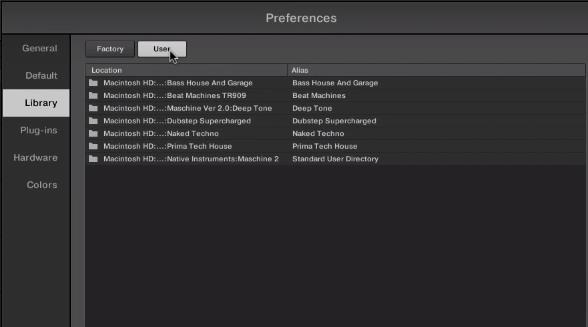
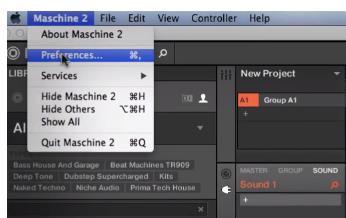
3. Launch Maschine and select the ‘Preferences’ tab via the drop-down selection, which is located via the ‘Maschine 2’ option at the top left toolbar.

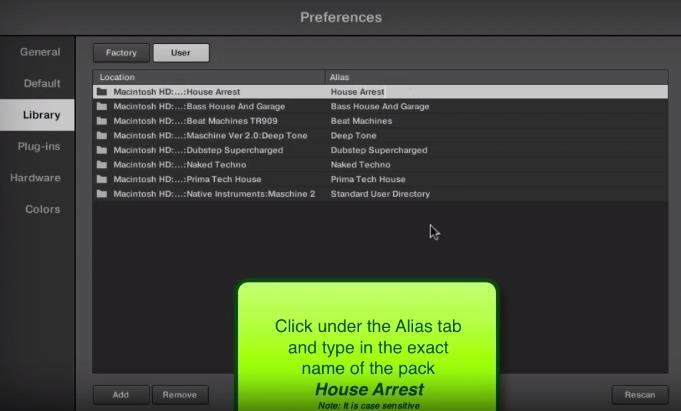
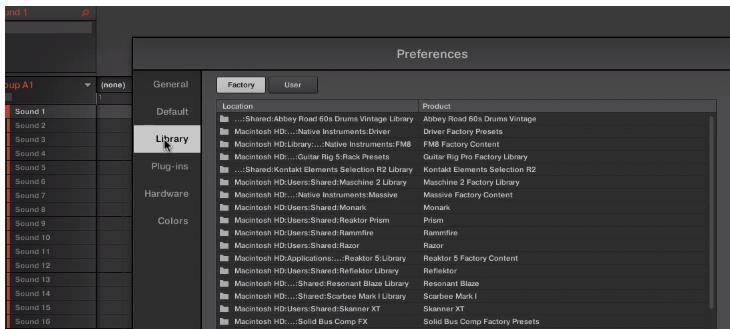
4. Select ‘Library’.

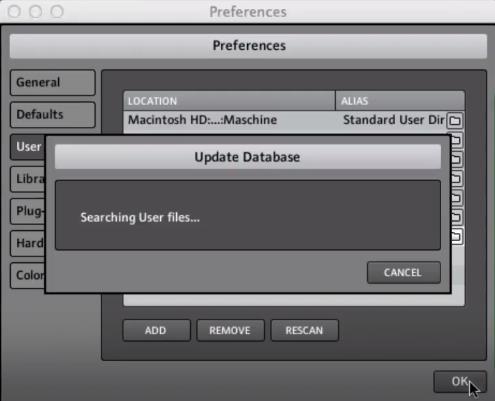
5. Click the ‘User’ tab.

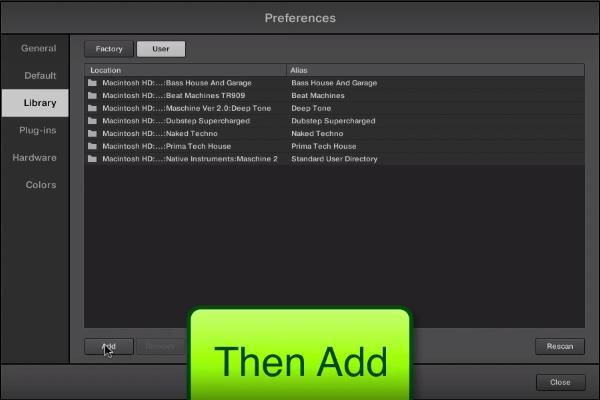
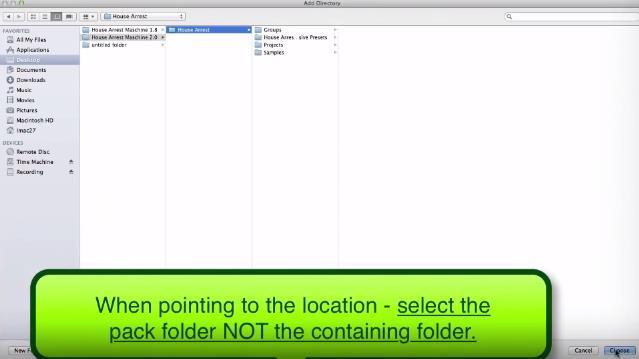
6. Click ‘Add’ to open the file browser, and then locate the pack’s main folder which contains sub-folders entitled ‘Groups’, ‘Massive Patches’, ‘Projects’, and ‘Samples’.

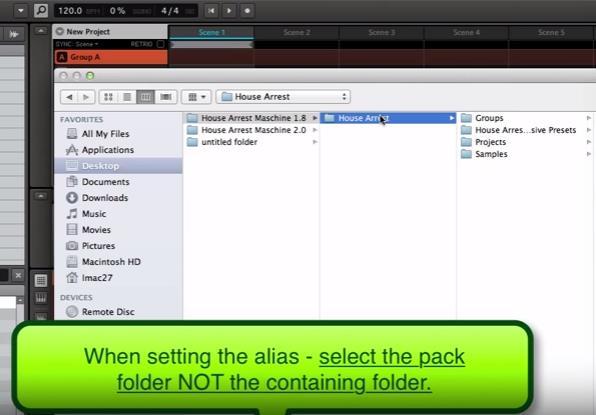
7. Be sure to select the main pack folder, which in this instance is ‘House Arrest’ > once performed, click the ‘Choose/Open’ option that is located at the bottom right-hand corner of the Mac - Finder/Windows - Library window.

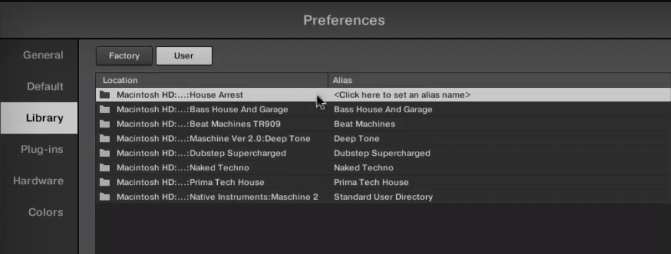
8. After the folder has been located, you will then need to enter and add an alias name for the pack e.g ‘House Arrest’ > double-click underneath the ‘Alias’ tab (where it reads ‘Click here to set an alias name’) and type the exact name of the pack, including numbers, capitals and symbols.

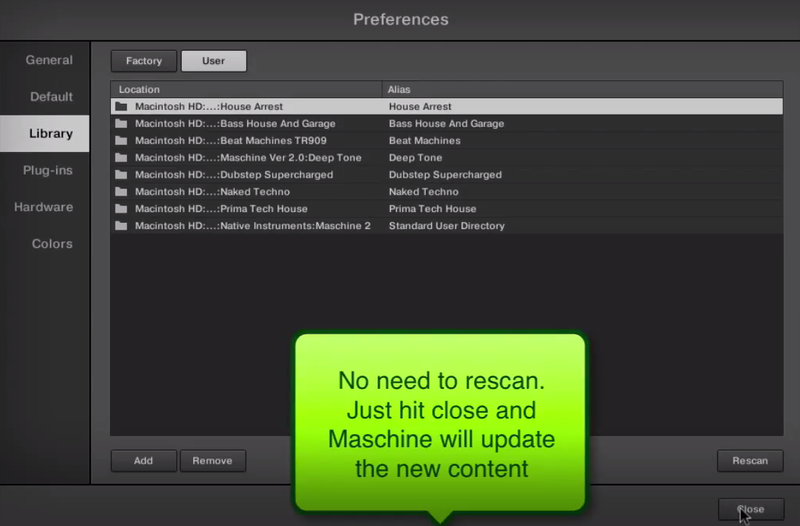
9. Once this has been performed, select ‘Close’ and the Niche Audio pack content will automatically upload to Maschine.

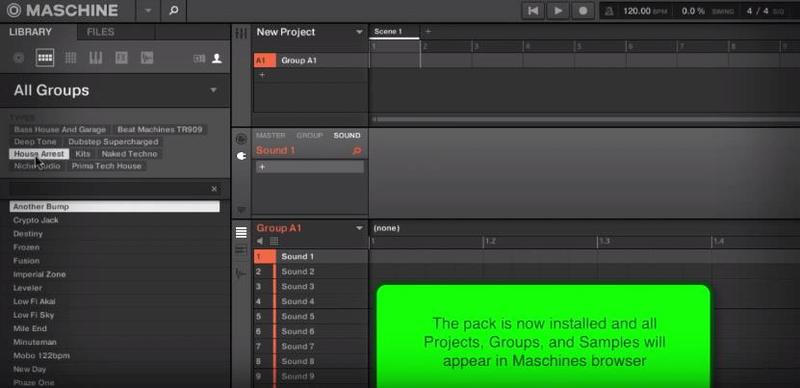
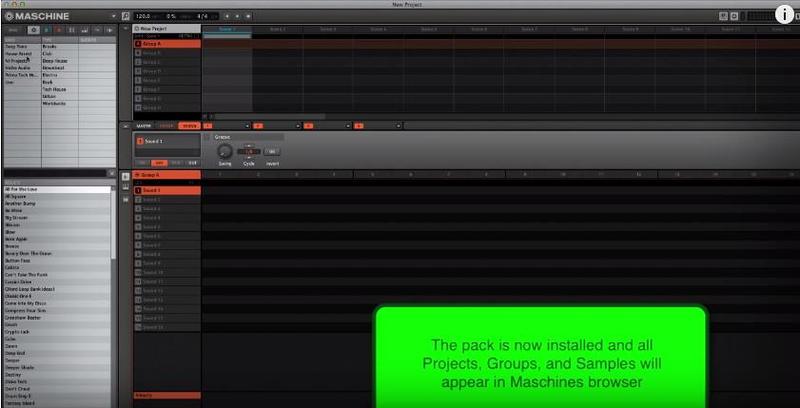
10. Select ‘Close’ once again to exit the preferences window, and you will then see the pack’s content within your user library!

The Pack is now Installed and Ready for Use Within Maschine!

Maschine 1.8 Video Installation Guide

(Note: Skip to 2.02 mins)

1. Download the purchased Niche Audio software .zip folder provided within your User Account, to your computer.

2. Double-click the .zip folder to open and reveal its contents > save it to a computer location of choice, e.g documents or your external hard drive.

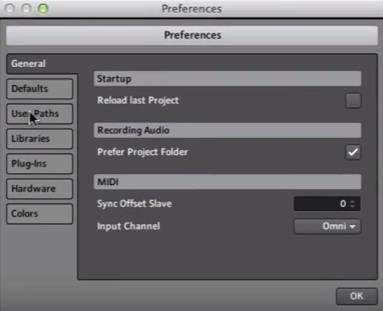
3. Launch Maschine and select the ‘Preferences’ tab via the drop-down selection, which is located via the ‘Maschine’ option at the top left toolbar.

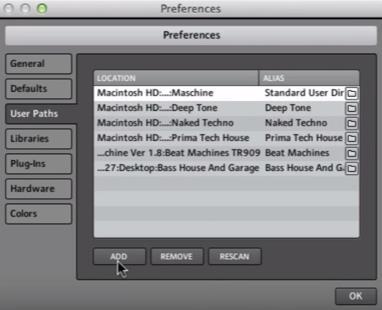
4. Click ‘User Paths’.

5. Click ‘Add’.

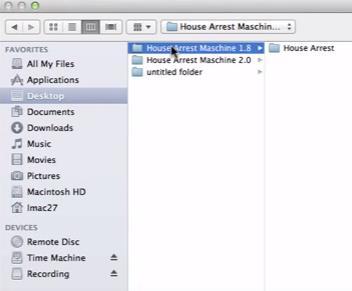
6. Locate the main Niche Audio 1.8 folder, which in this instance is entitled ‘House Arrest Maschine 1.8’.

7. Be sure to select the main pack folder, which in this instance is ‘House Arrest’ > once selected, click the ‘Choose/Open’ option that is located at the bottom right-hand corner of the Mac - Finder/Windows - Library window.

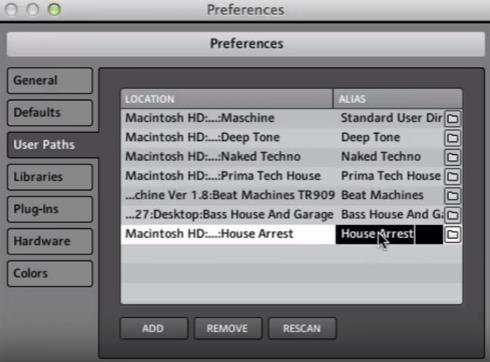
8. After the folder has been located, you will then need to enter and add an alias name for the pack e.g ‘House Arrest’ > double-click underneath the ‘Alias’ tab (where it reads ‘Click here to set an alias name’) and type the exact name of the pack, including numbers, capitals and symbols.

9. Once this has been performed, select ‘OK’ and the Niche Audio pack content will automatically upload to Maschine.

10. Select ‘OK’ once again to exit the preferences window, and you will then see the pack’s content within your user library!

The Pack is now Installed and Ready for Use Within Maschine!

Install Problem?

  • If you have previously installed a Maschine Pack and the groups or projects are not loading, please ensure that you have installed the correct pack for your version of Maschine
  • Also check that you have created an alias to the sample pack, so that Maschine can locate the projects: For example, the alias should be written as ‘House Arrest’

Note: The alias should not be written as ‘house arrest’

  • If you do not type the exact name of the pack, it will not install correctly
  • If you encounter any issues when attempting to install your purchased Niche Audio pack, it is advisable to uninstall the pack entirely from Maschine before re-installing it, to prevent any further cross-referencing problems

Uninstalling the Pack

1. Go to Maschine’s ‘Preferences’ tab, which is located at the top-left toolbar.

2. Select the ‘Library’ tab, followed by the ‘User’ option.

3. Remove any previous location path to the Niche Audio packs, and then close/quit Maschine.

4. Reopen Maschine and create a new project - this is necessary to clear the software history.

5. Quit Maschine, reopen it and follow the instructions from step 1 of the installation process.

Ableton Live Pack Installation Guide

(Note: Post Dubstep & Future Garage is used as the example).

1. Download the .zip folder provided within your User Account, and double-click it to extract its contents > save it to a computer location of choice, e.g documents or to your external hard drive.

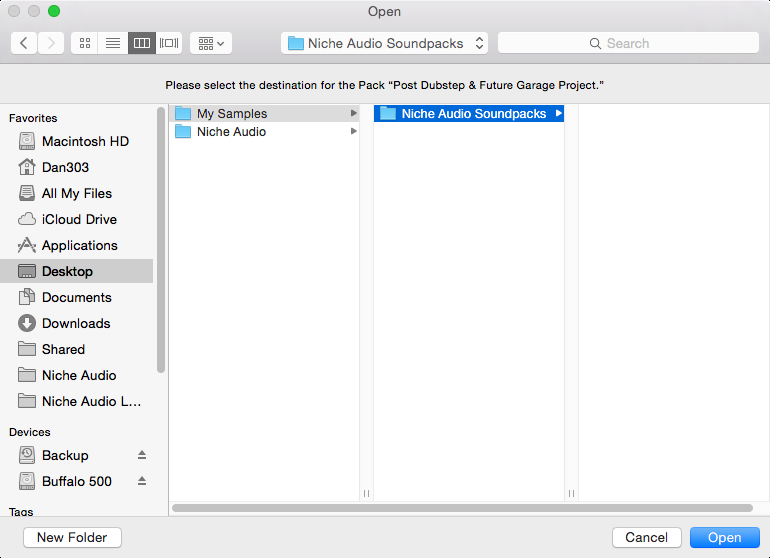
2. Locate the .alp file and double-click it > Live will automatically open and ask where you would like to install the project folder.

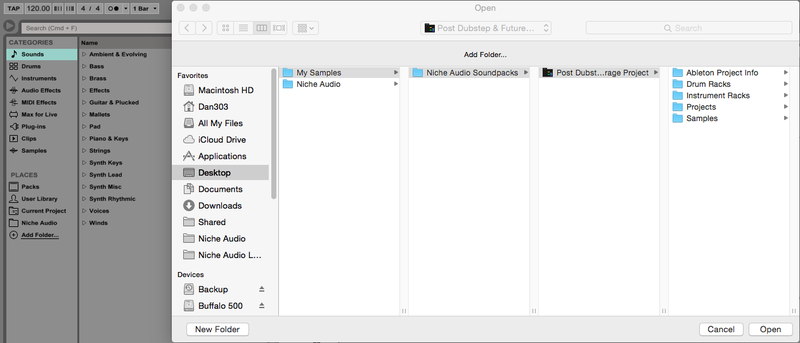
3. Locate the main extracted folder from the computer location that you saved it in (in step 1. of the installation process) > click 'Open' and Live will begin the unpacking process.

4. Once the unpacking process is finished you will need to tell Ableton Live where the pack is.

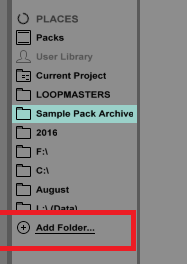
5. Within Ableton’s browser, select the ‘Add Folder’ option and then the project folder that you have installed. 

6. Click 'Open' and Ableton will add the pack to the browser for easy access.

7. The Ableton Live Pack is now ready for use within the DAW.

Plugin Boutique Rewards

Discover the most rewarding loyalty programme among all plugin retailers.

  • Free Loopmasters Samplepacks
  • Discounts on products and courses
  • Extra Virtual Cash claimed immediately at checkout
Find out more

Follow us:

X (Twitter) Facebook YouTube Instagram
Logo Logo

Plugin Boutique Limited, Part of the Beatport Group LLC.

Copyright © 2011-2025 Plugin Boutique. All rights reserved