Log In

Free gifts available with your purchase
Tube Warmth for Your Mix
Vintage Vibe, Drive and the Magic Tone of the 1567A Tube Mixer. A Beast on Bass and Drums.
Introducing Radiator, a dual drive tube input channel and EQ, based on the classic Altec 1567A tube mixer from the 1960s.
The original Altec 1567A hardware was a rack-mounted five-input tube mixer with removable transformers, a simple two-knob EQ, an unmistakable green faceplate, and a whopping 97 dB of gain. The sound, by today’s standards, is coloured and gritty, with a heaping helping of good old-fashioned hardware noise. In its day, it was used on many early Motown hits and found its way into the PA racks of countless churches and school auditoriums across the USA.
A Bit of History
The unmistakable green-faced Altec gear, and in particular the 1566A and 1567A, played a big part in shaping the early “sound” of Motown between 1961 to 1964. Songs by greats like The Four Tops, The Marvelettes and The Supremes went through a 1567A mixer to the massive three-track recorder. Ahhh, when life was simple.
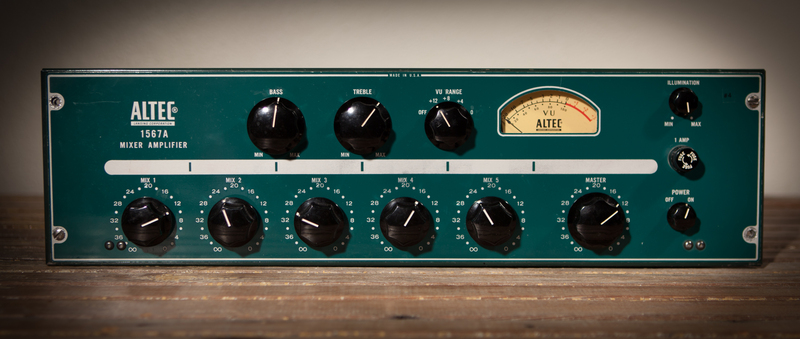
These mic preamps and mixers have a very coloured warm sound and are very loud. The EQ is as simple as it gets, with one knob for bass, and another for treble. After Motown, and after much gear came and went, analog diehards began seeking out the 1566A and 1567A as inexpensive sources for real tube sound.
Motown Records Chief Engineer, Russ Terrana, used the 1567A extensively and it became part of the distinctive Motown sound. Producer Matt Wallace was a very big fan. Butch Vig and Billy Bush are also fans.
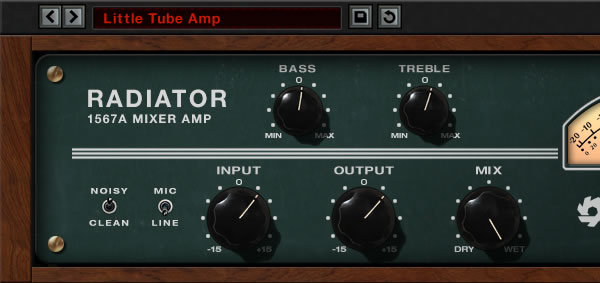
Radiator brings the classic Altec tube sound to desktop recording rigs, capturing the distinctive warmth and punch of the original hardware. Featuring the modelled bass and treble tone controls from the original unit, a mix control for easy parallel processing, and the saturation and harmonic effects of the original hardware’s input and output amplifiers.
All of these different circuit elements interact, allowing a wide range of tones to be created with just a few simple knobs. Plus Soundtoys lets you decide if the original noise is on or off.
Over the past few years, the Altec mixers have been picked up by recording studios as an inexpensive way to bring analog colour and character to computer-based digital recording. With producers like Matt Wallace of early Maroon 5 fame utilizing the 1567A on their early hits, and now bands like the Black Keys (who had a custom console made from Altec 1567A) the demand, and price, for these funky little colour boxes have soared.
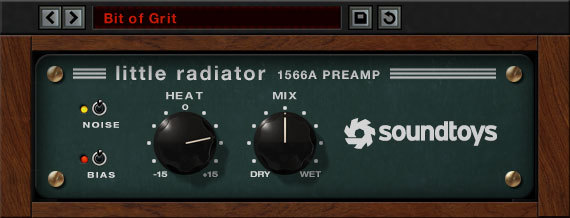
Computer recordists everywhere can now get the Altec tube sound – on every input channel, without the hassles of interfacing to esoteric analog gear, and at a much lower cost. Radiator also includes Little Radiator, a simpler single-stage tube pre-amp model based on the Altec 1566A hardware, the little brother of the Altec 1567A.
Features
- Analog-modelled tube mixer with EQ
- Independent input and output amplification stages each add their own character
- Bring the sound of a Motown-era classic to your DAW
- Load the transformers two different ways with the Mic/Line switch for different sounds
System Requirements
Mac
- macOS 10.12 Sierra and later (Intel / Apple Silicon supported) (64-bit only)
- VST2, VST3, AU, AAX Native, AAX AudioSuite
Windows
- Windows 7 and later (64-bit only)
- VST2, VST3, AAX Native, AAX AudioSuite
Supported Sample Rates:
- Minimum - 44.1 kHz
- Maximum - 192 kHz
Important Notes:
- A FREE account at ilok.com is required (a physical USB iLok is not required)
- This software is 64-bit only and is not compatible with 32-bit systems.
Officially Supported Host Applications:
All version 5 Soundtoys products come in 64-bit VST2, VST3, AU and AAX Native plugin formats.
Supported DAWs:
- Pro Tools: 12 or higher (Mac & PC: AAX Native and AudioSuite)
- Logic Pro X: 10.7 or higher (Mac: AudioUnits)
- Ableton Live: 10.0 or higher (Mac: AudioUnits, VST2 & VST3; Windows: VST2 & VST3)
- Studio One: 4.5 or higher (Mac: AudioUnits, VST2 & VST3; Windows: VST2 & VST3)
- Cubase: 9.5 or higher (Mac & PC: VST3)
- Nuendo: 8 or higher (Mac & PC: VST3)
- Reaper: 6 or higher (Mac: AudioUnits, VST2 & VST3; Windows: VST2 & VST3)
- Bitwig: 4 or higher (Mac & PC: VST2 & VST3)
Billy Bush
Producer/Engineer - Garbage, Foster The People, Muse
"Love this thing - instant vibe - I used it on drums and vocals on a mix that was very straight and polite and it added such great character to both. Really loved how it made both sound much more real and energetic."
Butch Walker
Producer/Song Writer - Weezer, Never Shout Never, Cee-Lo, Pink
"I used it on vocals, which is my favorite thing to use my real Altec box on, and it sounded f***ing great."