Log In

Free gifts available with your purchase
Unique audio metering and side chaining tool
Blue Cat's DP Meter Pro (DPMP) is a unique audio analysis tool. It combines very flexible and customizable audio meters with advanced side chaining control capabilities thanks to its MIDI and automation outputs.
The metering capabilities of the DPMP plug-in let you control and monitor audio signals exactly the way you want. Almost every aspect of the peak, RMS and crest factor meters can be customized. It proposes five different scales by default, including Bob Katz's popular K-System scales (K-12, K-14, K-20), and you can create your own.
Large coloured statistics displays following your own scales are included for an overview of a track, while histograms give you a precise measurement of the dynamic range of your track. The graphs show the evolution of the audio envelopes over time and the mid-side switch lets you verify mono compatibility problems and check the "stereoness" of your audio sources very easily. Whether you are working with mono, stereo or surround tracks, this plug-in will fit into your workflow.
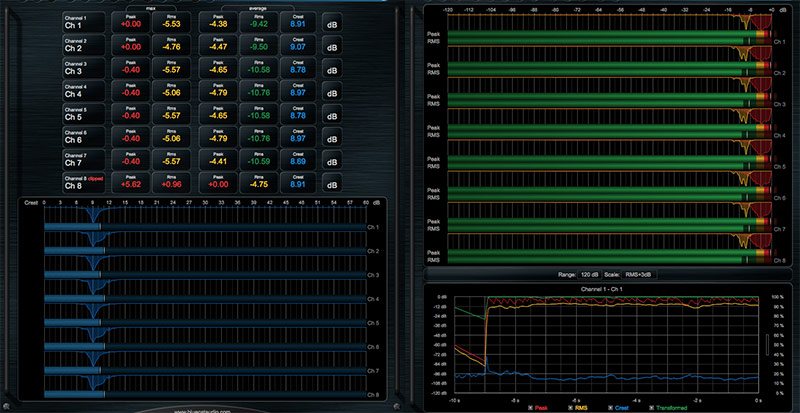
All envelopes (peak, RMS, crest factor...) can be reused for additional monitoring or side chaining purposes: combined together, reversed, modified and recorded as automation curves or sent as MIDI CC messages, they can control other effects in real-time.
The DP Meter Pro possibilities are endless, from voice over and ducking to side chain compression, multiple tracks monitoring or dynamic stereo enhancement. It is also possible to control external MIDI hardware (such as synths and MIDI effects), video effects or lighting systems with an audio signal.
Features
- Multichannel peak, RMS & crest factor meter
- True dynamic range measurement with levels histograms
- Instant, average and maximum audio levels
- Modular user interface to fit into your workflow, with multiple screen sizes
- Total control over the metering characteristics, including attack/release shape
- Bob Katz's K-System scales support (K-12 / K-14 / K-20 and custom)
- Mono, stereo, mid-side or surround analysis
- Record measurements (peak, RMS, crest factor, clip etc.) as automation curves
- Control in real time any MIDI-compatible plug-in or external MIDI device with the generated envelopes thanks to the plugin's MIDI CC output
- Manage the shape of the output envelope: record reversed envelope, change the amount of signal and offset the generated envelope. This lets you use the plug-in for side chain ducking, compression and much more
- Easy 'stereoness' and phase cancellation measurement
- Native DSP code for optimal performance
- Full MIDI control and automation support with silent, zipper-free parameters update, advanced response control and MIDI Learn
- No CPU load on idle: when the plug-in is fed with silence, the processing smoothly shuts down, to optimize the CPU usage of your Digital Audio Workstation
- Customizable user interface with transparency management and zoom
- Automation and MIDI output: record output parameters as automation curves or send MIDI CC messages to other plug-ins for powerful side chain effects
- Smooth Bypass: activate/deactivate the plug-in with absolutely no noise
- Undo/Redo
- Full-featured integrated presets manager
- Copy/paste the state of the plug-in between instances using the system clipboard
System Requirements
Mac OS
- Intel & M1 Compatible
- Mac OS 10.9 or newer (Catalina and Big Sur are both supported)
- VST / VST3 / Audio Unit / AAX compatible DAW (32-bit or 64-bit)
Windows
- Windows 7 / 8 / 10
- VST / VST3/ AAX compatible DAW (32 or 64 bit)
Future Music Magazine
The number one magazine for today's producers. Packed with technique and technology we'll help you make great new music.
"A world of creative possibilities awaits..."
I have downloaded and played around with VST plugins for years, and this, Peak Meter Pro, is probably the most exciting one I have tried for a long, long time. This VST plugin is the supreme sidechaining utility, bar none. Unlike others which are limited to the traditional sidechain comp...
Read MoreI’m back with a small review of the Energy Pack from Blue Cat audio. The plugins included in this bundle are Digital Peak Meter Pro, Dynamics, MB-5 Dynamix, MB-7 Mixer and Protector. Digital Peak Meter Pro The Digital Peak Meter Pro is an audio analysis tool that comes in mono and stereo format...
Read More