


 Log In

Free gifts available with your purchase

Take Shape
Transient shaping is the key to getting your audio upfront and punchy. Whether it’s adding extra power to your kicks, or taming the tails of your synth lines, a decent transient shaping plugin should be an essential part of your music making arsenal. At WA Production, they don’t just do decent… they only do extraordinary!
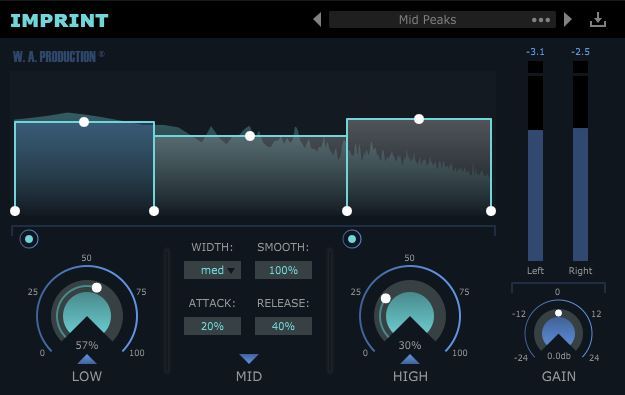
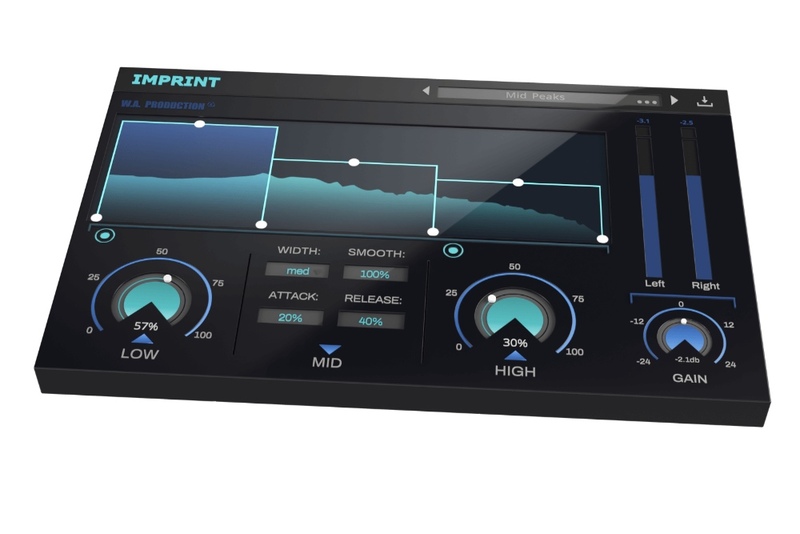
‘Imprint’ is an innovative multiband transient designer featuring real-time display, 3 frequency bands, adjustable crossover points and advanced parameters. Running in all major plugin formats for Mac and PC, Imprint will add upfront definition to any audio with a range of useful presets and intuitive user controls.
3 Band Transient Shaping
The flexible three-band workflow boosts transients that occur in different frequency ranges. The multiband graphic interface makes it easy to set the crossover points and gain of each band. The mix controls of each band boost the transient content in the selected frequency range (plus useful bypass controls).
Power
The Imprint logo acts as a bypass control for the whole plugin, and is smoothed to be click and pop free for unhindered A/B testing.
Advanced Controls : WIDTH / SMOOTH / ATTACK / RELEASE
Every band has an advanced panel that can be accessed through the triangular shaped control below the mix controls. The advanced parameters include peak width, smooth, attack and release controls so that you can tweak the behaviour of the transient boosting effect. The width control allows you to set the width of the peaks you want to target. The smooth control lets you smooth out those peaks for a more subtle effect. In addition, the attack control dampens the transients and the release allows you stretch the generated gain boost over time for a more extreme effect. Combined, these four features give you precise control over the generated gain boosts.
Presets
Over 20 factory presets are designed to get you up and running quickly, with tailored settings for many types of instruments, mastering chains and special FX. These are all easily accessible from the plugin menu and of course, you can save your own settings as user presets too.
The intuitive multi-band transient shaping controls give lifeless tracks punch, power and definition. Imprint is your quick and easy solution to surgical transient shaping where regular plugins just won’t do.
W. A. Production are real-life producers making creative plugins to help you achieve studio quality processing quickly and easily. Enjoy!
Features
- Multiband Transient Shaper
- 3 Frequency bands with adjustable crossover and gain
- Over 20 Creative Presets for bass, drums, vocals, mastering and FX
- Click free bypass control per-instance and per-band
- Advanced transient character controls: width / smooth / attack / release
- Output level and master gain control
- Real-time waveform display
- Full PDF Manual & Tutorial video
- Resizable user interface
System Requirements
- Windows 8 or later (32 / 64-bit only)
- macOS 10.13 and later (64-bit only)
Please Note: AAX format requires Pro Tools 11 or higher.
Important Note for Mac Apple Silicon users: Before purchasing, please review the current compatibility status of this plugin on your system here.
The Samplecast
The show for sample library geeks, plug-in fans and soundware enthusiasts.
"I’ll definitely be swapping out the Logic Enveloper for Imprint - the options are just so much more comprehensive."
Miza
Producer / DJ.
"Imprint is a very easy to use vst and it's so powerful. You definitely need to give it a try! I mainly use it to add energy and punch to my drum samples and loops."
Sulvida
Producer / DJ.
"My favourite part of Imprint might be the advanced controls available for each band, which allow you to fine-tune the transient settings and get the sound hitting exactly how you want it."
Reviews Summary
While it aims to provide a helpful overview, it may not capture every perspective or detail. We encourage you to read individual reviews to make an informed decision.
Users highly praise this easy-to-use multiband transient shaper, highlighting its intense shaping capabilities, user-friendly interface, and the unique sound qualities delivered by the 'Imprint' feature.


