


 Log In

Free gifts available with your purchase

The Toughest Element
This story-telling superweapon brings heavily distorted sounds to your production...
UJAM built CARBON because there was nothing like it – a virtual instrument creating versatile modern “sound-designed” guitar sounds in all kinds of music genres – from the super-quantized accents in electronic music to action-packed big riffs in game soundtracks to subtle vibes in movie scores.
What's in There?
- Organic, distorted & processed rhythm guitar sounds
- First ever Virtual Guitarist with Instrument Mode
- Unique Layerer soundstage combining up to four guitarists
- Finisher multi-effect rack with 75 cutting-edge effect algorithms
The Most Versatile Virtual Guitarist
CARBON is for sound designers and musicians who go beyond borders. It’s an otherworldly guitar for game soundtracks and film scores, but can also give electronic and pop music that extra kick. It’s a wild and heavily distorted sound, yet that rawness is somehow precise, controlled and sometimes even synth-like at the same time.

Sound Designers' Delight
No matter how much you push the edgy digital effects, the underlying sonic textures always remain organic and raw. The instrument always remains playable and musical. This lets CARBON play perfectly alongside synths, drum machines, orchestras and band musicians.
Decidedly Cinematic
It is the sound of hellfire inside an Icelandic volcano and also the sensitive instrumentation aboard a lonely space station orbiting the moons of Jupiter. It is heavy and in-your-face when pushed but also light-and-delicate when dialed down. Use it to inject an instant, controlled blast of raw power or to provide a slowly evolving momentum to build up and carry a scene.
Features
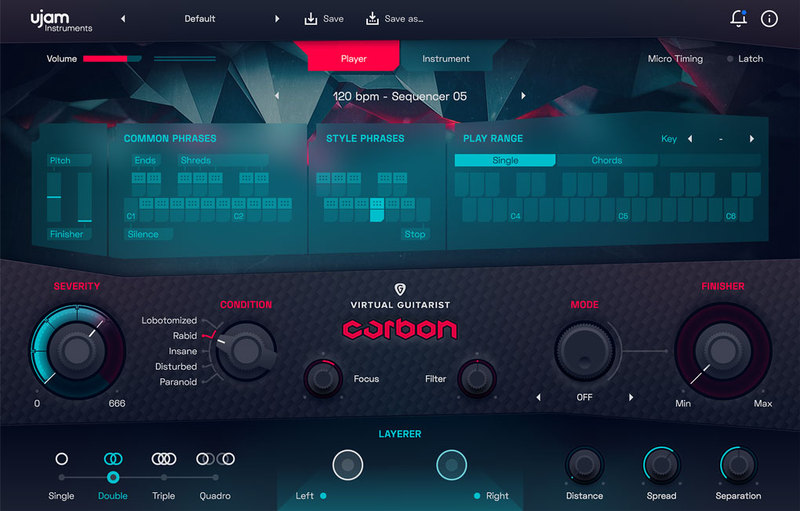
CARBON’s Ultra Amp and Future Distortion algorithms leave no call for insane overdrive unanswered. Its innovative Layerer feature, a virtual soundstage with up to four guitarists, lets you control bigness and width from a tame mono riff to the earth-shaking quadro Wall Of Doom.
- Organic, distorted and processed rhythm guitar sounds for electronic music, soundtrack, rock and other contemporary music genres
- Instrument Mode lets you play a wide range of articulations on an amazing 8-string guitar, Player Mode comes with inspiring riffs and phrases
- Unique Layerer soundstage combining up to four guitarists for ultimate fatness
- Finisher multi-effect rack combining 20 cutting-edge effect algorithms into 100 presets, live-controlled or automated by one single knob
Instrument Mode
CARBON’s Instrument Mode lets you play a wide range of articulations on an amazing 8-string guitar.

Player Mode
The Player Mode comes with inspiring riffs and phrases.

System Requirements
Operating Systems
- Windows 7 or later (64-bit only)
- macOS 10.14 - macOS 14 (64-bit only)
- You may run them on earlier versions but UJAM doesn’t support them.
For up-to-date info on UJAM products support for VST3, AAX, and Apple Silicon, please refer to the UJAM website.
Minimum Requirements
- 4 GB of RAM
- 4.5 GB of Disk Space
- 1280x768px Display
- Internet Connection required for download and authorisation.
Plugin Formats
- VST 2, AU 2
- AU 2 version is only compatible with Logic Pro X and newer.
Supported Standards
- MIDI, Native Instruments NKS
Additional Information
- Comes as downloadable installer files.
- Authorize by email address and password for ujam.com within the plugin.
- If you want to move your .blob files to an external drive, UJAM recommend the use of an SSD to prevent dropouts.
.jpg?t=1791920245)
Hans Zimmer
Grammy Award Winner, Golden Globe Winner & Academy Award Winner.
"CARBON is completely inspirational and all over our tracks! The devil’s candy."

John Massari
Film Composer | Killer Clowns from Outer Space.
"With CARBON, the ability to create great guitar sounds with amp placement & incredible signal processing becomes so intuitive and rewarding. I’m proud to have this in my DAW."

Masahiro Aoki
Ex-Capcom Composer | Street Fighter V.
"CARBON lets you make your ideal sounds quickly even without an ability to play guitar."
Reviews Summary
While it aims to provide a helpful overview, it may not capture every perspective or detail. We encourage you to read individual reviews to make an informed decision.
Users praise the plugin for its heavy, aggressive 8-string guitar tones, making it an excellent tool for metal, electronic music, and creative sound design. Reviewers highlight its intuitive player mode, drag-and-drop MIDI, and convincing sound quality when layered or blended with live instruments. While some note that it is stylistically focused on heavier genres and benefits from tweaking or automation, it is widely regarded as an inspiring, easy-to-use, and budget-friendly asset.


