Muze

Mello

4.7 (17 Reviews)
$19.00 $99.99

80% off until Dec 31

Muze Mello - Main Image
Muze Mello - Youtube Demo gallery thumbnail
Muze Mello Main GUI
Muze Mello Effects GUI
Muze Mello - Rack GUI
Buy Now
Product information

The classic Mellotron sound & brand new hybrid instruments

Muze Mello features a classic Mellotron M400 with a unique voice. It has thousands of premixed multi-channel samples recorded through analog gear for a pristine sound suitable for any production. It perfectly fits many musical styles including RnB, Hip Hop, Cinematic, and Pop. 

The Mellotron is an electro-mechanical musical instrument developed in Birmingham. The instrument is played by pressing its keys, each of which pushes a length of magnetic tape against a capstan, which pulls it across a playback head. Then as the key is released, the tape is retracted by a spring to its initial position. Different portions of the tape can be played to access different sounds.

The Mellotron has been used by musicians and bands such as King Crimson, Rick Wakeman, The Beatles, Rolling Stones, Oasis, Genesis, and many others.
Features

  • A flexible user interface that allows you to control all aspects of the sound.
  • 238 sounds: Brass, Guitar, Mallets, Organ, Strings, Pianos, Sax, Vocals, Pads & more.
  • Leslie speaker effect (rotator).
  • 238 classic & new hybrid presets: Accordion, Brass, Guitar, Mallets & Bells, Vibraphone, Marimba, Xylophone, Celesta, Glocken, Gamelan, Timpani, Organs, Pianos, Electric Pianos, Sax, Strings, Woodwinds & Vocals.
  • Distortion & tape saturator effects for more dirty sound.
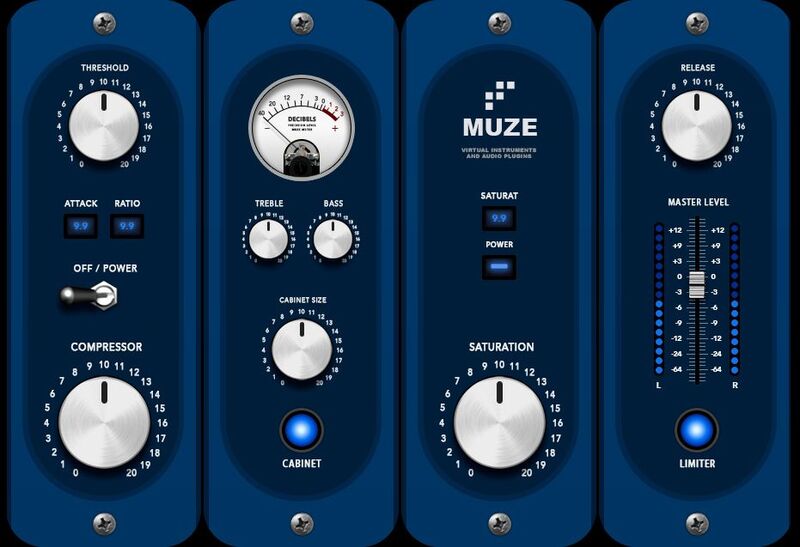
  • 30 Built-in effects: compressor, delays, reverb, limiter, cabinet, gainer, rotator, skreamer, distortion, 4-band EQ & more.
  • 4254 Samples (compressed).
  • 2.4 GB disk size.

System Requirements

Mac

  • Minimum – 8GB RAM / Mac OS X 10.7 or later / 7200 RPM or faster HDD.
  • Recommended – 16GB RAM or more / Mac OS X 10.7 or later / SSD (Solid State Drive).

PC

  • Minimum – 8GB RAM / Windows 7 or later / Sound card with ASIO drivers / 7200 RPM or faster HDD.
  • Recommended – 16GB RAM / Windows 7 or later / Sound card with ASIO drivers / SSD (Solid State Drive).

Please Note: This product requires the FULL version of Kontakt and is NOT compatible with the free Kontakt Player.

Installation Instructions

Please Note: Muze - Aquamarine is used as an example.
Important Note: This software requires the Full Version of Native Instruments Kontakt to be installed on your system.

Mac Installation

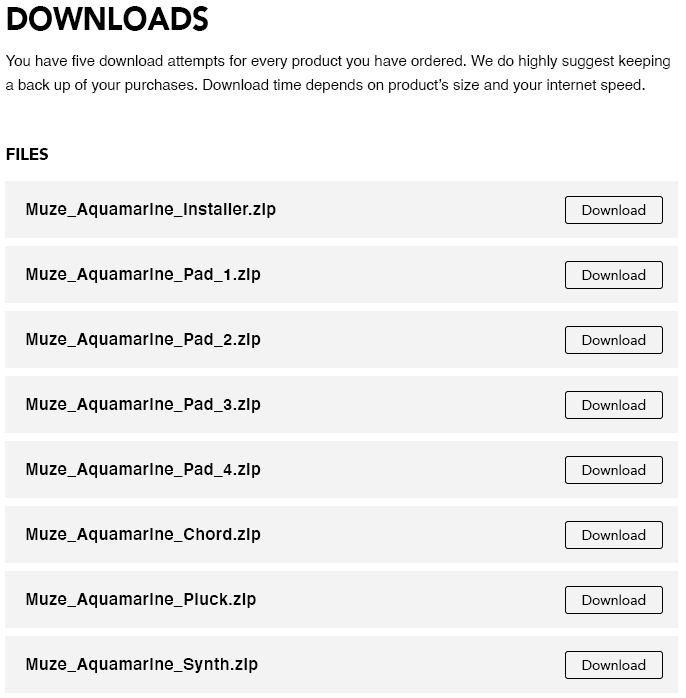
1. Click the blue 'Download' within your Plugin Boutique User Account > Click 'Download' on all of the folders from the Muze download page.

2. Once the downloads are complete, unzip all of the folders.

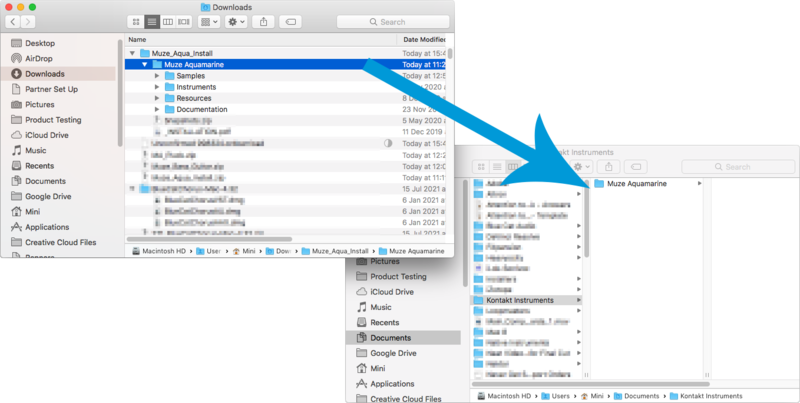
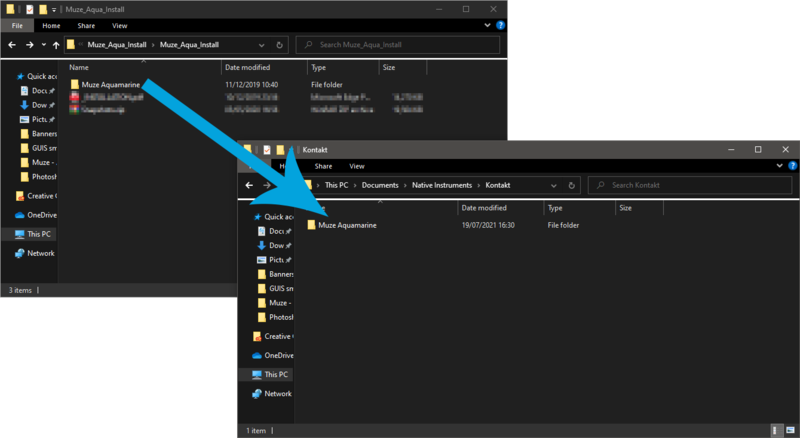
3. Move the 'Muze Aquamarine' folder (located within 'Muze_Aqua_Install') to where you store your Kontakt Instrument files.

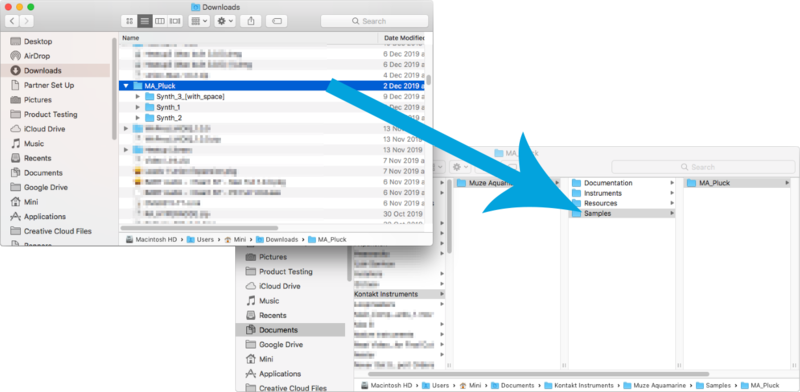
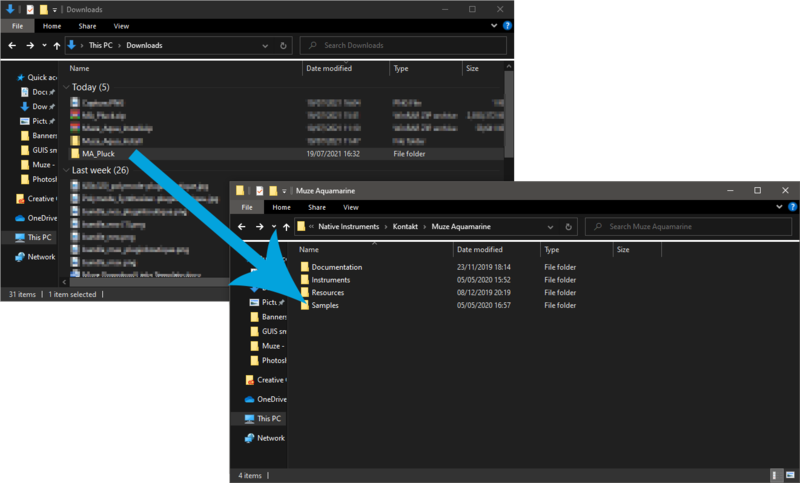
4. Move the unzipped instrument folders (located within all 'MA_xxxx' folders)  to 'Muze Aquamarine/Samples'.

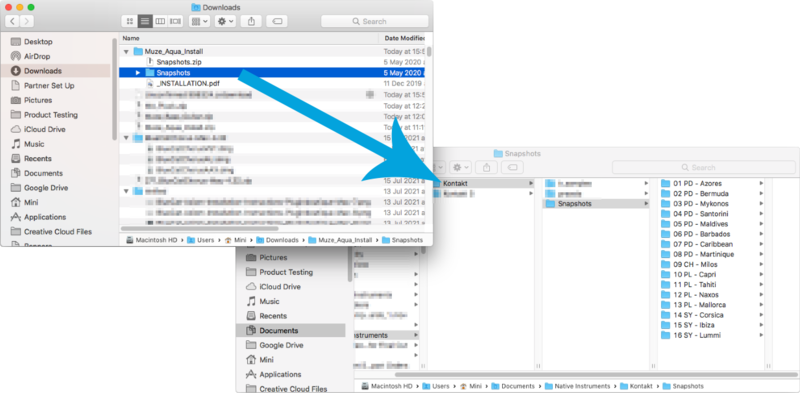
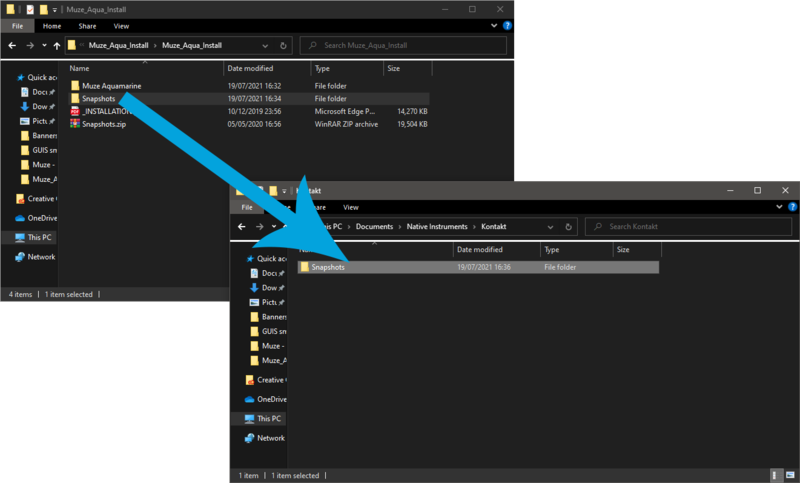
5. Unzip the 'Snapshots.zip' (located within 'Muze_Aqua_Install') file and move to, 'Users/*your username*/Documents/Native Instruments/Kontakt/'.

6. Open Kontakt, either as a standalone application or as a plugin within your DAW.

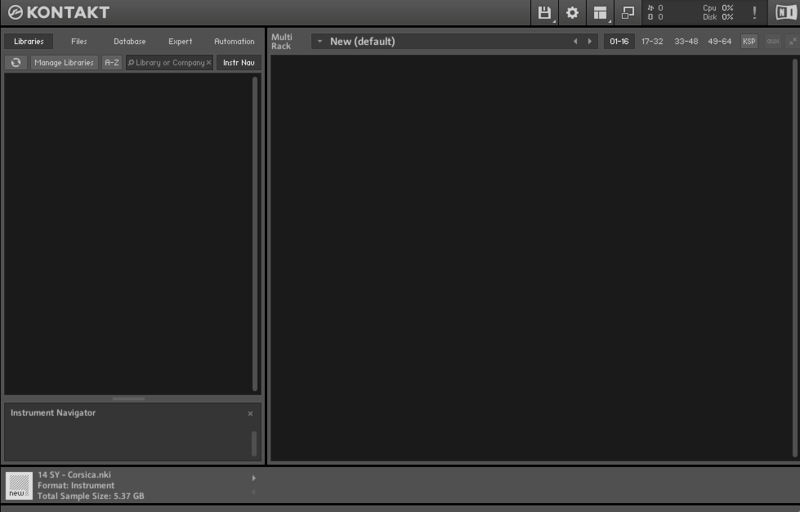
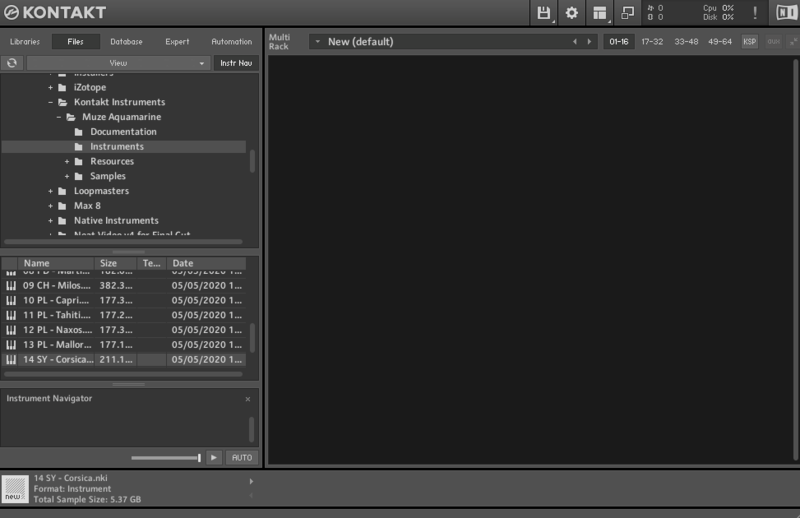
7. Click the 'Files' tab at the top of Kontakt > Navigate to the location of 'Muze Aquamarine' folder from step 2 of the installation instructions > Click 'Muze Aquamarine', followed by 'Instruments'.

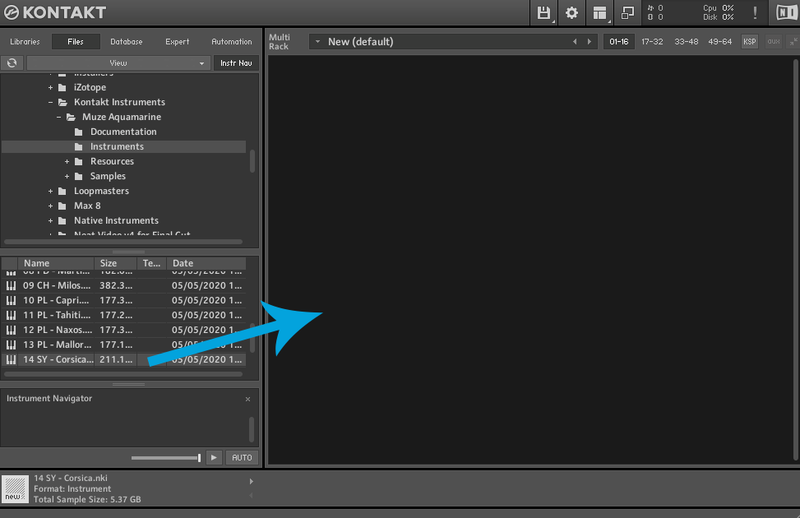
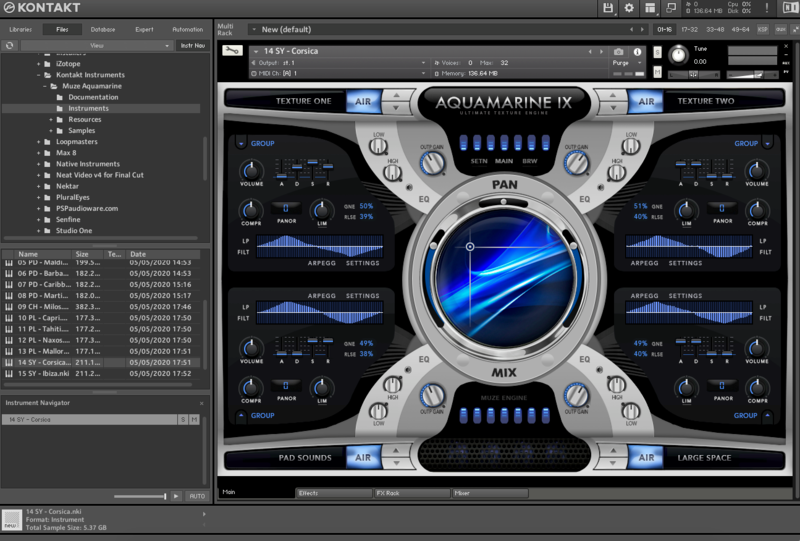
8. Click and drag any .nki file from the left-hand window of Kontakt into the main window of Kontakt to load up a patch.

Your software is now installed and ready to use.

Windows Installation

1. Click the blue 'Download' within your Plugin Boutique User Account > Click 'Download' on all of the folders from the Muze download page.

2. Once the downloads are complete, unzip all of the folders.

3. Move the 'Muze Aquamarine' folder (located within 'Muze_Aqua_Install') to where you store your Kontakt Instrument files.

4. Move the unzipped instrument folders (located within all 'MA_xxxx' folders)  to 'Muze Aquamarine/Samples'.

5. Unzip the 'Snapshots.zip' (located within 'Muze_Aqua_Install') file and move to, 'C:\Users\*your username*\Documents\Native Instruments\Kontakt'.

6. Open Kontakt, either as a standalone application or as a plugin within your DAW.

7. Click the 'Files' tab at the top of Kontakt > Navigate to the location of 'Muze Aquamarine' folder from step 2 of the installation instructions > Click 'Muze Aquamarine', followed by 'Instruments'.

8. Click and drag any .nki file from the left-hand window of Kontakt into the main window of Kontakt to load up a patch.

Your software is now installed and ready to use.

Plugin Boutique Rewards

Discover the most rewarding loyalty programme among all plugin retailers.

  • Free Loopmasters Samplepacks
  • Discounts on products and courses
  • Extra Virtual Cash claimed immediately at checkout
Find out more

Follow us:

X (Twitter) Facebook YouTube Instagram
Logo Logo

Plugin Boutique Limited, Part of the Beatport Group LLC.

Copyright © 2011-2025 Plugin Boutique. All rights reserved