Log In

Free gifts available with your purchase

All-around Phasing Effect
All-encompassing phasing effect with a vast array of sonic possibilities, from resonant swirls to stunning atmospheric stereo sounds.
BLEASS Phaser is an all-encompassing phasing effect which offers a vast array of sonic possibilities, from resonant swirls to stunning atmospheric stereo sounds.
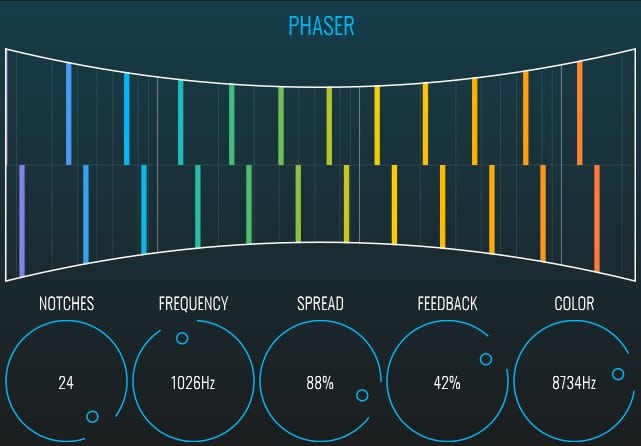
A colorful and magnetizing Spectrum View coincides with the notch frequencies, and brings an instantly pleasing sonic and optic effect into the sound design process.
Popularised by everyone from Queen to Chromeo, Jean-Michel Jarre to Tame Impala, the phaser effect is great for many instruments such as synthesizer, guitar, bass, and vocals.
No modulation collection would be complete without a phaser. This is why BLEASS Phaser delivers at the same time all of the classic phasing effects through 40 refined presets as well as a large pull of stereo functionalities and interweaving modulations thanks to its frequency & spread LFOs, as well as a precise control over the stereo.
The phaser effect processes the signal through successive all-pass filters and adds the resulting signal to the original to create phase cancellation around certain frequencies (notches). A feedback loop reinjects a certain amount of the processed signal back into the filters chain.
PHASER stage:
- Notches: sets the number of all-pass filters, adding a filter creates a new notch in the signal’s spectrum. Notches count can go from 1 to 24.
- Frequency: sets the center frequency of the phaser (the frequency of the all-pass filters).
- Spread: sets the spacing between the notches by changing the Q factor of the filters.
- Feedback: sets the amount of processed signal reinjected into the filters chain. Feedback can be negative.
- Feedback Color: sets the frequency of a low-pass filter applied to the feedback signal.
- Spectrum: a spectrum view representing the estimated frequency position of the notches. Touching this view will adjust the center frequency.
FREQUENCY LFO & SPREAD LFO stages:
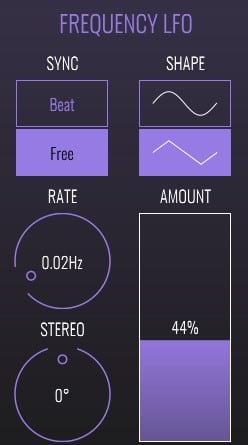
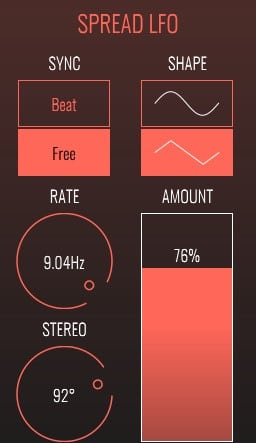
- Sine LFOs that modulate the center frequency and the spread parameter of the phaser.
- Sync: sets the sync state between BEAT (synchronised with the host transport and tempo) and FREE.
- Shape: sets the shape of the LFO between Sine and Triangle.
- Rate: sets the LFO rate in Hertz if Sync is set to Free or in fraction of a bar if Sync is set to Beat.
- Phase: sets the phase difference between left and right channels.
- Amount: sets the amplitude of the LFO.
System Requirements
PC
- Windows 8 and later (64-bit)
- VST3
Mac
- macOS 10.9 and later (64-bit only) (including macOS 11 Big Sur and M1 processors)
- VST3 / Audio Unit
Format
- BLEASS Saturator is not a standalone product, it requires host software.
- BLEASS Saturator is compatible with all VST3 / Audio Unit compatible DAWs.