


 Log In

Free gifts available with your purchase

Shaken Percussion
Create shaker patterns as played by a human being
Skaka is a sample-based sequencer plugin for shaker percussion instruments. It has 12 slots, each with its own instrument, parameters (lots of them!), and pattern. Klevgrand has built both the sequencer and the sampler from the ground, to optimize this instrument for these types of sounds. Each pattern contains events, with individual parameters like pitch, velocity (as in how fast the instrument is shaken), and envelope.
With full control over shuffle/swing amount, an advanced humanizer function, internal awareness of in- and out shakes (yes, they sound different), using grids divided into triplets/quintuplets/septuplets, timing fine-tuning and variable sequence lengths, Skaka can get very close to how a human percussionist would sound in almost any tempo without any use of degrading time stretching or similar techniques.
To top it off, there's a nice reverb, a room simulator, and a high-shelf filter.
Skaka comes with nearly 200 ready-made patterns covering most genres and styles.
Anatomy
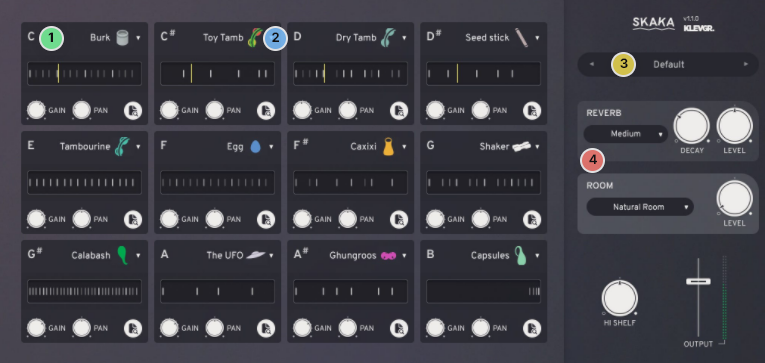
1. Slot machine - 12 slots, each with its own instrument, parameters (lots!) and pattern.
2. Mr Tambourine man - Choose between 18 carefully sampled shaker instruments.
3. Pre-baked shakes - Choose between different presets, both global and per-slot.
4. A double room, please - A high quality reverb combined with a room simulator. No one will think that you didn't hold the shaker yourself.
Pattern Edit
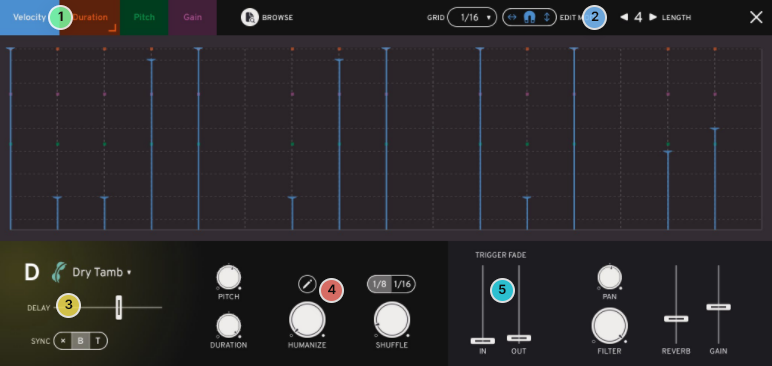
1. Hit the mode, Jack - Set each event's velocity, duration, pitch, and gain independently.
2. On or off the grid - Choose between many different grids, and decide whether your events should snap to them or not. Independent per-pattern setting of the loop's length.
3. Chill amount - The whole pattern can be delayed or early for different feels.
4. Human behavior - Adds some micro-changes (customizable) to make the loop sound just like anything between a robot and you.
5. Sneak in, sneak outThe loop may "sneak" in or out, just as it would in the real world.
Features
- 12 parallel slots, each with individual settings for instrument and pattern
- 18 different shaker instruments (Egg, Shaker, Tambourine, Caxixi, Single Shot, Ghungroos, Calabash & Seeds + much more)
- High-quality reverb plus room simulation
- High-precision editing of each pattern, with a plethora of controls for getting the exact right timing, pitch and velocity
- Wide range of presets covering most genres and styles
- Advanced and customizable humanizer
- 8 (or 9) velocity layers with more than 30 round-robins per layer for each instrument (thousands of samples used)
System Requirements
- macOS 10.10 or later (optimized for the M1-processor)
- Windows 7 SP1 or later
- AU, VST-2, VST-3, AAX

























Reviews Summary
While it aims to provide a helpful overview, it may not capture every perspective or detail. We encourage you to read individual reviews to make an informed decision.
Users praise the plugin for its realistic sound quality, humanized timing and velocity variations, and ease of use in quickly adding acoustic grooves and filling percussive gaps. While the sequencer offers strong customization, some noted minor drawbacks such as a limited selection of presets and instruments, the inability to import custom samples, and the time required to program variations.


