


 Log In

Free gifts available with your purchase
A Simple, Powerful Reverb Plugin
The Apogee Clearmountain’s Spaces plugin reproduces Bob Clearmountain’s personalized workflow for creating the distinctive, rich spaces where his mixes live. With the very same echo chamber profiles and processing he’s used on countless hit records, Clearmountain’s Spaces lets you envelop your tracks in unique and cohesive atmospheres that set your mixes apart.
Even with the simple operation of “adding reverb” to a mix, Clearmountain has developed a highly personalized workflow for creating the distinctive sonic environments that make his mixes stand out. Rather than rely on commonly available reverb effects, Bob has relied on physical rooms and chambers for realistic and unique reverb. Once convolution reverb technology allowed him to “capture” the characteristics of his favourite rooms as digital impulse response files, he was free to use all his favourite spaces no matter their location.
With Clearmountain’s Spaces, you now have access to the very same impulse response room profiles used on countless hit mixes. Equally important to achieving the signature Clearmountain sound is flexible input signal processing for shaping the sound before it hits the Spaces – three-band EQ, easy-to-use de-essing, and pre-delay. The final stage of Bob’s spatial workflow is a technique we call Composite Spaces – mixing and layering Spaces of different timbral characteristics and decay times for a result that’s utterly personalized.
Classic Presets Make it Easy to Add Space to your Mix
Have you ever struggled when adding reverb to your mix? The Clearmountain’s Spaces presets built by Bob, deliver decades of mixing expertise to your fingertips letting you easily add polish, depth and atmosphere to all your tracks.
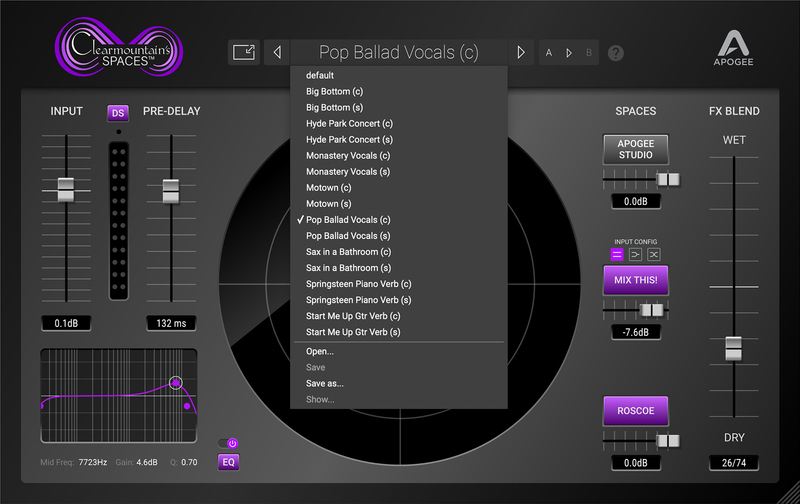
Custom Impulse Responses of Clearmountain's Reverb Spaces
Earlier in his career, Bob leaned heavily on physical rooms and chambers for realistic and unique reverb – for example, the custom-designed echo chambers at his MixThis studios in Los Angeles. Once convolution reverb technology allowed him to “capture” the characteristics of his favourite rooms as digital impulse response files, he was free to use all his favourite spaces no matter their location. With Clearmountain’s Domain, you now have access to these spaces, the very ones used on countless hit mixes.
Product Tour
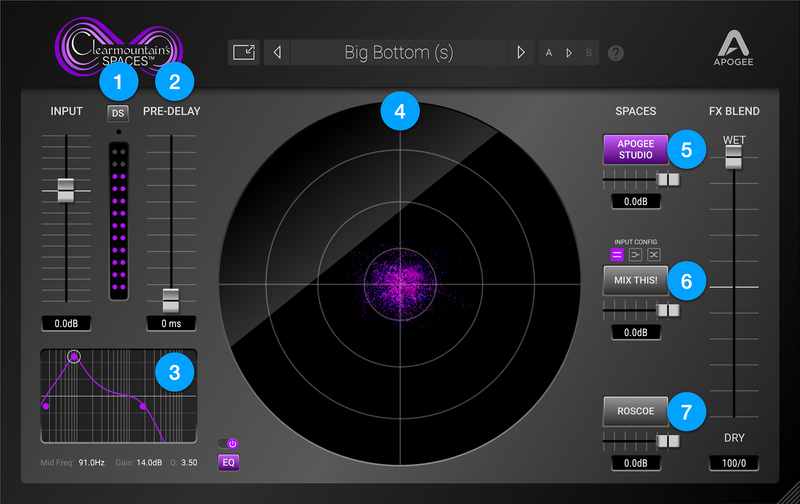
Flexible Input Processing
- 1) Easy-to-use De-esser removes distracting sibilance for smooth and consistent Spaces
- 2) Pre-delay separates the dry signal from the Spaces signal for greater clarity and rhythmic interest
- 3) Three-band EQ gently de-clutters or radically alters the character of Spaces
Realtime Spaces Visualizer
- 4) See the sonic effect of your reverb with the captivating display of Spaces as they evolve through time & space
Three Customized Spaces you can Combine
- 5) Apogee Studio - A short and warm ambience from Apogee’s in-house recording studio and development lab
- 6) Mix This! - A medium length, bright reverb from the physical echo chambers at Clearmountain’s Mix This! studio in Los Angeles
- 7) Roscoe - An extra-long, rich-sounding reverb captured in Clearmountain's friend's studio with AEA ribbon mics for a super-warm sound
Features
- Three Customized, Clearmountain Spaces
- Clearmountain Expert Presets
- Composite Spaces Mixer
- Input Processing with 3 – Band EQ, De-esser
- Pre-Delay
- Real-Time Spaces Visualizer
- Flexible Plugin Window Resizing
System Requirements
Mac
- macOS 10.14.6 and above (Intel / Apple Silicon supported) (64-bit only)
- 4 GB RAM (8 GB or higher recommended)
- VST, VST3, AU, AAX
Windows
- Windows 10 and higher (64-bit only)
- 4 GB RAM (8 GB or higher recommended)
- VST, VST3, AAX
Please Note: A FREE Pace iLok account is needed in order to register this software (physical iLok Dongle is not required).
Tested & Supported DAWs:
- Pro Tools 12, Ultimate (Pro Tools 11 and lower not currently supported)
- Ableton Live 10
- Logic Pro 10
- Cubase 9.5 VST 1 & 2 (VST3 not implemented in this release).
Please Note: Any AUv2, VST2 or AAX fully compliant DAW should work.
Dave Way
Producer, Mixer & Engineer
"… lots of options! I’ve had it for two months and I feel like I’m still just standing in the foyer admiring the artwork on the walls.”


