


 Log In

Free gifts available with your purchase

Compression With Character
Presenting Combustor - a unique way to create personalized compressor timbres. This inspirational effect features adaptive saturation processing to add character and crunch to your audio, all within a single plugin.
Every compressor, both hardware and software versions, has its own unique tonality. This is due to the performance of the real-life circuitry or modelling in the virtual realm. Now you can give your own audio the type of sweet saturation that your tracks deserve, and create a bespoke character all your own. Combustor features all the compressor controls you’d expect, and some surprises too, with 5 different saturation models and generous options for sound shaping. This plugin can add harmonics to bass lines, snap to percussion and make your vocals sing.
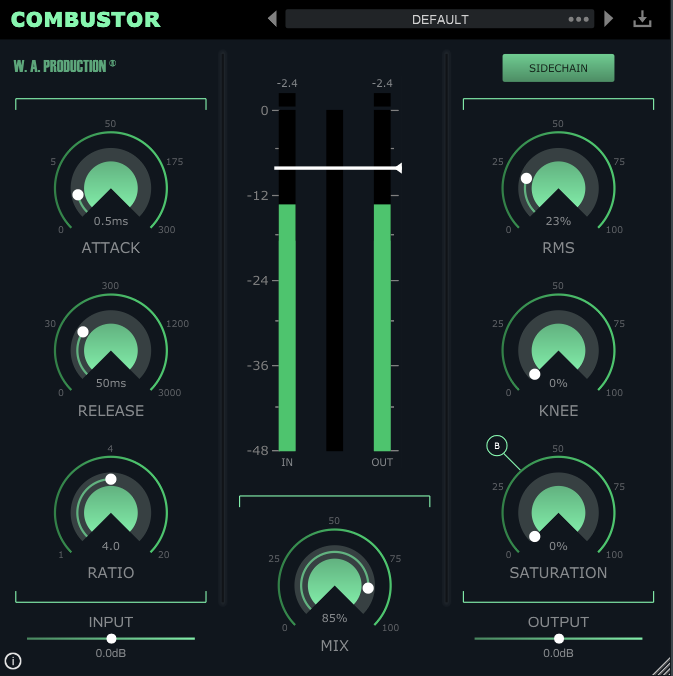
Of course, also included are loads of factory presets to get your creative compression juices flowing, from extreme settings to pump the master mix, to more subtle blends for shaping transients and tails. Use these presets as jumping-off points and then adjust the saturation type, threshold, mix and other parameters to create your unique sound.
5 Saturation Types
With multiple saturation models, from subtle to screaming, you can choose the type of adaptive saturation for your own audio. Depending on the characteristics of the incoming signal and your compressor settings, saturation will be applied in different ways. Choose type A for a subtle tube effect, or type E for overblown circuitry... and everything in-between. Experiment for yourself by cycling through the different saturation options and tweaking the saturation mix dial to taste.
Controls You Know
As well as producing creative ways to compress audio, Combustor is also easy to use, with controls familiar to anyone who’s ever used a standard compressor. All of the normal compressor controls are present and correct: threshold, attack, release, ratio and knee. W.A Production have even included a sidechain mode for effortless external triggering. With generous parameter ranges, you should be able to achieve almost any compression effect that you need, from transient shaping to glueing tracks together.
Input, Output & Mix Ratio
Use the Input and Output sliders to compensate for any gain boost or reduction caused by the compression settings with up to +/- 24dB attenuation. This allows for very accurate comparisons when A/Bing. Use the Mix ratio control at the bottom centre of the interface to dial in as much (or as little) of the compression as you like. Apply a conservative ratio for subtle dynamic shaping, or push the control to the limit to hear a 100% effected signal.
Visual Feedback
The central stereo meters show exactly what’s happening to the signal as it’s being processed in real time. This allows for accurate monitoring at every stage of the signal chain. As you drag the threshold fader down, you’ll see exactly how much gain reduction is being applied to the audio. Peak indicators will glow red if the signal is running too hot.
Presets
With many included presets, it’s easy to select starting points for your own compression experiments. Tailored to specific instruments, genres and audio effects, these factory options can be used on many types of audio. The presets include everything from subtle dynamic shaping to fully-crushed limiting.
W. A. Production are real-life producers making creative plugins to help you achieve studio quality processing quickly and easily. Enjoy!
Features
- Compression with built-in adaptive saturation
- 5 different saturation types
- RMS / Peak ratio
- Sidechain mode
- Visual feedback
- Pop & click free bypass
- Responsive & CPU friendly
- Factory presets
- Full PDF Manual & Tutorial video
System Requirements
- macOS 10.13 and later (64-bit only)
- Windows 8 and later (32 / 64-bit)
- AAX version requires ProTools 11 or higher
Important Note for Mac Apple Silicon users: Before purchasing, please review the current compatibility status of this plugin on your system here.
The Samplecast
Podcast & YouTube show for sample library geeks, plugin fans, and musicians
"With the simple twist of a dial I can easily audition different saturation and compression effects in double-quick time."
22Bullets
DJ & Producer
"Combustor is a great tool for when I want to quickly add power and crunch to a weak sound... I love the simple interface and intuitive controls...highly recommend!"
Manene
DJ/Producer from Czechia
"I'm really enjoying Combustor so far! Sometimes your sound needs a little extra to get it going, and Combustor's ability to add different styles of saturation mixed with compression gives it the power it needs to sound great. Will be using this in my mixes for sure!"


