


 Log In
Choose one FREE gift with your purchase
Introducing our improved free gift offering at Plugin Boutique - a new way for you to get more value when you spend more.
Depending on the value of your order, you'll unlock access to different gift tiers and be able to choose from a selection of free products available at your spending level. Our gift lineup is updated regularly, so be sure to check back often for the latest additions.
Make any paid purchase and choose the following:
8-Track by Bitwig
Spend at least £29 / €29 / $29 to unlock:
Check back for more gifts in this tier coming soon!
Spend at least £49 / €49 / $49 to unlock:
TAIP by Baby Audio
Spend at least £99 / €99 / $99 to unlock:
Serato Hex FX by Serato
Melodyne 5 Essential by Celemony
How it works:
- Add more products to your cart to unlock more free gifts to choose from.
- Once you’ve unlocked your desired free gift, choose the gift and proceed to the checkout.
- If you use virtual cash to bring your order total below the minimum required spend for your chosen free gift, your order will be unaffected.
- If you use a coupon code to bring your order total below the minimum required spend for your chosen free gift, the gift will be removed from your cart. We’ll make you aware of this so that you can remove the coupon, or go back to the cart to choose a different free gift.
If you have any questions, feel free to reach out to our Customer Care team here.
Important notes:
- Rent To Own plans are not eligible for the free transaction gift.
- Limited time only.
- If you already own the product/s in this offer, we are unable to provide an alternative product.
- You cannot exchange your copy of this product for another product.
- You cannot resell your copy of this product.
- You are eligible to claim 1x copy of the product in this promotion.
- You can only claim 1x free product per transaction, but, in the case of multiple free gifts, you can redeem this offer in separate transactions until all free gifts are obtained.
Bitwig Studio 8-Track
Customized Workflow To Match Any Style
Bitwig Studio 8-Track is the sketch pad for your musical ideas featuring the acclaimed workflow of Bitwig Studio
Bitwig Studio 8-Track, the trim and effective digital audio workstation to start producing, performing, and designing sound like a pro.
- A large selection of instruments, effects, and modulators
- Up to 8 project tracks with audio or MIDI
- Out-of-the-box controller support
- Play and record instruments
- Produce arrangements
- Design sounds
Features
- 8 audio-, instrument-, hybrid tracks
- 2 effect tracks
- 2 group tracks
- 8 scenes
- 2 VST plug-ins (with 32-/64-bit bridging, delay compensation, and crash protection)
- VST multi-out and side-chain not supported
- Up to 32-bit audio export (including multi-track export)
- 4/8 audio I/O busses
- 3 algorithms of time stretching: Stretch, Stretch HD, Slice
- 3 display profiles (single display only)
Instruments & Effects
In total 50 instruments, effects, note FX, and modulators. Here are some highlights:
- Sampler, Polymer, Drum Machine, and more
- 17 excellent audio FX devices: Reverb, Delay, Distortion, EQ
- 10 Modulators: LFO, ADSR, Macro, and many more
- Hardware devices: control your hardware via MIDI and CV/Gate
Sound Content
From acoustic bass to futuristic glitch loops, Bitwig has your sound content needs covered. Here's what you get with Bitwig Studio 8-Track:
- Drum sounds: from classic to contemporary, professionally sampled, as single sounds and kits
- "Bösendorfer" Grand Piano Light: a great sounding piano, ready to play
- Wurlitzer E-Piano
- 100's of world-class presets for all included Bitwig instruments and audio effects
- Clips and Templates to give your song creation a flying start
Baby Audio TAIP
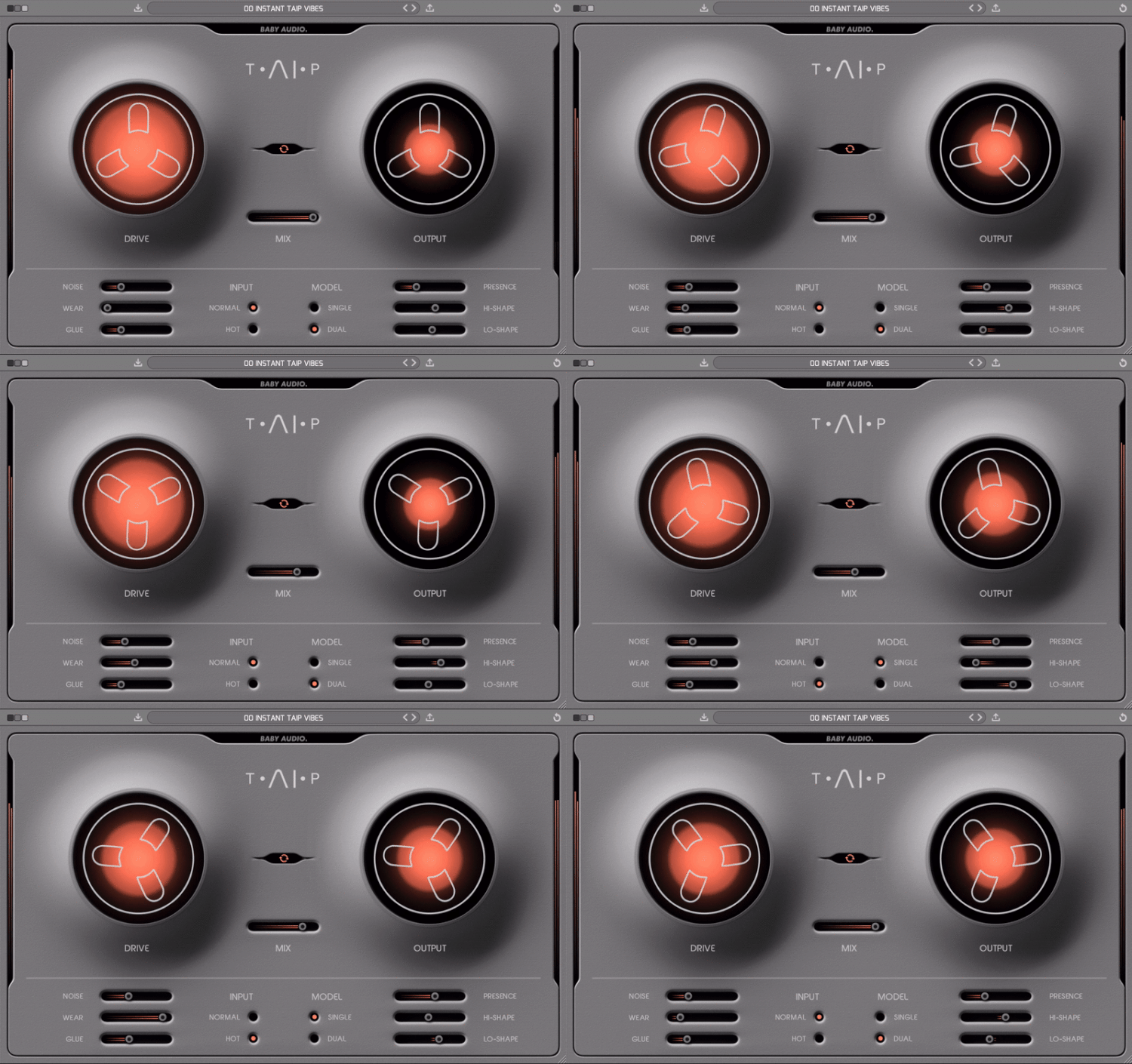
Warm Up Your Sound
Tape recordings have a musical quality that digital mixes often lack. TAIP brings this quality into your DAW. It will add some authentic analogue heat to your tracks, without the need to route any audio outside the box.
Tape plugins are not a new concept. However, this emulation method is. Instead of using traditional DSP, Baby Audio has developed TAIP around an AI algorithm designed to decipher the invisible nuances of analogue circuits.
The result is a truly faithful tape emulation that’s intuitive and creative in use – with some added features to accommodate a modern workflow. Use TAIP to bring a touch of warmth and glue to your tracks, or ‘drive it like you hate it’ as an alternative to your distortion plugins.
Highlights
- AI-powered algorithm, giving you the true warmth and behaviour of analogue tape.
- Flexible feature set, allowing you to create a custom ‘tape flavour’ for any need.
- Use TAIP to add musical saturation and glue to drums, instruments, vocals, and beyond.
TAIP is Baby Audio's creation of the ideal ‘Tape Machine’ for the DAW-era, combining an authentic vintage sound with a modern feature set. Its parameters will let you customize the right tape flavour for any need.
Putting the 'AI' in TAIP
‘AI’ is an overused - and often misused - term. But Baby Audio believe it’s the future of music technology. It just needs to be used genuinely and with a legitimate purpose.
For a hardware emulation project like TAIP, AI offers an alternative - and in Baby Audio's opinion more faithful - approach over the traditional DSP method. Where a normal DSP emulation would entail ‘guesstimating’ the effect of various analogue components and their mutual dependencies, TAIP can use AI / neural networks to accurately decipher the sonic qualities that make a tape machine sound and behave in the way it does. This happens by feeding an algorithm various training data of dry vs. processed audio and teaching it to identify the exact characteristics that make up the difference. Once these differences have been learned by the AI, TAIP can apply them to new audio.
This process may sound overly digital for a plugin that brings an analogue sound. But the reality is that ‘analogue’ and ‘digital’ are two fundamentally different domains. To get a computer to behave (or sound!) in a certain way, it helps to think like it does. Re-creating an ‘analogue-style’ signal path in DSP is thinking about the problem like a human. The AI approach helps to solve the problem like a machine would – for a more faithful emulation.
Presets
TAIP comes loaded with 135 presets created by friends of Baby Audio - including:
- Mark Needham (Fleetwood Mac, The Killers, Bloc Party, Elton John)
- Max Jaeger (Ariana Grande, Kanye West, Drake, Calvin Harris)
- Eestbound (Travis Scott, Young Thug, Jazz Cartier)
- Rob Kleiner (Sia, Britney Spears, David Guetta, Cee Lo)
- Cesar Sogbe (Prince, David Byrne, Jennifer Lopez)
Display Options
- Switch between three backgrounds (Black / Gray / White)
- Plugin window fully resizable
Features
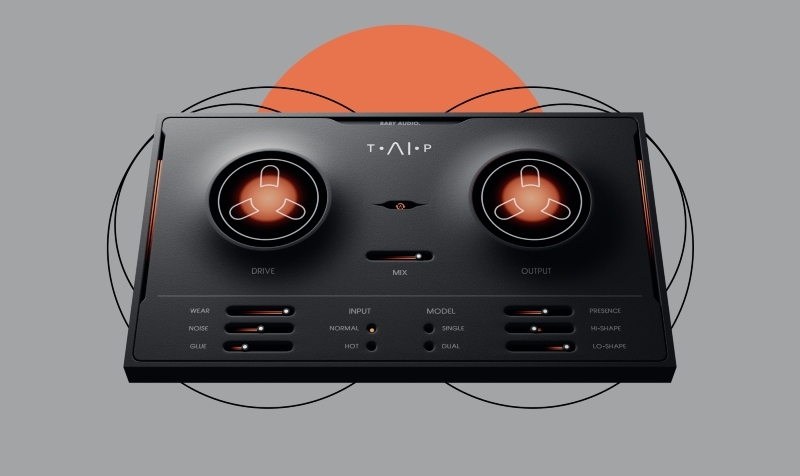
- DRIVE: Traditionally, tape machines were designed to colour the sound as little as possible. TAIP is not. You can use the DRIVE knob to add just as much colour as you need - from a subtle touch of heat to heavy distortion.
- MIX/TAPE FLANGING: MIX lets you run your tape in parallel. You can combine MIX and WEAR to get a classic ‘tape flanging’ effect. This is caused by the wow and flutter of WEAR running in parallel with the dry track.
- MODEL: While SINGLE is a regular tape emulation, DUAL creates a series of two tape emulations chained together under the hood, each applying half of the DRIVE value. This will add slightly more weight to your signal.
- LO-SHAPE / HI-SHAPE: These sliders let you saturate the low/high end more or less than the rest of the frequency spectrum. (Example: Warm up a drum bus without distorting the low frequencies).
- GLUE: Tape machines are known to introduce a pleasing compression-like effect due to their low dynamic range. TAIP lets you add this effect – or even exaggerate it. Use GLUE for subtle cohesion or as an actual compressor.
- NOISE: Let's you add tape noise to taste – or avoid it altogether.
- WEAR: Combines wow, flutter, and an altered frequency response curve to emulate a worn-out tape machine.
- PRESENCE: Part of the tape warmth comes from an attenuated high-end. PRESENCE allows you to decide how much of that attenuation you want. It can bring back the brightness that is sometimes lost on tape.
- INPUT: Choose between NORMAL or HOT (more distorted) input levels without affecting the output volume.
- AUTO GAIN: Allows you to add more DRIVE while keeping a consistent plugin output level.
Serato Hex FX


Hex Your Sound
The all-in-one multi-FX plugin for sonic alchemists. Bend, morph, and hex your sound with a full suite of 45+ chainable FX and 100+ presets—all in one powerful multi-FX plugin. From subtle tweaks to full-on chaos, add color, energy, and movement to every track. The power’s yours.


Features
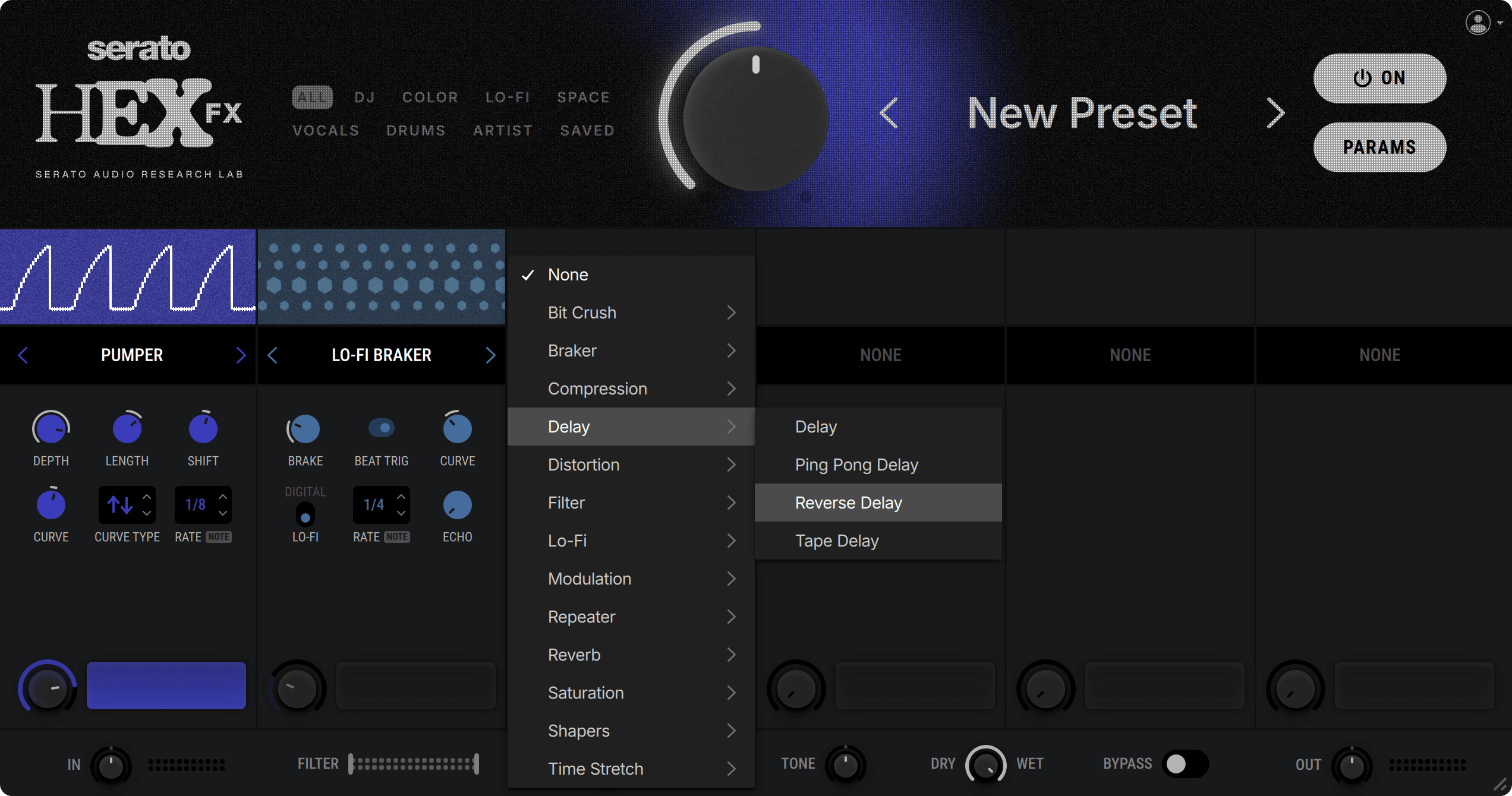
- 45+ Individual FX: Conjure gritty textures, vibrant tones, and spellbinding modulation. Bend time, shape reflections—with every effect you can dream of in one place, including bit crushers, compression, delay, distortion, filters, modulation, reverb, saturation, shapers & tremolo, time stretching, and more.
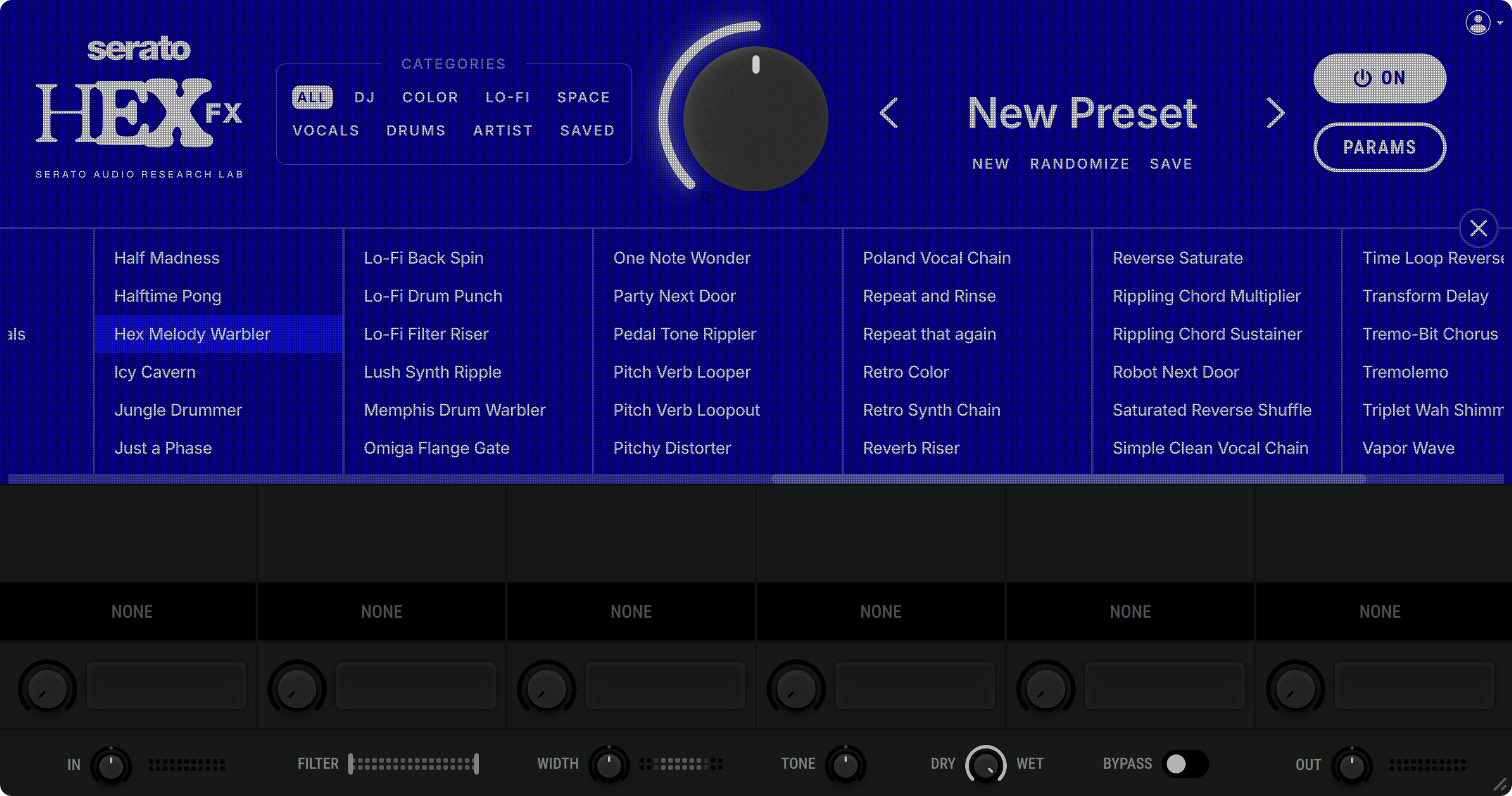
- 100+ Presets: Hex your drums, samples, bass, or even mix bus with lo-fi grit to vintage warmth, ethereal echoes to electrifying modulation—choose from a huge range of powerful FX chain presets to set the perfect tone for your sound.
- Presets From the Pros: Fast track your way to pro sounding tracks with exclusive access to signature presets from industry legends like Guy Lawrence (Disclosure), Lord Finesse, DECAP, Amber Navran (Moonchild), Jake One, Dibia$e, DuckGirl, and more.
- Performance FX: Jam, trigger, and tweak these FX in real time to give your beats and automation that dynamic, live movement—including various Brakers, Repeaters, Halftime, Vinyl Backspin and DJ Transform.
- Customize Every Element: Dial in every FX parameter with precision, rearrange chains, sculpt custom presets, and fine-tune the output signal to craft your signature sound.
- The Best Sound, Period: The best FX processing in the game, delivering pro-level sound for every track, every time. Unlock new textures, fuel your creativity, and keep your flow going strong—all with effortless control.

Discover Hex FX
Explore the definitive multi-FX plugin for sonic alchemists

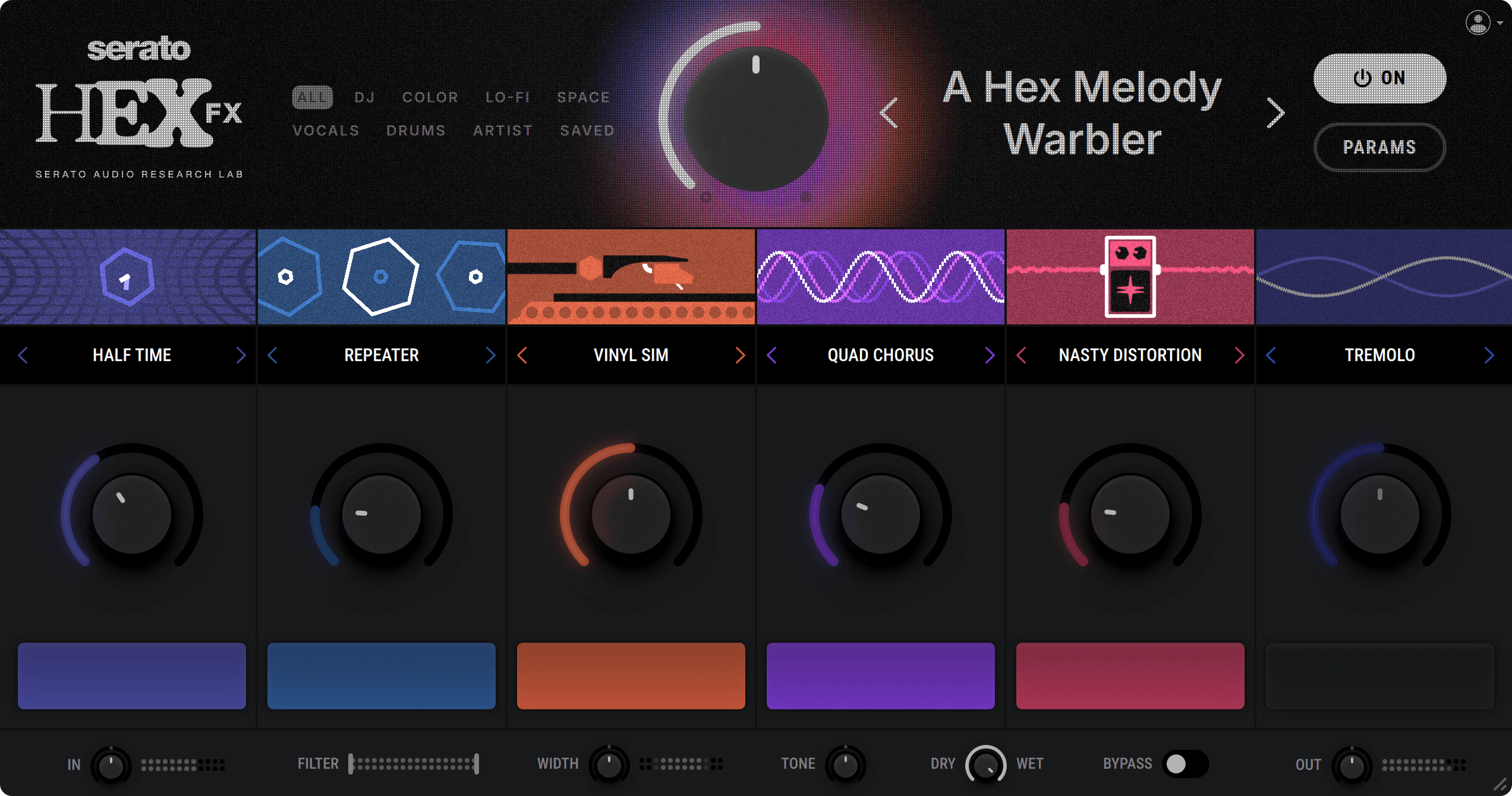

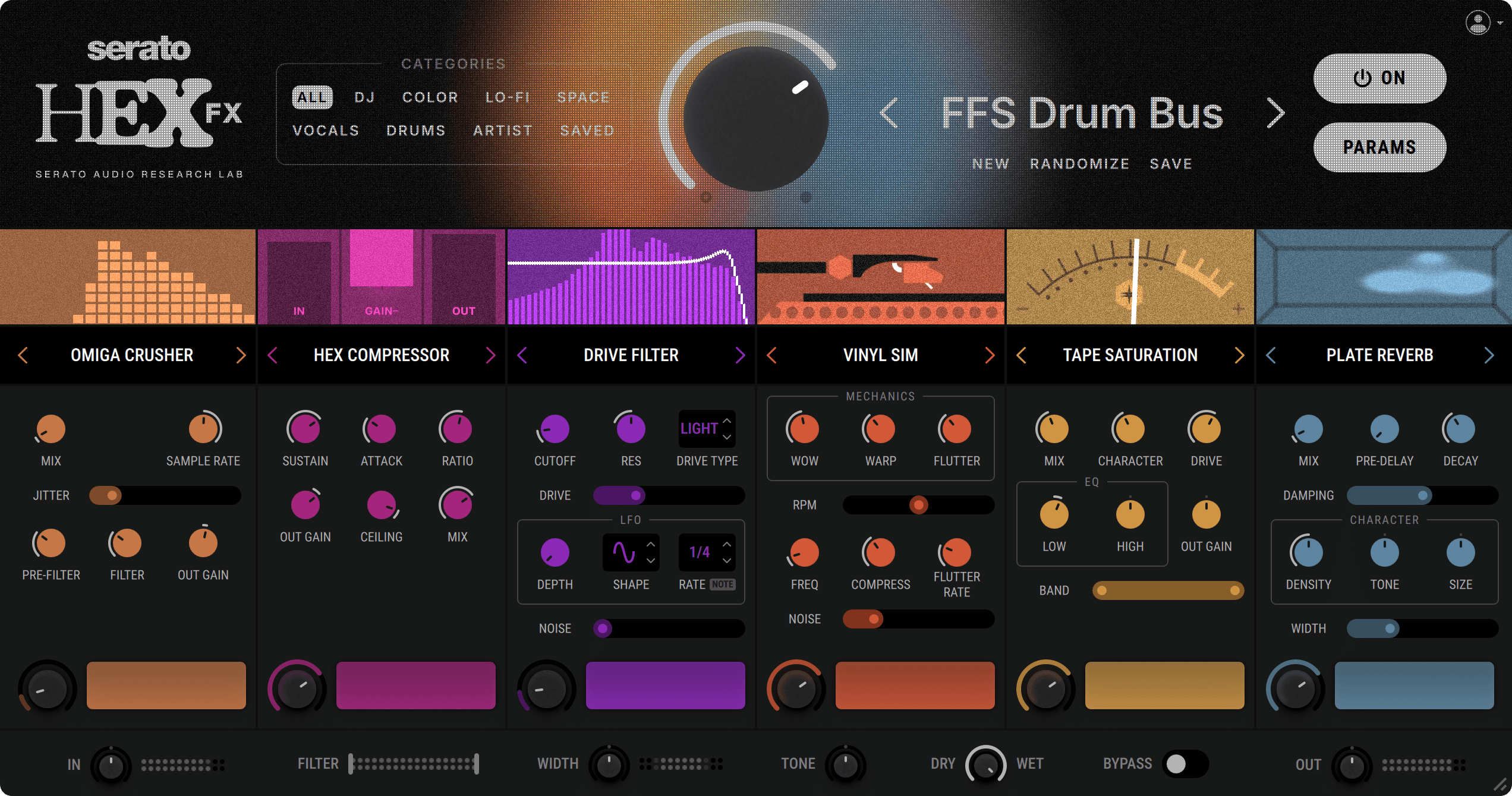
Parameter View
Fine-tune any effect parameter and tailor it to your sound


Preset Browser
Access 100+ powerful multi-FX presets at the click of a button


Preset Builder
Craft custom effect chains, with a suite of 45+ individual FX at your fingertips



The Easy Way to Begin
With Melodyne 5 Essential, you edit your vocals using the basic functions for pitch and timing. Musical, quick and easy. And if you need more, you can always upgrade, paying only the difference.
Features
- Grammy Award-winning technology.
- Exceptionally musical and intuitive note-based way of working.
- The algorithms Melodic (with Sibilant Detection), Percussive and Universal.
- Melodyne's Main Tool for editing pitch and timing.
- The Chord Track and Chord Grid with automatic chord recognition.
- Full compatibility: VST 3, AU, AAX, stand-alone.
- Integration via ARA Audio Random Access (depending on the DAW).
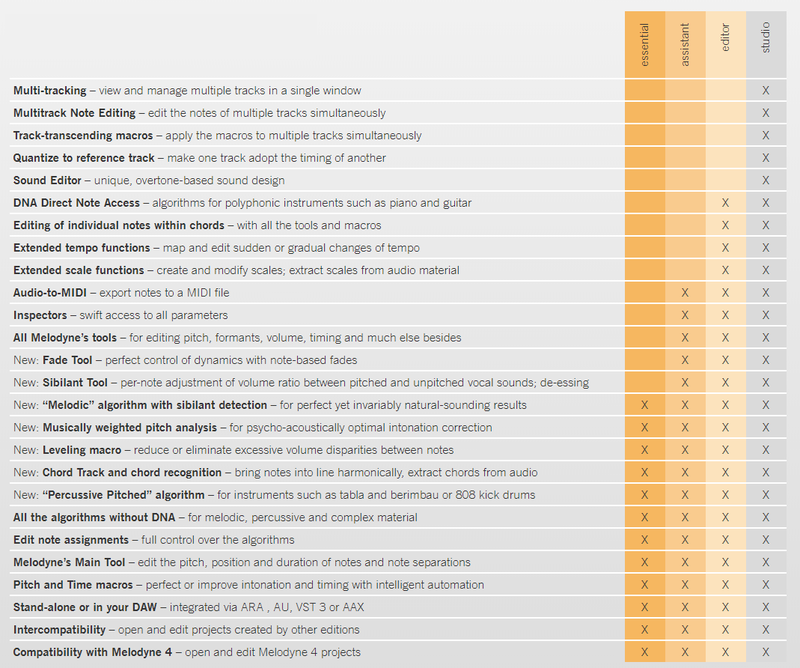
Important Note: Not all functions listed on this page are available in Melodyne Essential. Please see the table below for a full comparison.
Melodyne Studio, Editor, Assistant & Essential Compared
New in Melodyne 5
New technologies, for better results in less time. Thanks to the fundamentally improved “Melodic” algorithm, Melodyne makes your vocal editing even better than before. With perfect, natural corrections at the press of a key. Thanks to the Chord Track, you can adapt notes with lightning speed to suit the song – chord recognition included.
All this is new:
- The ability to edit pitched and noise-like components separately with the “Melodic” algorithm.
- More musical analysis of pitch deviations.
- The Chord Track and Chord Grid for pitch editing, chord recognition.
- An additional algorithm (“Percussive Pitched”) plus other algorithm improvements.
- Search functions for keyboard shortcuts, saving of shortcut sets.
Vocals, Now Even Better
Melodyne heightens its core competence. The “Melodic” algorithm used for vocals can now distinguish the unpitched, noise-like components of a note – i.e. voiceless consonants (such as sibilants like “s”) and breath sounds – from its pitched components. Even when they coincide. And although all pitch and timing changes are implemented in a tried-and-tested manner as far as the pitched components are concerned, different rules that emulate accurately the natural behavior of the human voice govern the handling of sibilants. So now when you are working with Melodyne, you obtain the highest possible sound quality and most natural-sounding results automatically.
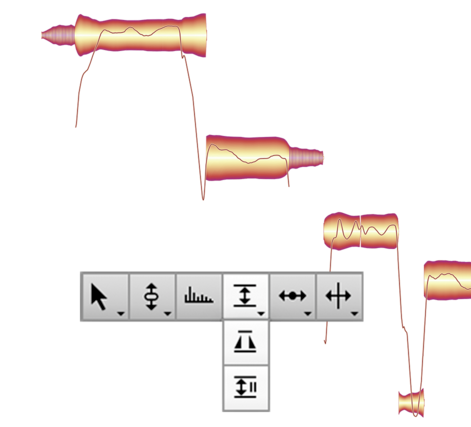
Modelled on Human Hearing
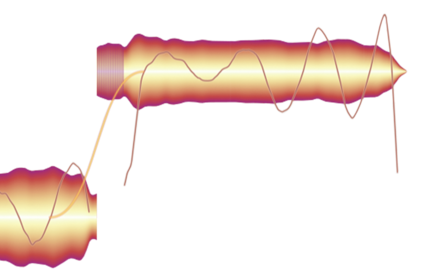
Why do some notes sound out of tune and not others? Fluctuations in pitch contribute to the quality of a vocal performance because it is through them that passion and emotional complexity find expression. They give it, in other words, its human dimension. But for their contribution to be a positive one, the nature, scope and precise timing of such fluctuations is of crucial importance.
A note doesn’t necessarily sound sharp or flat just because it isn’t “spot on” mathematically. Just particular, often very brief segments of the note annoy us. Sometimes at the beginning, sometimes at the end, sometimes somewhere in between. It is these crucial segments that have to be perfectly in tune; if they are, the note will sound right to us. The presence of any fluctuations before or after to such segments doesn’t trouble us – to the contrary, Celemony feel they add life to the performance and sound natural.
Melodyne now identifies these problem areas precisely, and the offset shown in the Note Inspector is calculated from the pitch of each note at the crucial moment only – not its entire lifetime. As a result, double-clicking (to set a note’s offset to zero) now yields precisely the right musical result. Also the macro profits from this new, even more musical approach: Each individual note is pitched to perfection. Yet everything still sounds natural and alive
The Chord Track and Chord Grid
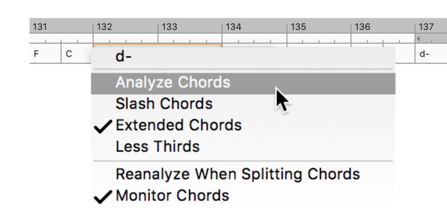
Work better with chords, adapt notes quickly. Melodyne 5 offers you a chord track that is linked to the Pitch Grid in the Note Editor. This makes working with chords far more enjoyable and harmonies more transparent. Because you can see at any time which pitches are compatible with the current chord and can adapt the notes accordingly with lightning speed. This is helpful when you’re altering chords, and if you want to match any sample harmonically to your music, it works like a dream.
Autopilot for chords. Melodyne’s chord recognition technology is so advanced, it can consider tracks apart or together – even the entire mix – and identify the chords formed when their notes are combined. It analyses your recordings fast and reliably and fills in the Chord Track automatically. This makes working with chords even easier.
Further Algorithm Improvements
- “Percussive Pitched” This new algorithm was developed especially for instruments like tabla, berimbau or 808-kick, the notes of which – though percussive in character – still have a recognizable pitch.
- “Robust Pitch Curve” With this new option, you can obtain better sound quality when editing certain signals, such as those with a great deal of reverberation. When it is activated, the monophonic algorithms employ a pitch curve that has been slightly smoothed out.
- “Complex” This algorithm playback type has been improved and can now be used just as flexibly as the playback type “Tonal” concerning the formants.
Other improvements
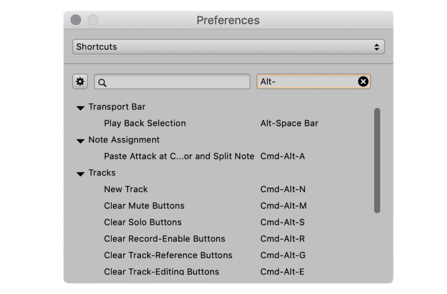
- Better keyboard shortcuts. New search function for keyboard shortcuts, the saving of personalized shortcut sets has been improved.
- No more “.mdd” files. Melodyne’s detection data, which was previously saved to separate “.mdd” files, is now stored in the audio files themselves, making file directories clearer and the sharing of projects easier.
What Is Melodyne?
Note-based Audio Editing
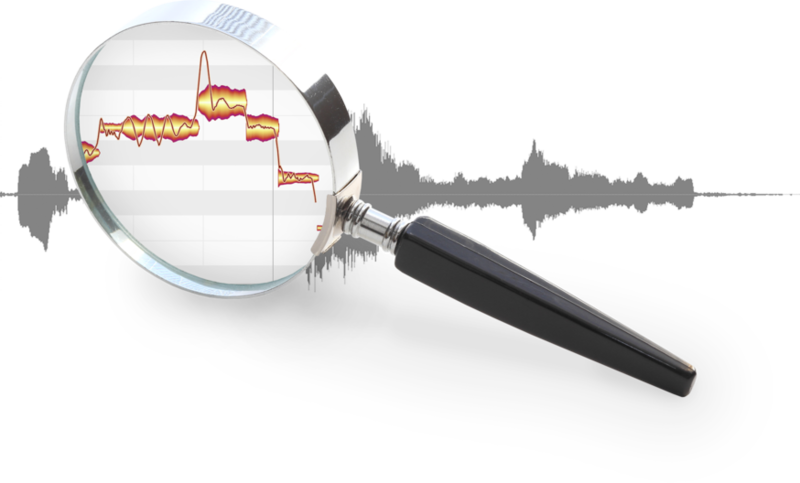
Melodyne grants you unrivalled access to all the musical details in your recordings and samples – note by note. This is made possible by a sophisticated analysis that delves deeply into your recordings and samples, and recognizes and understands the musical relationships within them: the individual notes and their characteristics, the scales, keys and chords, the timing, the tempo, the tone colour. And with Melodyne, you can edit all these things intuitively. With vocals, but every type of instrument as well – including polyphonic ones, such as the piano and guitar.
Notes and Tools
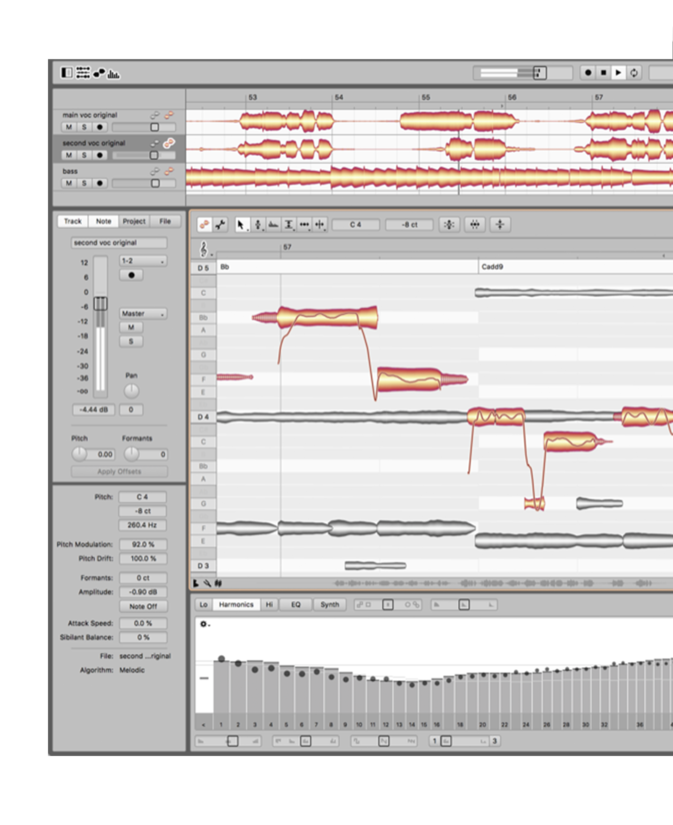
In Melodyne, notes are represented by blobs. By manipulating these with Melodyne’s powerful tools, you can edit (among other things) the pitch, vibrato, volume, sibilants, length, timing and formants of each note. In this way, you can enhance in a musical yet straightforward manner the intonation, phrasing, dynamics and timbre of a performance. While ingenious algorithms ensure your editing’s almost always inaudible, sensitive, natural.
- Notes instead of waveforms. With Melodyne, you see the notes in your recordings and samples, and can manipulate and modify them at will. Even with polyphonic instruments like the piano and guitar.
- Tools and macros. Edit intonation, melody and harmony, but also rhythms and grooves, dynamics, formants and much more. Using intelligent macros or – with great precision – by hand.
- All that counts musically. Melodyne also recognizes chords, keys, tunings and tempos. And the editing functions for these important musical parameters are just as comprehensive as for the notes themselves.
- Compatibility and user-friendliness. Melodyne can be operated via ARA or as a plug-in directly in a DAW. Or even as a stand-alone program. Its flexible interface adapts perfectly to the requirements of each situation.
Important Note: The new Fade tool and Sibilant tool are NOT included in Melodyne Essential.
Please see individual product pages for System Requirements information.
Click here for guidance on claiming your transaction gift.
Other articles
Saffron’s Emerging Artist Development Programme Returns to Combat Music Tech Gender Gap
Backed by the PRS Foundation, the initiative offers a £1,000 grant, a 5-day studio retreat, and expert mentoring for Black women and gender-diverse creators in the South West of England. Bristol-based organisation Saffron has announced the return of their Emerging Artist Development Programme. Aimed at dismantling deep-rooted systemic barriers in music technology, the scheme is open to Black women and gender-diverse musical creators based in South West England. With reports showing that le
The Best Music Software Deals This Week [Live List]
As the music production landscape evolves week by week, so does the opportunity to save on powerful creative tools. New plugin releases, flash sales on VSTs and limited-time deals on music software can appear from any angle, making it harder than ever to keep track of what’s worth your attention. Whether you're looking for the latest bundles on offer, or even deals on exciting virtual instruments, it's as important as ever to stay up to date on what we have to offer. That’s where our live g
How Queer Ballroom Influenced House Music – A Collaborative Event
In a one-of-a-kind event in LA, we rejoiced in the name of house music and its queer origins by taking part in a community vogue ball (presented by Banjee Ball Foundation) after our Roland 909 product demo and giveaway, which followed our initial conference-style panel. It sure was an evening to be remembered with smiles and delight shared all around. Yet, we’re here to dissect the panel discussion, to dig into the real substance of what was discussed. We’ll be covering the main discussion po
Helping You Make It: Seven UK Organisations Creating Change Through Music
Make Music Day celebrates everyone who creates. Meet seven UK organisations helping people find the tools and communities they need to make music and be heard. Music is a universal connector. It’s always there, comforting us through our headphones or uniting a thousand of us on a dark club floor. It rushes in to fill the spaces between us and reminds us of why we are here. But before any of that, it needs to be made. That might mean opening a blank session, recording an idea before it disappe


