


 Log In

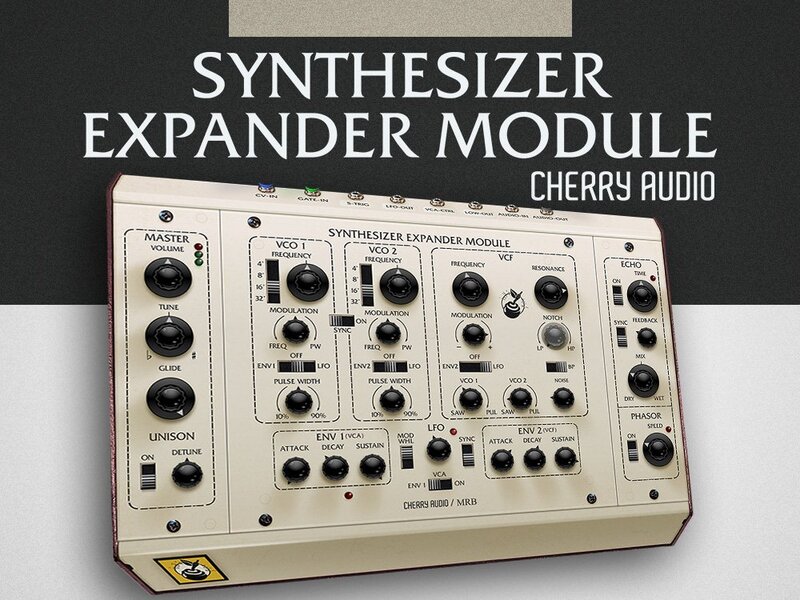
The Biggest Sound at the Smallest Price... FREE!
One Tremendously Powerful Voice
Synthesizer Expander Module is a free emulation of the classic Oberheim® self‑contained synthesizer module of the same name. Originally released in 1974, the keyboardless, mono module was intended as a companion to the one of the earliest digital sequencers, the Oberheim DS-2. Soon thereafter, Oberheim linked multiple Synthesizer Expander Modules to an early digitally scanned keyboard to create some of the first polyphonic synthesizers, used by legendary artists including Joe Zawinul, Toto's Steve Porcaro, Styx, and Jan Hammer.
Though it was a simple, barebones monosynth, the Synthesizer Expander Module possessed a unique tone quality, courtesy of its 12 dB/oct state-variable filter. With lowpass, bandpass, highpass, and notch modes, this flexible filter was the star of the show. Cherry Audio have precisely recreated it here with a filter section and Phasor effect programmed by award-winning synth designer Mark Barton (MRB).
Best of all, it's absolutely FREE!
Features
- Ultra-accurate dual oscillators
- Multi-mode filter emulation by award-winning synth designer Mark Barton (MRB)
- Massive unison mode
- 100 presets for Basses, Leads, and Percussion
- Unique "Phasor" effect section emulating the vintage Oberheim stomp box, also replicated by Mark Barton
- Studio-quality Echo effect with tempo sync
- Complete MIDI control and DAW automation for all controls, with easy-to-use MIDI learn and mapping (Preset and Global)
- Focus zoom-in feature, as well as standard UI zoom and resize via drag
- Complete documentation available directly online from the instrument or in downloadable PDF format
- Highly optimized DSP for optimal performance
System Requirements
Mac
- macOS 10.13 or above. macOS 13 Ventura supported.
- 64-bit required.
- Native Apple M1 or greater processor support, including Ultra.
- Hard disk space: 106 MB.
- 3.4 GHz Quad-Core or M1 CPU with 8GB of RAM recommended
- AU, VST, VST3, AAX, and standalone formats.
Windows
- Windows 7 or above (including Windows 11)
- 64-bit required.
- 3.4 GHz Quad-Core computer with 8GB of RAM recommended.
- Hard disk space: 106 MB.
- VST, VST3, AAX, and standalone formats.
Note: Internet connection required for product activation


