Log In

Free gifts available with your purchase
The immense possibilities offered by Photosounder are only starting to be discovered. Every day spent using Photosounder brings new discoveries, new kinds of sounds never heard before, new effects never approximated, new takes on classical effects or methods, all merely by combining the power of the simple set of tools built in the program.
Features
Analysis/Synthesis
- Lossless processing of sounds based on images, so that real sounds can be transformed by transforming their image.
- Noise-based synthesis for synthesising original sounds from nothing or resynthesising wildly transformed sounds in a way that results in a continuous and smooth spectrum.
- Pro-tip: Turn on the Live Synthesis in the Options menu for instantaneous results!
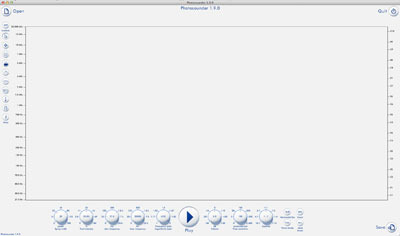
- Exclusive spectrogram analysis algorithm that natively operates on a logarithmic scale and can vary time/frequency resolution depending on frequency for better clarity and better resynthesis.
- Coming soon: Real-time live synthesis, allowing real-time time-stretching or to hear changes as they are made to the images.
Editing
- Dedicated graphical editing tools best suited for editing or creating sounds, such as various sprays to enhance, suppress, erase or create features, including a harmonics modifier to apply all modifications to a frequency and its harmonics at once.
- Layer system similar to Photoshop's, with layer groups and various layer blending modes, including exclusive layer convolution modes.
- Extensive graphical/mathematical operations specially adapted to spectrogram editing which allow you to apply all kinds of effects, from the most common (such as EQ, compression, denoising...) to the weirdest (envelope reversion, spectral gating, pitch inversion, spectral quantization...).
- Processing in third-party image processing programs by exporting images to BMP files and importing of the externally modified images.
- Rhythm and note overlays to help with music composition.
History
- Ability to restore a session, even after a crash.
- All actions are instantly saved to a history file in a human-readable language so none of your work is ever lost. Also allows you to edit the history by hand or save a project and all its history.
- Easy scripting to automate actions.
Specs
- Images processed in 32-bit precision.
- Sounds processed and exported in 32-bit precision (with an option to export to 24-bit instead).
- Opens audio formats such as MP3, OGG, WAV, AIFF, FLAC and various others and allows to export to 24-bit or 32-bit WAV, AIFF and FLAC.
- Opens image formats such as JPEG, PNG, BMP, PSD, GIF and various others and allows to export to BMP images.
- Can natively process, playback and export everything in any sampling rate (up to 384 kHz) supported by your sound card.
- Multicore support for faster processing and a smoother experience.
What's New in Photosounder 1.12.0?
- Dialog for setting the noise loop duration
- Option to resize image vertically to default height
- "Rescale image" command
- Indication of the height of the image in the analysis options window
- Added button to restore hardcoded analysis defaults
- Made the "log base" default changeable
- Fixed slow analysis of sound files with a certain length
- Apple Silicon build
- Right-click on knobs to set value
- Dialog for setting either time resolution or sound duration
- Added a menu entry for the console
- TIFF image file export compatibility improvements (ICC profile, fixed missing tag)
- Fixed cursor control of playback in lossless mode
- Fixed crash when turning on lossless mode
- Fixed loading a .pha file from the command line
- Fixed linear knobs having a dead zone in the centre for no reason
- Many miscellaneous bugs fixed using Codex/ChatGPT 5.5
What It Does
The following is a non-exhaustive list of what has been found that can be done using Photosounder. (Check out the demo videos above)
- Turning a sound upside down (bass sounds become treble and vice versa)
- Complex soundscapes using extreme time-stretching
- Creating instruments graphically and arranging them into a beat
- Transmitting photographs through sound
- Performing operations between different sound files, such as subtracting an instrumental from a song to isolate vocals
- Isolating or removing an instrument from a complex sound
- New effects such as piano chorusification or time-pixelation of sound
- A new take on more classical sound effects such as sound reverb
- High quality and flexibility processing such as denoising
- Creating new sounds from photographs or fractal images
- Vocoding
- Synthesizing spectrograms created from other spectrographs, such as printed spectrograms of bird calls in books
- Pitch shifting, pitch interval stretching, sound rotation, time-frequency domain compression
System Requirements
Photosounder is available for Windows (Windows XP and above), Mac OS X Universal (10.9 and above, on Intel and Apple Silicon machines). It can also run on Linux using Wine. A powerful machine is recommended. A demo version is available, with the ability to save the resulting sound to file disabled, and a short silence inserted every 12 seconds.
Important Note: Photosounder is a Standalone Application, not a Plugin.
Photosounder lets you tweak sounds like images and vice versa For a few years, a French coder named Michel Rouzic, living in Ireland, has been tinkering with the relationship between images and sound. The result is an application called Photosounder, which lets you play around with a...
Read More