/ Synth / Flow Motion FM Synth
Waves

Flow Motion FM Synth

4.3 (3 Reviews)
$29.99 $99.00

69% off until Dec 07

Waves Flow Motion FM Synth
Waves Flow Motion FM Synth gallery thumbnail
Buy Now
Product information

Flow Motion FM Synth

The Dominant 80s Synth Sound—Reborn

FM synths like the Yamaha DX7 were huge in the 80s. Their bells, strings, brass, and bass sounds appear on countless hits of the era, and have remained popular in music by Skrillex, Kavinsky, and many more. But programming FM synthesis was often daunting and complex. Not anymore.

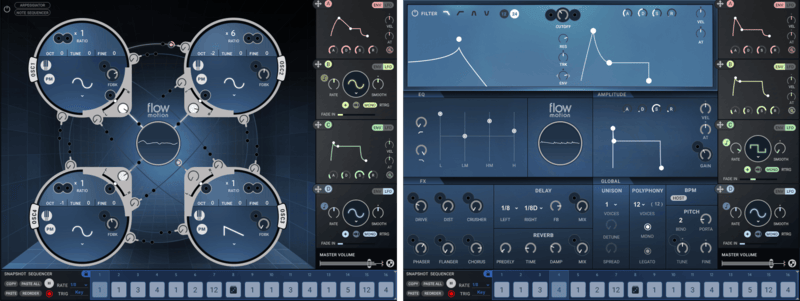
Flow Motion makes FM synthesis playful and easy. The graphic FM modulation matrix gives you instant visual feedback: simply drag-and-drop assignments between the four oscillators, each with independent waveform control. Or choose from over 1,000 presets that combine FM and analog tech for screaming leads, rich pads, floor-shaking basses, and big polysynths. Flow Motion does it all.

Features

  • Over 1,000 factory and artist presets
  • 4-oscillator synthesis engine, with Frequency or Phase Modulation
  • Analog synth filter, VCA, 4 envelope/LFO modulators
  • Interconnections among oscillators give clear visual feedback for edits
  • 16-step sequencer with up to 16 recallable snapshots per patch
  • Built-in note sequencer / arpeggiator
  • Use as plugin or standalone instrument, in the studio or live
  • Rich roster of effects to process your sounds even further
  • MIDI Learn for hardware controllers
  • NKS-ready for NI Komplete Kontrol and Maschine

System Requirements

Mac

  • macOS Monterey 12, Ventura 13, Sonoma 14, Sequoia 15
  • VST / AU / AAX

PC

  • Windows 10+
  • VST / AAX
Installation Instructions

1. Head to https://www.waves.com/create-account

2. Enter your email and choose a password to create an account (if you already have a Waves account, choose Log in, enter your details and head to Step 5) > click 'Submit'

3. Open your email inbox > click the activation link in the email from Waves

4. Click 'Log in here' > Log in to your Waves account

5. Click 'Register New Products'

6. Enter the Serial Number found in your Plugin Boutique user account > click 'Submit'

7. Click download in your Plugin Boutique user account or head to https://www.waves.com/downloads/central > download the Waves Central app for your operating system

8. Install Waves Central > Open Waves Central

9. Click 'Log in' > enter your log in details

10. Click the 'Install Products' tab

11. Tick the blue dot on all products you wish to install or click the top dot to install all products > click 'Install & Activate'

12. Click 'OK'

13. Open your DAW > open the Waves plugin

Your Waves plugins are installed and ready to use, enjoy!

Plugin Boutique Rewards

Discover the most rewarding loyalty programme among all plugin retailers.

  • Free Loopmasters Samplepacks
  • Discounts on products and courses
  • Extra Virtual Cash claimed immediately at checkout
Find out more

Follow us:

X (Twitter) Facebook YouTube Instagram
Logo Logo

Plugin Boutique Limited, Part of the Beatport Group LLC.

Copyright © 2011-2025 Plugin Boutique. All rights reserved