/ Synth / Codex Wavetable Synth
Waves

Codex Wavetable Synth

4.1 (7 Reviews)
$24.99 $149.00

83% off until Dec 07

Waves Codex Wavetable Synth
Waves Codex Wavetable Synth gallery thumbnail
Buy Now
Product information

Codex Wavetable Synth
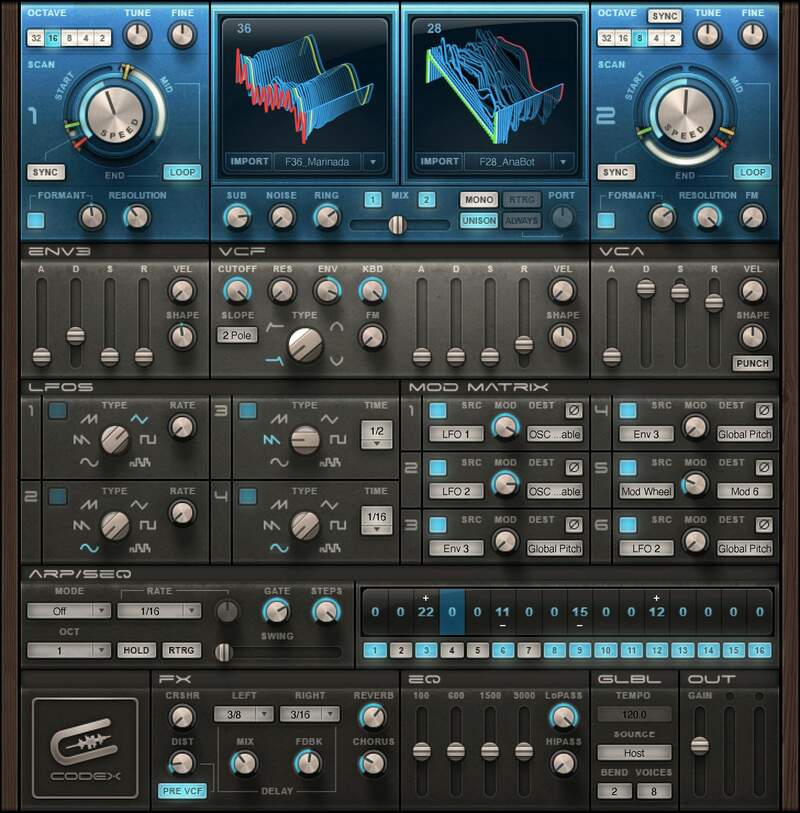
Powerhouse Synth for Your Basses, Leads, and Beyond

You want the sweet sound of analog, but the clarity and flexibility of digital—you want CODEX. This granular, wavetable-based synthesizer’s offers an immense sonic palette. Inspirational, innovative, and exciting, there’s no faster or better way to liberate yourself from conventional synth sounds.

Starting out? Simply dial up any of the 500+ incredible presets. Synthesis Jedi master? Dive deep into unparalleled sound design possibilities—including the option to load your own waveforms.

Features

  • Dual oscillators create animated sounds by sweeping wavetables
  • Matrix modulation, with 12 modulation options
  • Modulate virtually any parameter, and reverse modulation phase
  • Four LFOs with six different waveforms, including random
  • Arpeggiator/sequencer modulation source
  • 12/24 dB/octave, warm-sounding multimode analog filter
  • Distortion, delay, chorus, EQ, and reverb effects section
  • Over 500 presets showcase CODEX’s incredible power

System Requirements

Mac

  • macOS Monterey 12, Ventura 13, Sonoma 14, Sequoia 15
  • VST / AU / AAX

PC

  • Windows 10+
  • VST / AAX
Installation Instructions

1. Head to https://www.waves.com/create-account

2. Enter your email and choose a password to create an account (if you already have a Waves account, choose Log in, enter your details and head to Step 5) > click 'Submit'

3. Open your email inbox > click the activation link in the email from Waves

4. Click 'Log in here' > Log in to your Waves account

5. Click 'Register New Products'

6. Enter the Serial Number found in your Plugin Boutique user account > click 'Submit'

7. Click download in your Plugin Boutique user account or head to https://www.waves.com/downloads/central > download the Waves Central app for your operating system

8. Install Waves Central > Open Waves Central

9. Click 'Log in' > enter your log in details

10. Click the 'Install Products' tab

11. Tick the blue dot on all products you wish to install or click the top dot to install all products > click 'Install & Activate'

12. Click 'OK'

13. Open your DAW > open the Waves plugin

Your Waves plugins are installed and ready to use, enjoy!

Plugin Boutique Rewards

Discover the most rewarding loyalty programme among all plugin retailers.

  • Free Loopmasters Samplepacks
  • Discounts on products and courses
  • Extra Virtual Cash claimed immediately at checkout
Find out more

Follow us:

X (Twitter) Facebook YouTube Instagram
Logo Logo

Plugin Boutique Limited, Part of the Beatport Group LLC.

Copyright © 2011-2025 Plugin Boutique. All rights reserved










