


 Log In

Free gifts available with your purchase
The greatest of all time
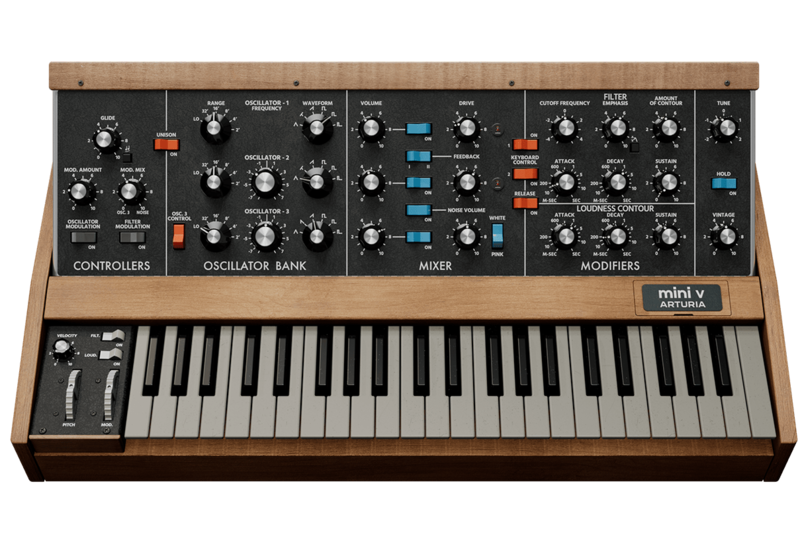
The most recognizable monosynth on the planet, reincarnated. Mini V captures the magic of the instrument that put iconic lead and bass sounds into the hands of musicians. Brought to life with next generation modeling, add compelling synth sounds to any track with luscious detail and dynamic drive.
DNA preserved, sound set alight
Timeless and iconic, the full and famed sound of the Mini continues to leave a mark on music culture.
A potent lead and bass synth actualised with True Analog Emulation®, that recreates the awe-inspiring character of vintage analog circuits. Mini V offers a remarkable musical experience - continuing its legacy and expanding its capabilities.
True sound
Mini V’s precise emulation and sonic accuracy is simply unparalleled. The 3 OSC fatness, the super-rich ladder filter — it’s all there.
Analog feel
You’ll love the attention to detail and authenticity Arturia have put into the Mini V interface - stripped back to its core essence, with plenty of ways to tweak your sound just the way you like it.
Versatile sound
Whether punching nostalgic Boards of Canada keys or shredding retro solos, Mini V’s iconic sound is genre-fluid.
Up to date
Adjustable polyphony, versatile effects, and modulation options provide accessible and advanced settings without compromising its inner core.
Explore the powerful and diverse sounds of Mini V
A reference for bass and lead synthesis, after its legendary analog ancestor. Mini V’s sound goes above and beyond in terms of detail and drive.
Mini by name, Massive by nature
From classic prog and funk to mainstream pop, hip-hop and electronica, everyone fell in love with the Minimoog.
The Minimoog put the essentials of wall-filling modular synths into a package everyday musicians could afford, and take to the gig. The rest is history.
While Minimoog was not the first synthesizer, it was definitely the one that got most people’s attention. Robert Moog, whose name is synonymous with synths, had already seen his modular systems succeed and even cross into popular musical culture thanks to musicians like Wendy Carlos and Keith Emerson. Towards the late 1960s, though, demand for a truly portable and user-friendly way to get that soaring sound was building, and sales of the large and expensive modulars were slowing.
Vintage controls, thoughtfully enhanced
The original Minimoog featured a no-nonsense layout that yielded instant sonic gratification. Mini V starts there, and ends in a phenomenal sound ranging from creamy to monstrous, with extensive options for advanced sound treatment when you need it.
Three’s Company
Three oscillators cover the frequency range and waveforms of the hardware, for truly phat leads, basses and pads.
From the ground up
A rebuilt engine for Mini V explores the coveted non-linearities of the analog circuitry in a way that aligns Mini V with its historical namesake like never before.
Keep the bass
With Filter Bass Compensation you can crank up the filter and resonance of Mini V without sacrificing its classic monosynth baritones.
Choose an age
Introduce some circuit decay and detuning with the Vintage Knob, a continuous control that allows you to fine-tune your synth's calibration from supreme precision to 40 year-old attic-find.
Drive & feedback
Impart presence and crunch with the drive knob or recreate the classic effect of headphone reamplification, but be careful not to take it too far.
Modulation & effects
Create evolving movements & vivid sonic coloration without leaving Mini V’s interface; 1 arp, 2 modulators, 3 effects and 4 channels for custom keyboard expressivity.
The advanced panel
Go from raw and unrefined to completely customized at the touch of a button. Mini V’s Advanced panel lets you dive deep into its modulations, keyboard response and effects for advanced sound design that takes this classic monosynth into the next generation.
Mod/Arp panel
Access in-depth modulation that rewards imaginative routing as well as a simple yet effective Arp, great for creating hypnotic melodic lines, rhythmic effects and revolving basslines.
Keyboard panel
Have full creative input on keyboard velocity, aftertouch, modwheel and keyboard tracking curves, with multiple routing options for each.
Effects panel
Mold, modulate and shape the Mini V sound with 3 effects slots and up to 17 powerful effects to choose from - from expansive reverb, to precise EQ and impactful chorus.
Preset library
Enjoy an expertly-crafted selection of 150+ presets, from classic bass synth lines to brawny leads - find that perfect analog punch with ease.
Included in V collection
This instrument is also part of the V Collection -your complete dream line-up of the legendary synths, organs, pianos and more that made keyboard history. They’re modeled with the most advanced technologies for authentic realism, and enhanced with new creative options. Whether you use it as DAW plugins in the studio or standalone at gigs, V Collection puts the greatest keys of all time at your fingertips for instant inspiration.
Features
- Enhanced software emulation of the classic Minimoog synth.
- Built-in tutorials
- Modeled analog triple-oscillator with up to 6 voices of Polyphony
- Vintage knob that emulates machine age-related characters
- Drive, Feedback and Noise adjustment
- Filter, envelop and loudness modifiers
- Filter bass compensation
- Advanced modulation, polymetric arpeggiator, keyboard expressivity and effects
- 2 modulators
- 1 arpeggiator
- 4 modes of custom keyboard expressivity
- 3 effects slots with 17 effects to choose from
- Over 160 factory presets
System Requirements
Windows
- Win 10+ (64bit)
- 4 GB RAM
- 4 cores CPU, 3.4 GHz (4.0 GHz Turbo-boost)
- 32GB free hard disk space
- OpenGL 2.0 compatible GPU
- ARM processors not supported on Windows
- Works in Standalone, VST, AAX, Audio Unit, NKS (64-bit DAWs only).
Apple
- Mac OS 11+
- 4 GB RAM
- 4 cores CPU, 3.4 GHz (4.0 GHz Turbo-boost) or M1 CPU
- 32GB free hard disk space
- OpenGL 2.0 compatible GPU
- Works in Standalone, VST, AAX, Audio Unit, NKS (64-bit DAWs only).
Work with ASC
An elegant and simple solution to help you install, activate, and update your Arturia software instruments.


