Log In

Free gifts available with your purchase
Easily create visuals that react to MIDI and audio
Creating audio-reactive visuals has traditionally been a complex and intimidating process, often requiring deep technical knowledge and navigating software designed with steep learning curves. For many musicians and creators, this complexity becomes a barrier to exploring the visual side of performance.
VS - Visual Synthesizer offers a refreshing solution by making the creation of music-driven visuals accessible, intuitive, and creatively inspiring. Its compact yet powerful feature set is purposefully designed with a musician’s mindset, adopting familiar concepts from audio workflows to ease the transition into the visual realm.
By streamlining how MIDI and audio triggers are assigned to control visual parameters and movement, VS removes the technical friction, empowering users to focus on creativity and expression rather than setup and configuration.
Shaders
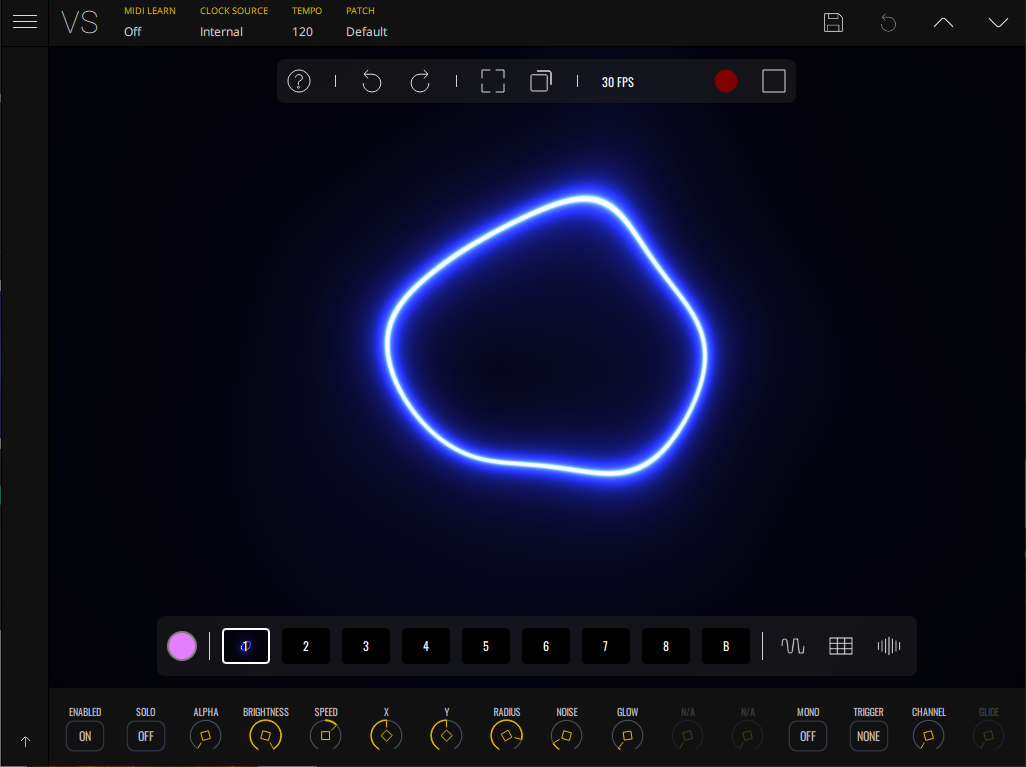
At the core of VS Visual Synthesizer is an engine powered by real-time, procedurally generated graphical shaders. Each shader renders dynamic visual geometry through its own parameters, offering vast potential for customization and expression. VS includes 53 stunning, hypnotic shader materials that can be tweaked, layered, and modulated to create captivating visuals. A curated factory bank of presets by acclaimed audiovisual artists provides an inspiring starting point for live shows and creative exploration.
Polyphonic Visual Voices
We’re taking polyphony into the visual domain with the concept of ‘visual voices’. Just like pressing multiple piano keys produces the sound of several notes together, each VS layer can display multiple visual voices of its material.
Layers
VS - Visual Synthesizer's layer-based rendering engine allows you to stack and blend 8 material layers, on top of a custom background image/video layer, with the ability to access and control all layer parameters for a deeply customizable range of creative possibilities.
Built-in Audio Visualizers
Alongside its generative shaders, VS includes specialized shaders for real-time audio waveform and spectrum visualization. Each layer can receive audio input, feeding the shader with waveform and frequency data to drive dynamic visual responses. Users can fine-tune the behavior with controls for audio gain, buffer size, and spectrum decay, making it easy to create precise or abstract audio-reactive displays tailored to any sound source.
The Shape of Sound
A nod to classic analog gear, the Oscilloscope material visualizes audio waveforms in real time. It’s not only technically informative but also visually captivating. Use it for waveform-inspired designs that trace the raw energy of your sound with geometric elegance. Perfect for glitch aesthetics, experimental music, and adding a scientific edge to visuals.
Your Media, Your Style
VS supports loading images and videos into layers, allowing artists to blend their own content into the visual mix. Use modulations and blend modes with your logos, animations, and textures to make your own branded reactive show.
Say It Visually
Display custom text as a reactive visual element. Perfect for live messages, lyrics, or branding, the Text material can be modulated like any other material, giving life to your words with rhythmic movement. From pulsing titles to glitching typography, text in VS becomes an expressive part of the audiovisual narrative.
Live Feeds, Live Layers
Feed real-time video from external apps like Resolume or TouchDesigner directly into VS layers. Treat these inputs like any other source—modulate, blend, and transform them for seamless integration into your visuals.
Capture Motion, Create Emotion
Turn your webcam or external camera into a visual source. Capture live video input and apply real-time modulations, mixing it with other visual layers. This is great for adding a personal touch, VJing with physical media, or incorporating live audience visuals into a show.
Visual Feedback Loops
Route the output of the rendering engine back into one or more layers to create powerful visual feedback loops. This feature enables endlessly evolving visuals by recycling the final image as a source, allowing for effects like trails, echoes, fractals, recursive distortion, or infinite zoom. It’s a creative technique that adds a generative character to your visuals with minimal setup.
Modulation Made Simple
VS features a powerful modulation system that brings visuals to life with dynamic, responsive motion. With 2 EGs, 4 LFOs, and 4 audio modulators, users have a versatile toolkit to shape how visuals behave and evolve. Modulation sources can be routed through an intuitive matrix for precise control over parameters across visual layers, making it easy to assign and fine-tune modulation, unlocking rich, expressive visual feedback.
Open the DAW to a world of visuals
VS - Visual Synthesizer also comes in a range of plugin formats which can run inside a DAW - such as Ableton Live, FL Studio, or Logic - to react directly to your compositions in real time. Route your MIDI and audio tracks to VS and create amazing visuals right inside your DAW.
Run the Show
Users can now create a list of presets that play back in order, each for a defined duration, with optional fade-in and fade-out transitions. Alternatively, use your MIDI controller to trigger the presets yourself. Whether you're preparing a predefined set for a live show or setting up a looping visual installation, the Playlist makes it effortless to run a complete audiovisual experience with minimal manual control.
Built-in Shader Editor
For the shader enthusiasts, VS - Visual Synthesizer features a shader editor, giving you full control over your materials. Write your shaders from scratch, or port existing shaders from ISF, GLSL Sandbox, Shadertoy, or ChatGPT-generated code. The real-time preview lets you see changes instantly, streamlining your shader development experience.
Built-in Recorder
VS - Visual Synthesizer offers a built-in recorder, allowing seamless creation of high-quality videos up to 4K 60 FPS in landscape or portrait orientation, with no external software. Synchronize the recorder with the internal player or your host DAW’s transport for smooth, perfectly timed recordings.
Integrations
VS seamlessly integrates with a wide range of software tools, allowing real-time visuals across various creative workflows. Thanks to Syphon, Spout, and NDI support, VS easily connects with other applications, making it a powerful tool for live performances, streaming, and interactive installations. Whether you're a musician, VJ, content creator, or digital artist, VS works alongside the industry’s most popular platforms to enhance your visuals with effortless connectivity.
Live Performance & VJing
Sync VS with VJ and projection mapping software such as Resolume Arena & Avenue, VDMX and MadMapper to enhance your live performances.
Streaming & Broadcasting
Take your live streams to the next level with real-time visuals when using OBS-Studio and other streaming platforms that integrate with Syphon and Spout.
Generative & Interactive Art
Use VS in creative coding and interactive media environments such as TouchDesigner, Max/MSP/Jitter, Notch.
Who is this for?
Live Performers
Enhance your performances with real-time visuals that react to your music. Whether you're a DJ, electronic producer, or part of a band, VS – Visual Synthesizer brings an extra layer of immersion to your live shows.
Content Creators
Create dynamic, sound-reactive visuals for music videos, short films, and digital art projects. VS offers an intuitive way to generate captivating motion graphics without complex animation tools.
Streamers & VJs
Make your streams and live events more engaging with real-time visuals that sync with music and voice. Ideal for Twitch, YouTube, and professional VJ setups, VS adds a unique visual dimension to your content.
New media artists
Perfect for artists, designers, and event organizers looking to create immersive, audio-driven visuals for installations, galleries, and projection mapping. VS seamlessly blends sound and visuals for unforgettable experiences.
Perplexon
We’ve worked with the awesome new media artist Perplex On to bring you a factory bank of presets bursting with creative ideas to get you started, easy to adapt and make into your own style.
Features
- 8 Polyphonic visual layers with blend modes
- 4 voices per layer
- Multiple layer sources: shaders, audio visualizers, image, video, and text
- Real-time input sources: camera, Syphon / Spout, and render output feedback
- 1 background layer with a solid color or image / video
- Factory content amounting to 57 shaders, 63 presets and over 100 images and videos
- Multiple expansions with new shaders, videos, images and presets in a variety of styles
- Built-in shader editor for creating your own materials
- 4 multi-shape LFOs with sync and MIDI trigger options
- 2 MIDI-triggered envelope generators
- 4 audio-triggered modulators with peak and frequency band modes
- Modulation Matrix per layer
- Built-in video recorder
- Preset Playlist with duration and transition time settings
- Audio & MIDI player for loading your music
- Midi Mapping Manager
- Media Manager
- Up to 60 FPS, 4k output with horizontal and vertical portrait rendering
- Syphon / Spout and NDI output

Synth Anatomy
Vienna-based music technology website focused mainly on hardware and software related to electronic music production.
"Visual software tools are often very complex programs like DAWs, which you have to learn a long time before you can get a result. Learning by doing. It looks clearly hands-on and promises instant visual fun."

Attack Magazine
Electronic music online magazine and store dedicated to dance music production and culture
"Imaginando VS is an enjoyable and useful tool for expanding your creative reach. The fact that you can run it in your DAW makes it almost an extension of your musical ideas."

Sound & Design
Tutorials & Articles on Electronic Music & Visuals
"I like the way the app’s design supports the whole learning process, being approachable to both complete novices and experienced software programmers alike"
macOS
- macOS 12.0+ (64-bit)
- VST2 / VST3 / AU / Standalone
Windows
- Windows 10+ (64-bit)
- VST2 / VST3 / Standalone
MIDI and auto input supported across all formats