Log In

Free gifts available with your purchase

Taste the Power of the Liquid Modular
Modular Synthesizer for complex and organic sounds. Choose from the most particular synthesis methods, let yourself be charmed by the Matrix and morph between the most improbable variations of your sound. Four sequencers are pulling the strings behind the curtain. Factory is polyphonic supersonics!
Vibrant, Raw and Spectacular
Evolve your Sound with Minimal Effort!
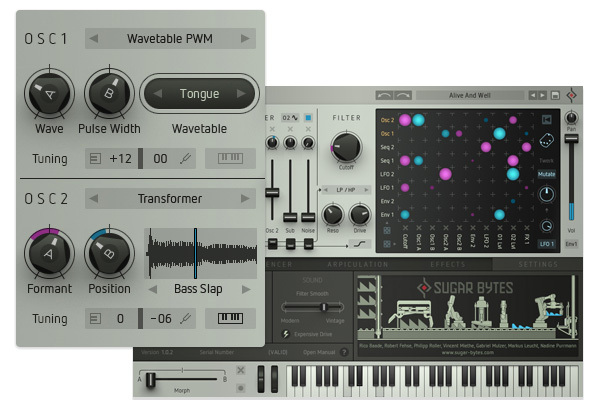
The 2 oscillators are the tonal ore and each of their 10 different modes is an instrument in its own right. Besides non-aliasing VA-Sync and fractal oscillators, we actually tackled wavetable, waveguide and FM. We also lifted Cyclop's complex Transformer tool and made it polyphonic: Feed your samples to the oscillators!
Factory opens up new paths to creative sound design – so it’s more than simply another instrument. Generative and durable sounds are child’s play, as well as the direct bass to the beat.
Your Beats Bore the Cat?
Give Factory a go and Combine what no one Else has Combined Yet!
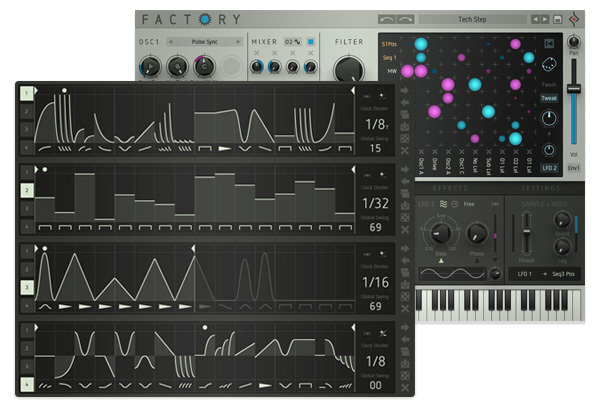
Features galore: Looping Envelopes, Oneshot LFOs, bipolar sequencers, Sample + Hold taking it to the top. Wouldn't make sense to list everything here, but whatever you need for your sound will be there and right where it belongs.
Factory's 4 sequencers are the secret force in the background. They can trigger the envelopes, LFOs or the Arp. Or evoke the uncertain, intricate triplet rhythms, aimless sweeps…
Arpiculation
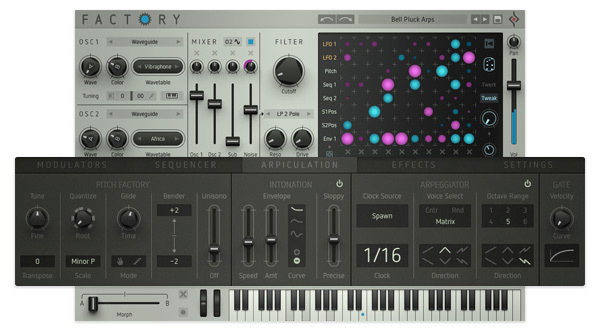
Arpiculation is Arpeggiator and Intonation
All life is imperfect, yet endlessly complex in its beauty. Organic pitch envelopes, slight fluctuation of tone, pitch-quantizing with a fine blend of scales. The Arpeggiator as Factory's data hydra, triggered by God knows what and voice selection via the matrix.
The Arpiculation Page contains all settings and features for pitch manipulation.
Liquid. Mod. Matrix
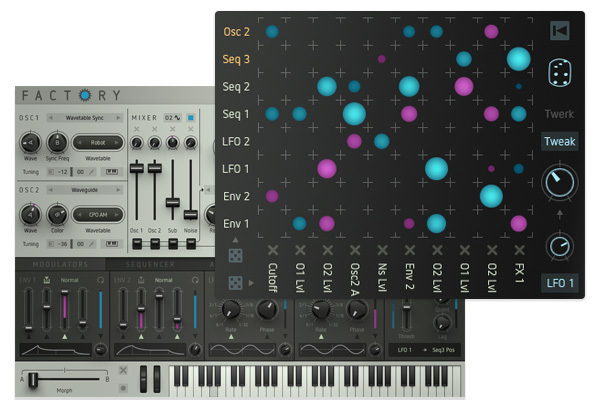
The 'Switchboard of Sound...' Next Level...
Routing 8 sources to 10 targets makes us happy. No retro plug matrix, bipolar mod amounts get the job done. Modulatable. Morphable.
And then there's the random button, an optical feast, blurring your vision for a moment or two. The twerk section with its shenanigans. Get things done with 36 modulation targets. A must have these days.
Not your Average Preset Clicker
 .
.
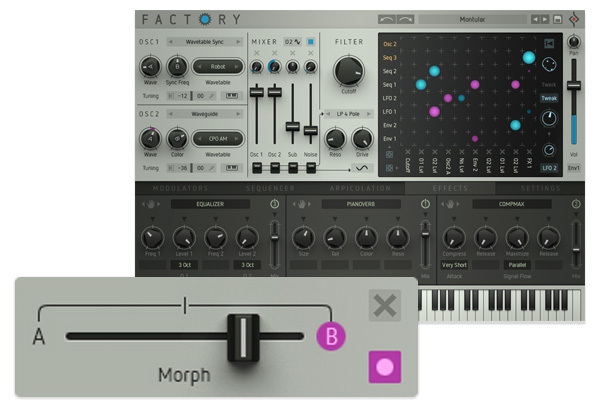
Crank the Crossfader From a Tricky Beat to Some Mellow Chords
Morphing one sound into another, this is contemporary stuff. Set start and finish - then crossfade to the most gripping progressions. Each morph position can be determined as a new starting point.
Sample+Hold: 36 curves with multi-trigger blow out the candles of boredom. This is where the synth came from. It all began with a small matrix and this. Trigger from anywhere and sample a value from somewhere else. Quantize the result and put a lag on it!
Sounds & Presets
Inspiration and creativity from the first launch. Highly addictive:
- Finding the perfect sound for any genre couldn’t be easier thanks to Factory’s innovative and clearly structured preset browser
- Sound designers who worked this beast for painful weeks: SolidTrax, Ryn Manning, Monolog, SiriusMo, Kabuki, SoundBits, Don Garbutt, Plaeground, Tom Cosm, Mikael Adle (Leap Into The Void) and the team here at Sugar Bytes
Features
- Poly Synth with Mod-Matrix and Sequencers
- 2x10 Oscillator Engines
- Sub-Oscillator with Ring Modulation
- Noise Generator with 5 colours
- 8x10 Mod Matrix with 36 targets
- Morph Fader, 2 States & Copy/Paste
- Sample & Hold Modul
- 8-voice VA-Sync, Wavetable, Waveguide & Fractal Synthesis
System Requirements
Mac
- macOS 10.12 or higher (Apple Silicon M1 supported) (64-bit only)
- VST2, VST3, AU, AAX & Standalone Application
Windows
- Windows 7 or higher (64-bit only)
- VST2, VST3, AAX & Standalone Application
Important note: This software is only available in 64-bit format for both Windows and macOS and will not function on 32-bit systems.
Awards


Producer Spot
Producer Spot provides the best in music production resources, news, tutorials, reviews and more.
”An extremely powerful synth which has no problems creating sounds ranging, from beautiful evolving textures to hard hitting leads, to gut punching basses and could even be used to create realistic lifelike sounding instruments".
Computer Music Magazine
The world’s best selling magazine dedicated to making great music with your Mac or PC.
”The German geniuses unleash yet another mould-breaking plug-in, this time an electrifying polysynth. Everything comes together brilliantly in an instrument that's surprisingly easy to use. It's a winner with a character of its own".
Keyboard Mag
The most trusted information resource for keyboard players and producers in all styles of music.
"One of the most satisfying synths to cross my hard drive this year. It’s astonishingly powerful, sounds fantastic, and invites experimentation. An unbelievable amount of synthesis power for the price.”