


 Log In

Free gifts available with your purchase
Please Note: This is an Upgrade for Users of Strum GS-1 (Excluding Strum Session)
Your New Session Guitarist
Strum GS-2 is a plug-in for the production of guitar tracks. With a huge collection of acoustic and electric guitars, automatic chord recognition, sophisticated chord voicing, integrated strumming and picking action, MIDI riff library, amp and effects, playing guitar on a keyboard has never been so easy.
What's New?
We’ve completely reinvented Strum GS-2. You didn’t know you could play guitar so well.
NEW Acoustic and Electric:
- The acoustic and electric guitars are now included in a single plug-in
NEW Guitar Library:
- A completely reviewed factory library with a huge collection of production-ready acoustic and electric guitars.
NEW MIDI Loop Library:
- An extensive set of strumming patterns in MIDI loop packs covering different techniques and musical styles.
NEW Modeling:
- Completely revised string module, finer pick/finger interaction, integrated coupling at the bridge, and precise body response for a super rich and natural tone
NEW Keyboard Mode:
- The new Keyboard mode lets you play lead lines and your own voicings.
NEW Loop Mode:
- The new Loop mode gives you direct access to elaborate rhythm figures—which you can pick from a large collection of MIDI loops covering many musical styles—to supplement your chord progressions.
NEW Strumming Engine:
- Completely revised strumming engine for expressive and natural strumming.
NEW Compressor and Equalizer:
- These new additions are perfect to add punch and definition to your sound, letting you cut through any dense mix or stage.
NEW Limiter:
- The new output limiter protects your ears and monitors during experimentation with the synth’s parameters while providing a maximum of distortion-free dynamics.
NEW Streamlined Interface:
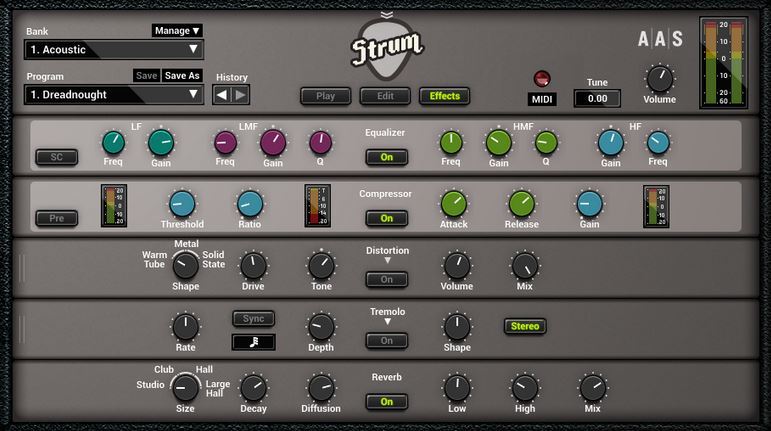
- Redesigned from the ground up, the new interface now divides Strum GS-2 into three panels: Play presents shortcuts to the performance and effect parameters including bypass switches for quick edits; Edit lets you tweak and create your sound; while FX supplies equalizer, compressor, multi-effect, and reverb processors for a final sheen.
NEW Bank and Program Manager:
- Strum GS-2’s new manager allows simple and efficient organization, backup, and sharing of your sounds.
NEW Native 64-bit AU, VST, and AAX Plug-ins:
- Strum GS-2 now runs in native 64-bit on Mac OS X and Windows making it compatible with the latest sequencers.
UPDATED Overhauled Effects:
- Reinvigorated and polished, Strum GS-2’s multi-effect processor features our best sounding chorus, delay, phaser, flanger, distortion, notch filter, wah-wah, auto-wah, and reverb to date!
Acoustic + Electric
The convenience of having all your guitars at the flick of a switch.
Pick a Guitar from Your Collection
With more than 200 different acoustic and electric guitars—nylon, steel, single coil and humbucker fitted pickups, clean, crunchy, distorted—, a 2-channel amplifier, spring reverb, speaker cabinet, and effects as well as 102 MIDI riffs covering many musical styles, Strum GS-2 packs everything you need to create guitar parts for your productions.
- Acoustic—63 presets
- Acoustic Experimental—40 presets
- Electric Clean—80 presets
- Electric Crunch—34 presets
- Electric Distortion—25 presets
- Electric DI—11 presets
- Acoustic MIDI loop packs—406 loops in 58 packs
- Electric MIDI loop packs—301 loops in 43 packs
Playing a Guitar on a Keyboard Has Never Been Easier
Creating a realistic guitar track from samples is a tough job. Guitar players voice chords differently, strumming is not easily reproduced on a keyboard, and guitar players use all sort of techniques such as palm muting, scratching and sliding simply not available on a keyboard. Strum GS-2 now does all of this for you!
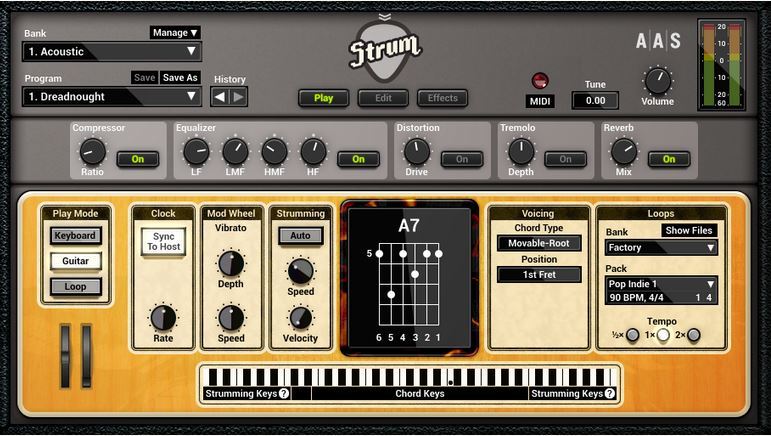
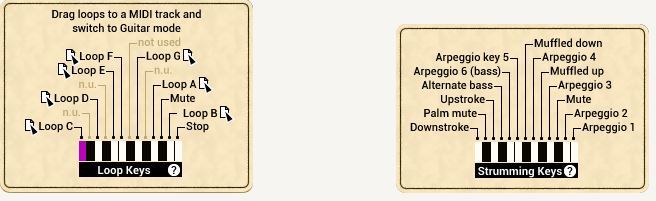
Strum with MIDI Loops;
- Use the vast collection of recorded strumming patterns over the chords you play and find inspiration for your track. Drag and drop the loop to your host sequencer and make it perfect for you song.
The Right Voicings for the Chords You Know:
- Strum GS-2 chord library contains basic and extended chords available in open, movable, or drop voicings. Play the chords you know and Strum voices them automatically as a guitarist would.
Strum on Your Keyboard:
- Trigger down and upstrokes, scratches and mutes, or create picking patterns using the arpeggio keys.
Articulation and Expression:
- Slide and bend with the pitch wheel or aftertouch. Add vibrato with the modulation wheel. Natural hammer-ons and pull-offs when playing leads.
Guitar Craftsmanship
Have you ever had the chance to create your own guitar? Strum GS-2 allows you to do just that by controlling every aspect in the making of your instrument.
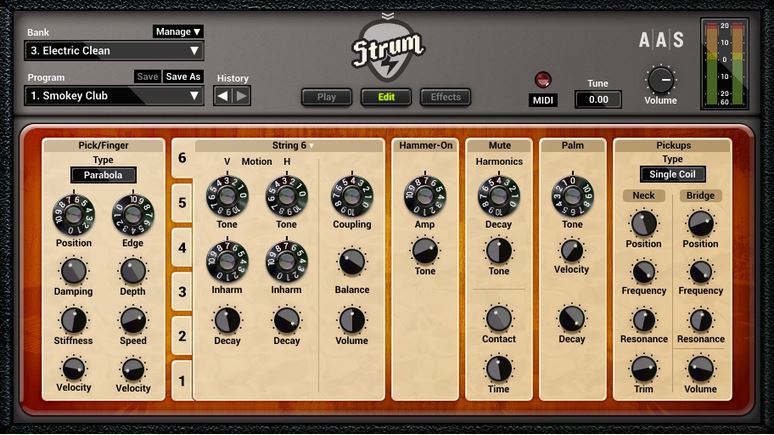
Picks and Fingers:
- Hand picking or playing an heavy riff? Use a pick that is rounded or sharp, stiff or soft. Dig into the strings or use a light touch, play near the bridge or towards the neck for an evolving tone.
String by String:
- Select material and natural decay for each string. Precise control of coupling and interactions at the bridge breath life into your tone with beating and organic envelopes.
Pickups:
- Whether they are single coils or humbuckers, pickups are a fundamental part of the electric guitar sound. They shape the whole instrument’s response and their multiple configurations give tremendous tone flexibility.
Body Shopping:
- The soundboard of a guitar radiates vibrations from the strings. Choose a body size to colour the sound with specific resonances and find the right character.
Mutes and Scratches:
- As on a real guitar, strings interact with the players hands and frets. Fine tune your rhythm parts and rifs with palm muting, scratches, and hammer-ons.
Bare Naked - All Suited Up
You’ll love the pure raw sound of Strum GS-2, but the built-in effects will bring it to so many places that you’ll enjoy having them on hand. And you have a chock-full of them to choose from: compressor, equalizer, delay, distortion, phaser, chorus, flanger, wah wah and notch filters, and reverb.
The Community Has Good Things to Say About Strum…
Jan Peter Eerenberg, Interface - 'Top Techniques'
- "AAS has succeeded in making a good acoustic guitar simulation. The diversity of the various attack techniques is simply top. And with the soon to be release electric version, this is quite exciting."
Mario Schumacher, Beat 'Extremely Expressive - 5/6 Rating'
- "Strum presents itself as an extremely expressive and playable instrument."
- "Our test revealed very favorably the full sound and dynamic response of Strum."
- "What's exremely impressive is the multitude of chords the program recognize."
Nick Magnus Sound On Sound - 'Remarkably Realistic'
- "The modelled sound is remarkably realistic and with care and practice fairly convincing strummed and arpeggiated rhythm parts can be achieved, as well as expressive solo lines."
- "Strum is entertaining and great fun to use, and a valid alternative to sample-based guitar emulations."
Marty Cutler, Electronic Musician - 'Utterly Convincing - 4/5 Rating'
- "Strum’s models are as good as it gets, and its accurate articulation and sophisticated chord voicing make it an utterly convincing chord-melody instrument, an excellent solo voice, and an agile accompanist. I recommend it highly."
Neat Features
- Standalone operation for quick jams and experimentations
- Real-time control over any parameters via your MIDI controller knobs, faders, and switches
- MIDI clock, tap, and host tempo synchronization for effects and modulations
- Relaxed editing with unlimited undo/redo capability
The Benefits of Physical Modeling
- Sound manipulation at the source core
- Presets load in a flash
- Super smooth dynamics—no velocity layers!
- Small memory footprint—less than 256 MB of RAM per instance
- Installs in less than a minute—less than 32 MB on disk
System Requirements
WINDOWS · MAC OS X · 64-BIT & VST · AU · RTAS · AAX NATIVE · STANDALONE
AAS products are compatible with nearly all DAWs...
- Ableton Live
- Apple GarageBand
- Apple Logic Pro
- Apple Mainstage
- Avid Pro Tools
- Bitwig Studio
- Bandlab Cakewalk
- Cockos Reaper
- Image-Line FL Studio
- MOTU Digital Performer
- Native Instruments Komplete Kontrol
- Native Instruments Maschine
- Presonus Studio One
- Propellerhead Reason
- Steinberg Cubase
Mac minimum system requirements*
- macOS 10.11 (El Capitan) or later
- Intel Core i5 (circa 2015), Apple M1 processor or later
- 64-bit DAW
PC minimum system requirements*
- Windows 10 64‑bit or later
- Intel Core i5 (circa 2015) processor or later
- 64-bit DAW
*The minimum system requirements mentioned above are for standalone usage. For plug-in usage, please refer to your DAW software requirements (Sonar, Pro Tools, Cubase, Live, Digital Performer, Logic Pro, etc.).
- This is an Upgrade for Users of Strum GS-1
Awards


















