


 Log In

Free gifts available with your purchase

Special Shifting Synth
Most digital synths out there offer easily accessible functions, pristine digital quality and precisely tuned tones. “Imperfect” aims to break that trend with wavering detuned oscillators, modulating effects and a whole host of other functions designed to put the analogue fun back into synth programming.
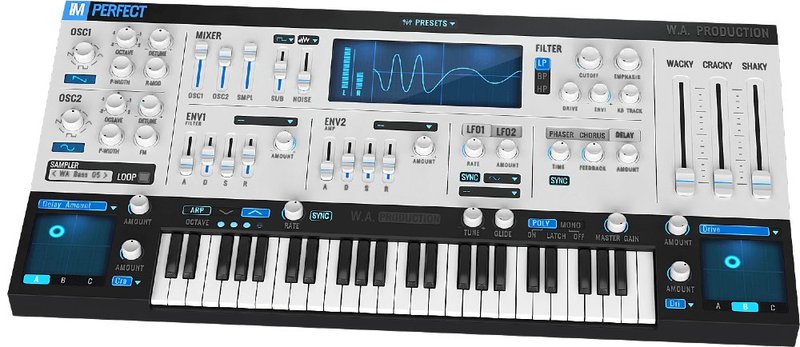
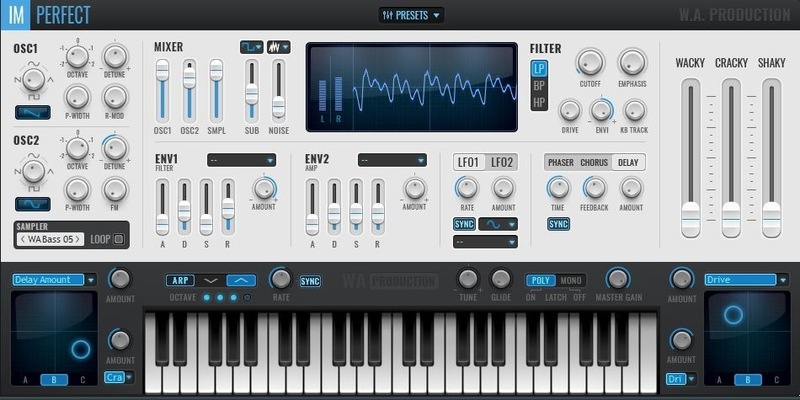
The architecture behind Imperfect will be familiar to anyone who’s used a soft-synth before, with 5 powerful oscillators, envelopes, filters, LFOs and an arpeggiator. Where things start to get interesting is with the 3 special modulation sliders. Named “Wacky”, “Cracky” and “Shaky”, these functions introduce modulated effects, saturated harmonics and tuning inconsistencies. Make your pads sound authentically analogue and keep your arpeggios moving by adjusting these sliders to create all sorts of circuit-bending scenarios. The modulations don’t stop there; almost any of Imperfect’s parameters can be assigned to the constantly shifting dual X/Y pads and played live or programmed with MIDI automation.
5 Oscillator Modules
Mix 5 different oscillators to create the basis of your sound. Oscillators 1 and 2 can each be morphed between 4 different waveforms, then layer up a sampled waveform, sub-oscillator and noise profile. Ring and Frequency modulation can easily be dialled in, along with octave, detune and pulse width settings.
260 Waveforms or Load Your Own
Preset waveforms can be loaded into oscillator 3 and there are 260 different ones to choose from. If you still feel limited then don’t worry, just load your own WAV file into Imperfect and then use the processing power to transform it into a totally different sound.
Catch the Drift
Wacky, Cracky and Shaky sliders dictate the amount of analogue-style processing that Imperfect performs. “Wacky” increases the amount of the 3 effects (phaser / chorus / delay) to push the tone into drifting and delayed space. “Cracky” pushes up the saturation level to introduce harmonics and dirty up the signal. “Shaky” modulates the tune from subtle detuning at low levels to full-on pitch modulation when pushed harder.
Dual X/Y Modulation Pads
Not one, but two X/Y pads can be assigned to a total of four different parameters and then be automated or played live. 3 different performance modes are available to automatically twist your timbres into unrecognisable shapes.
Visual Feedback
The central scope accurately displays the waveform you’re creating, along with left and right channel output meters.
Full Synth Controls
All the functions you’d expect of a plugin synth are present and correct within Imperfect, including filter module, dual envelopes, two low-frequency oscillators and an effects section. There’s no compromise to functionality or performance with Imperfect.
Arpeggiator
Set Imperfect to Arp mode for up to 4 octave automatic arpeggiation. Rate can be synced to your host BPM at a variety of note intervals, or you can set it to free running. Latch or unlatch the arp function with the selector switch.
Global Parameters
Imperfect features all the standard global controls you’d expect from a quality synth plugin. Set the global tuning and glide timing. Choose mono or poly modes up to 16 voices.
Presets
Including hundreds of expertly programmed factory presets, Imperfect has an onboard browser where you can audition sounds prior to loading. You’re sure to find the perfect starting point for your own creations and they’re easy to save and recall.
Forgot about static synth sounds and venture into the world of valves and resistors with Imperfect’s vintage-sounding processing. Never look back, unless that’s the sound you want!
W. A. Production are real-life producers making creative plugins to help you achieve studio quality processing quickly and easily. Enjoy!
Features
- Fully functioning synth with analogue-style imperfections
- 5 Oscillator modules
- 3 Unique transformation parameters
- Hundreds of factory presets
- 260 Preset Waveforms & load your own samples
- Dual X/Y pads
- Filters & Effects
- Real-time waveform display
- Dual Envelopes & LFOs
- Resizable Window
- Hi DPI support/Retina display
- Native M1 Apple Silicon Support
- Full PDF Manual & Tutorial video
System Requirements
- VST - Windows 8 or later (32/64 bit)
- VST / AU - macOS 10.13 and later (64-bit only)
- AAX - ProTools 11 or higher
Please Note: AAX format requires Pro Tools 11 or higher.
Important Note for Mac Apple Silicon users: Before purchasing, please review the current compatibility status of this plugin on your system here.

Tekhoover
DJs, Producers & Remixers.
"I'm using this plugin every day, I really like it!"

The Sample Cast
The show for sample library geeks, plug-in fans and people who love toys that make noise.
"Imperfect is going to be great for layering with other synths and making my own drifting analog patches. It’s back to the 70’s for me!"


