


 Log In

Free gifts available with your purchase


All-Purpose Studio Essentials
Legends, Staples, Evergreens
One for All
If you could take only one Usynth title to a desert island, this should be the one. A wide collection of essential synth sounds. From basses to polys, from leads to arpeggios. This is the comprehensive swiss knife for every occasion.
What’s in there?
- Fully Customizable Sequencer
- 2 Individual Layers per Note
- Custom Finisher featuring 90 Presets
A Journey to the Core
Peter Gorges, the chief sound designer behind CORE, is a revered industry-veteran. He has worked on several milestones of synthesizer history and brings more than four decades of experience to the table. This is his collection of must-have synth aesthetics.
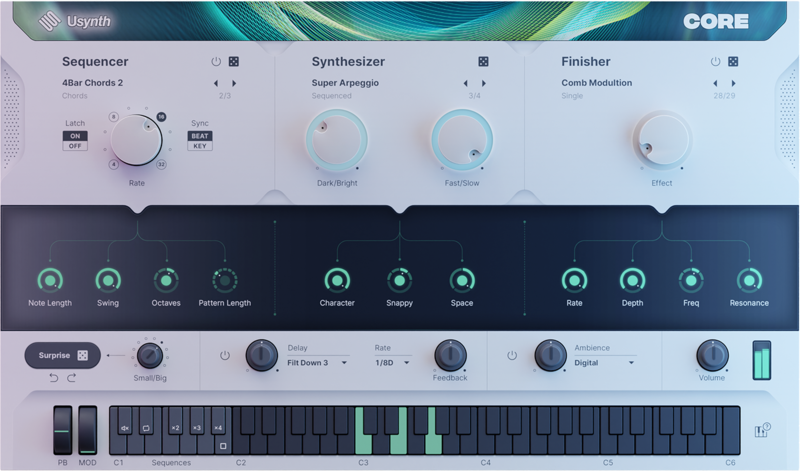
Features at a Glance
Usynth features a built-in Delay unit that’s simple to set up, yet super-flexible. Instead of a dozen parameters, you have to set, simple and complex Delay configurations are already prepared - all you have to do is select a Delay preset and adjust Mix and Feedback.
- Modulation - Each Synthesizer preset in Usynth has been set up with what the sound designer deemed the most useful modulation. You can dial it in using a Modulation controller/wheel on your keyboard.
- Global Keyboard Settings - Chord: This lets you play “1-finger-chords”, where one key creates an entire chord. Click under the Chord label to open a menu of available chords.
Endless Sonic Expressions
The UJAM App is a quick and easy way for you to install, authorize, and update all your UJAM software. Load Usynth using the latest version of the App. The UJAM App is at the heart of your sound.
Try Core Today
It’s time for you to have a synth that greases the wheels! Get the Usynth Bundle or pick your genre title.
System Requirements
UJAM App
- Usynth requires the latest version of the UJAM App to run on your computer
- The OS requirements below apply to the App
Operating Systems
- Windows 10 or later (64-bit only)
- macOS 10.14 - macOS 14 (64-bit only)
- You may have success on earlier versions but UJAM doesn’t support and fully qualify them
For up-to-date info on UJAM products support for VST3, AAX, and Apple Silicon, please refer to the UJAM website.
Minimum Requirements
- 8 GB of RAM
- 450 MB of free Disk Space
- 1280 x 768px Display
- Internet Connection
Plug-in Formats
- VST 2, AU 2
- AU 2 version only compatible with Logic Pro X and newer
Delivery Format
- Downloadable Installer File
- Usynth requires the latest version of the UJAM App to run on your computer
- With your first Usynth title, the UJAM App will also stealthily install the Usynth plugin which hosts all titles
Authorization
- E-mail and Password Within the Plug-in
Supported Standards
- MIDI
Reviews Summary
While it aims to provide a helpful overview, it may not capture every perspective or detail. We encourage you to read individual reviews to make an informed decision.
Users widely praise this synth for its ease of use, excellent sound quality, and ready-to-play presets that simplify modern music production and beat making without complex sound design routines. Many highlight helpful features like simple macro controls, the one-finger chord mode, and the randomizer, considering it a great value for the price. However, some users note drawbacks such as limited deep tweakability, a restricted selection of sounds compared to full versions, and occasional reports of high CPU usage and DAW crashes.


