


 Log In

Free gifts available with your purchase
The Comeback Club Kid
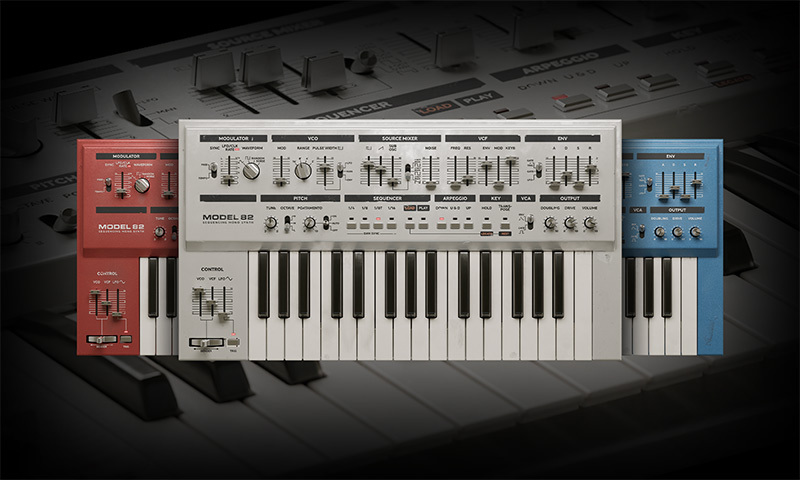
The raw sound of the original hardware is the stuff of dance dreams. But the unique and inspiring sequencer and arpeggiator took it from a muted debut to full techno colour. Softube recreated every speck of the original circuitry, interactions, and straightforward workflow to give you the only plug-in with a sound, feel, and interface that stays true to the most-used mono synth of the ‘80s and ‘90s.
Model 82 Sequencing Mono Synth is in the house.
- A '90s techno idol accurately emulated for faithful sound and feelings
- The authentically inspiring sequencer and arpeggiator of the up-all-night original
- Two versions included: the instrument and five modules for Modular
The Art of Rock & Roll Science
When it comes to creating equipment that enhances workflow and offers the most-supreme quality of sound, Softube's reputation is rock solid and illustriously long. Softube's partnerships with premium brands like Tube-Tech, Solid State Logic, Chandler Limited, Weiss Engineering, and Trident have traversed decades.
Softube constructed Model 82 Sequencing Mono Synth on this legacy of creativity, passion, and enthrallment with details. Because to create tools that innovate and elevate, you have to have heart, soul, and Rock & Roll Science.
Grab it and GO
The original has been called the sound of electronic music. And Softube's Model 82 Sequencing Mono Synth embodies those iconic lead, bass, and arpeggiated sounds in plug-in perfection. Every circuit and interaction is modelled in glorious detail to preserve the proper interplay between sections and the unmistakable dry mono sound. It's fun, sounds fantastic, and is still quick and easy to use - more so in fact.
More fun than most DAWs allow
The hardware put techno on a roll. And the sequencer and arpeggiator were the main reason. Devotees could let go of the keyboard and focus on wielding the oscillator, filters, and other controls. Softube Model 82 plugin provides the same performance and experimentation opportunities optimized for the DAW. And you don't have to be a trained pianist to play it. Run the sections freely based on the Internal Clock/LFO speed or DAW synced them to 1/4, 1/8, 1/16, or 1/32. The outcome is the approachability and spontaneity that made the original a sleeper hit.
Operation defrag
Softube wouldn't be Softube if they didn't give you an accurate emulation, plus added modern features. Softube has kept the delightfully straightforward workflow but adjusted the labelling and layout so you can find the sound you want even faster. Softube gave Model 82 a new drive knob that lets you push it, just like they did in the heyday, even more readily. And a new doubling knob enables Model 82 to hold its own in modern stereo productions while retaining its sonic essence.
What's Included
Model 82 Sequencing Mono Synth
This synthesizer gained infamy at the all-night dance parties of the late '80s and early '90s. Softube's expert modelling of the controls and circuits - including the famous sequencer and arpeggiator - makes for an authentic and easy-to-use instrument. The added modern features - like doubling and drive - and a refreshed layout help it excel in the DAW. Play it live or put it on a production to effortlessly get the cutting techno sounds that took it from commercial flop to underground success.
Model 82 for Modular
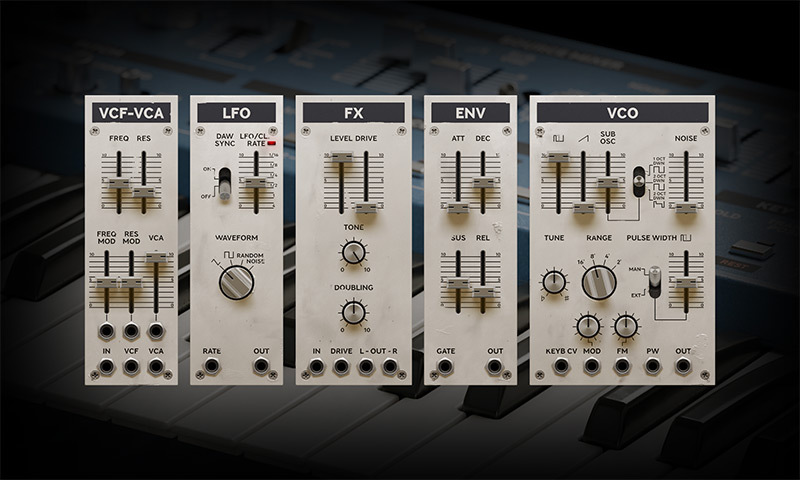
Model 82 for Modular offers five fully integrated instrument sections as individual modules: VCO, LFO, VCF-VCA, FX, and ENV. Plug them into your Eurorack system and add more creativity and inspiration with every module. Combine single components of the synthesizer in a modular workflow to build patches - or one monster synth patch! - and get the authentic sounds that defined techno. Or create inconceivable combinations that no other hardware or software can deliver.
Features
- An accurate emulation of the most-used mono synth of the late '80s & early '90s.
- The dry mono sound of the original hardware, authentically captured.
- The sequencer and arpeggiator that defined techno - now with DAW sync.
- Two versions included: the instrument and five modules for Modular.
- Three original, selectable color schemes for max inspiration.
- Added modern features, such as stereo doubling and drive.
- An enhanced version of the original, easy-to-use layout.
- A side panel with velocity and aftertouch control of the VCF and VCA.
System Requirements
- macOS Big Sur 11, Monterey 12, Ventura 13
- Windows 10 (64-bit), Windows 11
- Softube account
- iLok account
- Computer with AU, VST, VST3, and/or AAX-compatible DAW host software
- Internet access (for downloading installers and managing licenses)
Supported CPU Families
- Apple macOS computers with Intel Core i3/i5/i7 or Apple silicon (M1 or newer) CPU. Apple silicon is supported natively.
- Windows computers with quad-core Intel Core i3/i5/i7 or AMD quad-core processors with SSE 4.2 support.
- Other Intel processors (Celeron, Pentium, and Xeon) are compatible if they support SSE 4.2 instructions.
Supported Host Software (DAW)
Any 64-bit VST, VST3, AU, or AAX (Pro Tools 11.0.2 or higher) compatible host application should work. However, due to plug-in host differences between DAWs—and our rigorous standards—Softube only officially test their plug-ins and instruments in the most recent versions of Pro Tools, Logic Pro, Cubase, Ableton Live, Studio One, and Reaper. Softube plug-ins are not tested regularly in non-listed systems. They will likely work if the system requirements are met. However, the manufacturer cannot guarantee a solution for issues in unsupported systems.
Softube strongly recommend using VST3, as some of their plug-ins have features that are not present in the older VST format. Supported sample rates: 44.1, 48, 88.2, 96, 176.4, and 192 kHz, in both mono and stereo. The most recent maintenance release of your DAW application is recommended. AAX DSP is not currently in active development. TDM/VENUE/RTAS are no longer supported. See Legacy Installers.
Important Note: Make sure that you always use the latest iLok License Manager. It is not included in the Softube installer but can be downloaded from www.ilok.com
Tycho
2x Grammy nominee
"Model 82 captures all of the quirks and nonlinear qualities that first attracted me to analog synthesis. There’s a character and playability that I haven’t heard in other software synths. This is a truly special instrument and an authentic tribute without peer."
Dave “Rave” Ogilvie
Skinny Puppy, Tool, Nine Inch Nails, Ministry, Marilyn Manson, KMFDM, David Bowie, Mötley Crüe, Queen
"Always being a huge fan of Monophonic synths, the Model 82 is a welcome addition to the Family! It is an intense punchy synth that has the awesome ability to stand out in a track. The Model 82 is extremely flexible yet simple to use, and now a great part of my arsenal."
Reviews Summary
While it aims to provide a helpful overview, it may not capture every perspective or detail. We encourage you to read individual reviews to make an informed decision.
Overall, users praise the Softube Model 82 as an outstanding, accurate, and punchy emulation of the classic Roland SH-101, highlighting its authentic sound quality, low-end punch for basslines, immediate hands-on interface, and ease of use. While most consider it one of the best 101 emulations available—often rivaling hardware and competitors—a few reviewers noted limitations tied to the original hardware design, lack of MPE support, mixed opinions on the preset quality, and a couple of users who found it unremarkable or preferred alternative plugins.


