


 Log In

Free gifts available with your purchase

The Finest in Analog Sounds
Ultra Analog performs as a unique and powerful synth that is fast, easy, and remarkably versatile.
Upgrade Note: This is an Upgrade for owners of Ultra Analog Session. The full version of Ultra Analog VA-3 is also available.
What's New
AAS have streamlined Ultra Analog and brought it to a whole new level.
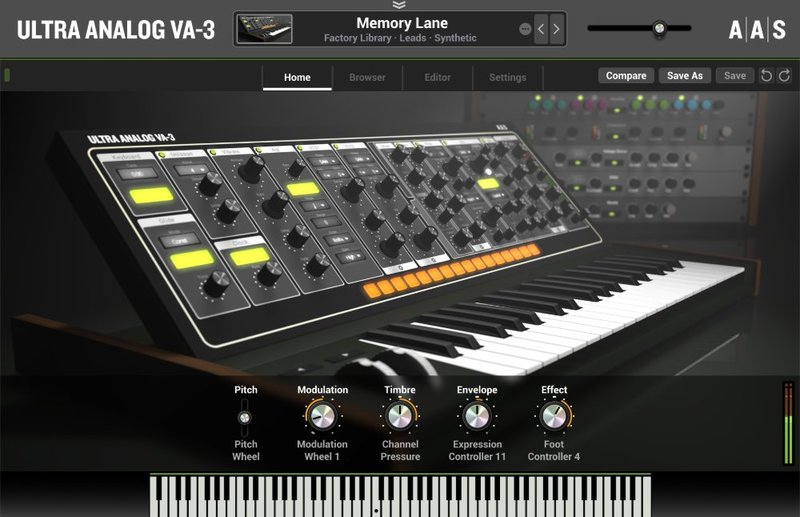
- Home View: With macros mapped to key sound characteristics—modulation, timbre, envelope, and effect—the Home view presents a distraction free and laidback browsing and tweaking experience.
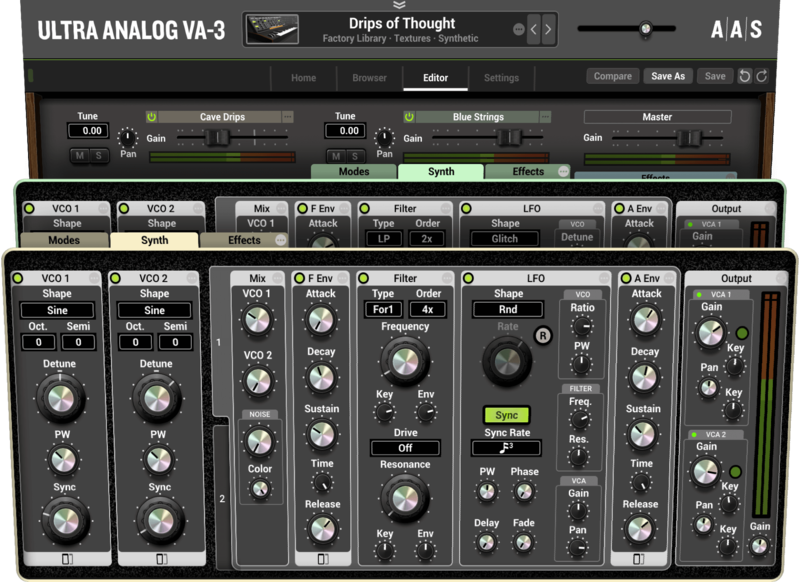
- Two-Voice Multitimbral: Ultra Analog VA-3 combines two independent timbres—stacked or split—to create performance-friendly, texture-full, and spacious sounds that are sure to make a good impression.
- Factory Library: Ultra Analog VA-3 ships with a completely new factory library of 560 sounds created by top sound designers. Richard Devine, Christian Halten, Jerry Kovarsky, Christian Laffitte, Niall McCallum, Adam Pietruszko, Thiago Pinheiro, Daniel Stawczyk, and Emeric Zubar form an incredible team that made the most of the latest Ultra Analog VA-3 features. It’s with great pride that AAS present these new signature sounds.
- VA-2 Legacy Library: A long and fastidious process of fine-tuning went down in the AAS quarters. Each and every sound of the legacy Ultra Analog VA-2 library went under the eyes of all team members to exit with a consistent gain-stage, unity-gain effects, better dynamics, and compelling real-time sound transformation assignments to take advantage of the new features of Ultra Analog VA-3. That’s an extra 648 solid sounds in your hands.
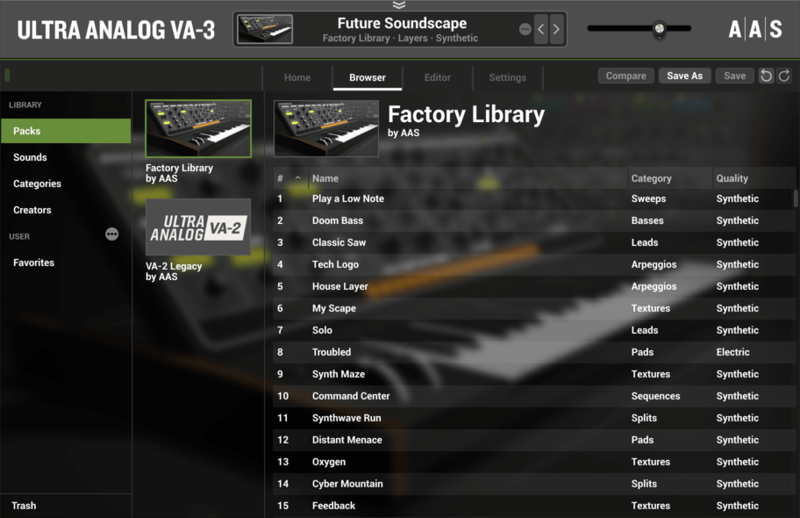
- Browser: With Packs, Sounds, Categories, and Creators views, Ultra Analog VA-3’s brand-new browser offers an efficient way to home in on the sounds you’re looking for.
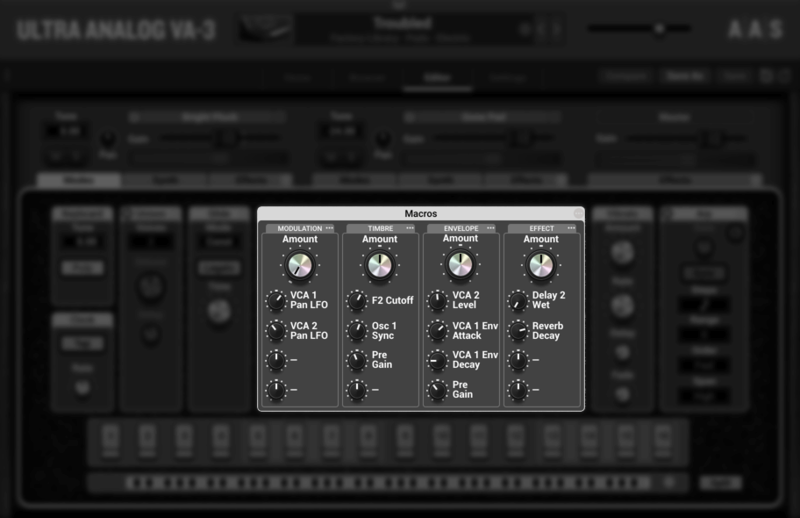
- Macros: Ultra Analog VA-3 now boasts four performance macros per layer that respond to user-defined MIDI controls. Each and every sound features modulation, timbre, envelope, and effect morphing assignments that can be played in real-time for enhanced expressivity and sonic dimension.
- Filter's Musicality: Ultra Analog VA-3’s filters can now put up with extreme modulation while remaining totally musical.
- Ladder Filter: Ultra Analog VA-3’s multi-mode module now stars a brand-new ladder-type filter for that classic low-pass response.
- Microtonal tunings via Scala scale files: Ultra Analog VA-3 now supports the Scala scale file format as well as reference note frequency tuning for microtonal music making.
- Compatible with Ultra Analog VA-2 sounds: Simply copy Ultra Analog VA-2 banks in Ultra Analog VA-3’s packs folder to convert them.
- Multi-Effects Module: Ultra Analog VA-3’s multi-effects module now sports reverb, equalizer, compressor, tremolo, and guitar amplifier processors for even more completeness. Furthermore, the five effect slots can be re-arranged in any order.
Home View
With macros mapped to key sound characteristics—modulation, timbre, envelope, and effect—the Home view presents a distraction-free and laidback browsing and tweaking experience.
Jump Right In
With Packs, Sounds, Categories, and Creators views, Ultra Analog VA-3’s brand-new browser offers an efficient way to home in on the sounds you’re looking for.
Two-Voice Multitimbral
Ultra Analog VA-3 combines two independent timbres—stacked or split—to create performance-friendly, texture-full, and spacious sounds that are sure to make a good impression.
Familiar and Sophisticated
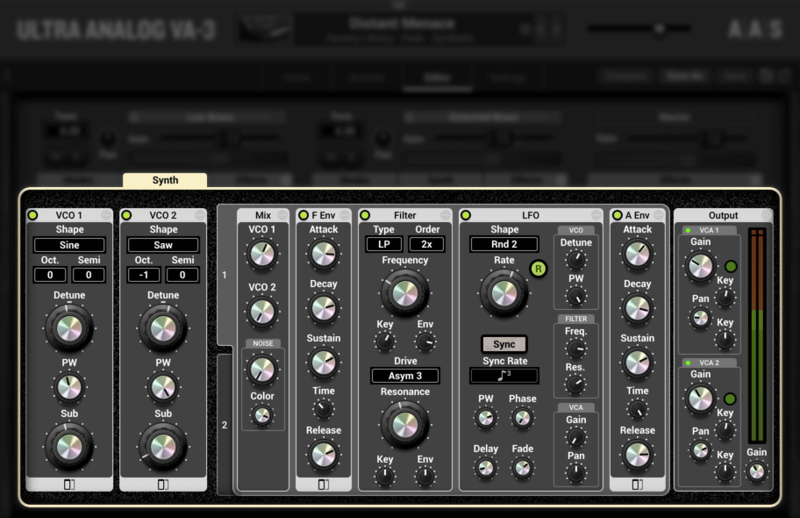
With its two-oscillator-plus-filter arrangement and advanced editing options, Ultra Analog VA-3 strikes a sweet balance between familiarity and an exceptional amount of flexibility.
Multi-effect Galore
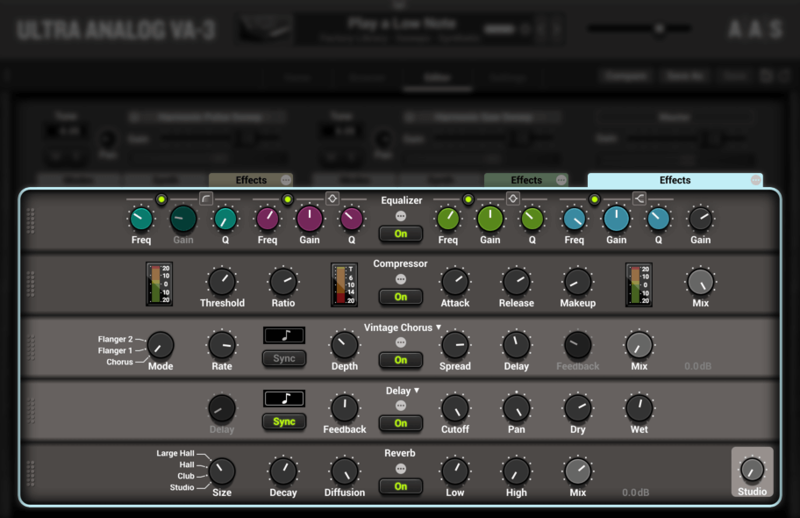
Ultra Analog VA-3 holds an abundance of effects in three independent racks. Reverb, delay, distortion, phaser, chorus, flanger, filters, equalizer, compressor, guitar amplifier, tremolo—all assist in putting the final touch on a sound.
Per Sound MIDI-controlled Variations
Ultra Analog VA-3 now boasts four performance macros per layer that respond to user-defined MIDI controls. Each and every sound features modulation, timbre, envelope, and effect morphing assignments that can be played in real-time for enhanced expressivity and sonic dimension.
Everything You Need from Start to Finish
With 1200+ professionally crafted presets covering all the synthesizer sound categories, Ultra Analog VA-3 packs everything you need to create all the parts of your productions.
- 560 New presets: Ultra Analog VA-3 ships with a completely new factory library of 560 sounds created by top sound designers. Richard Devine, Christian Halten, Jerry Kovarsky, Christian Laffitte, Niall McCallum, Adam Pietruszko, Thiago Pinheiro, Daniel Stawczyk, and Emeric Zubar form an incredible team that made the most of the latest Ultra Analog VA-3 features. It’s with great pride that AAS present these new signature sounds.
- 648 Revised VA-2 legacy sounds: Each and every sound of the legacy Ultra Analog VA-2 library went under the eyes of all team members to exit with a consistent gain-stage, unity-gain effects, better dynamics, and compelling real-time sound transformation assignments to take advantage of the new features of Ultra Analog VA-3. That’s an extra 648 solid sounds in your hands.
- 32 Synthesizer sound categories: Ultra Analog VA-3 shows high proficiency by covering 32 sound categories—arpeggios, basses, bells, brass, chimes, choirs, claps, clavs, cymbals, effects, formants, guitars, hi-hats, impacts, keys, kicks, layers, leads, noises, organs, pads, percussions, plucks, reeds, rhythmics, sequences, snares, splits, strings, sweeps, textures, and toms.
- 14 Top sound designers: Only a team can assemble a fine factory library—let’s introduce the 14 contributors: Adam Pietruszko, Christian Halten, Christian Laffitte, Daniel Stawczyk, Electric Himalaya, Emeric Zubar, Eric Thibeault, Gautam, Jerry Kovarsky, Kassen, Niall McCallum, Philippe Dérogis, Richard Devine, and Thiago Pinheiro.
System Requirements
WINDOWS · MAC OS X · 64-BIT & VST · AU · RTAS · AAX NATIVE · STANDALONE
AAS products are compatible with nearly all DAWs...
- Ableton Live
- Apple GarageBand
- Apple Logic Pro
- Apple Mainstage
- Avid Pro Tools
- Bitwig Studio
- Bandlab Cakewalk
- Cockos Reaper
- Image-Line FL Studio
- MOTU Digital Performer
- Native Instruments Komplete Kontrol
- Native Instruments Maschine
- Presonus Studio One
- Propellerhead Reason
- Steinberg Cubase
Mac minimum system requirements*
- macOS 10.11 (El Capitan) or later
- Intel Core i5 (circa 2015), Apple M1 processor or later
- 64-bit DAW
PC minimum system requirements
- Windows 10 64‑bit or later
- Intel Core i5 (circa 2015) processor or later
- 64-bit DAW
*The minimum system requirements mentioned above are for standalone usage. For plug-in usage, please refer to your DAW software requirements (Sonar, Pro Tools, Cubase, Live, Digital Performer, Logic Pro, etc.).
Awards


















