


 Log In

Free gifts available with your purchase
CR8 Creative Sampler
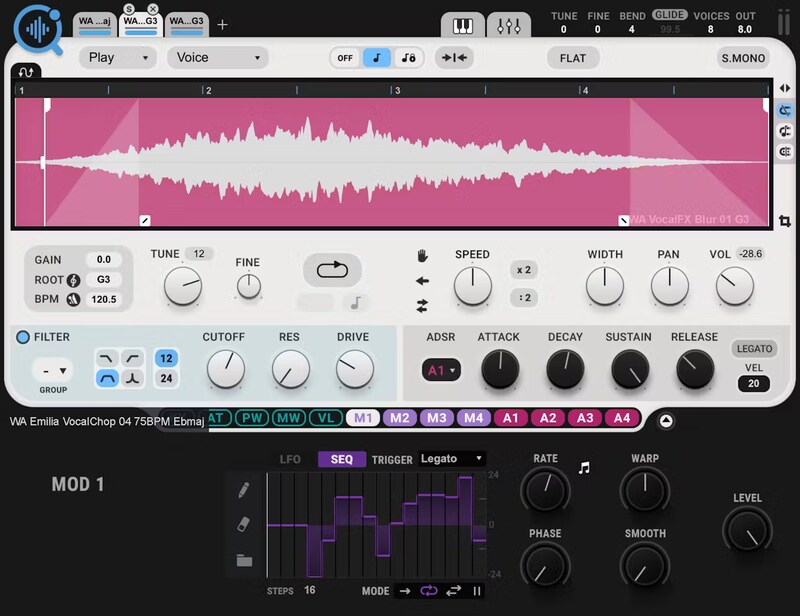
Turn Any Sound into an Inspiring Playable Instrument—Instantly
Ideal for beats, looping, instrument creation, sound design, and more, CR8 makes sampling easy and fun—just drag in a sample, and start playing. Or, take your creativity to the max: stretch, loop, sync, layer, stack, freeze, reverse, modulate, and use analog synth modules to process your sounds.
Take advantage of the vast collection of over 2500 free samples and over 800 presets—CR8 pairs with the AI-powered COSMOS Sample Finder, so you can find any sound you want in seconds.
Features
- Layer up to 8 samples for rich sample textures
- 5 stretching options: Voice, Beats, Melodic, Harmonic, Classic
- Easy Loop, Reverse, Freeze & more for instant playback control
- Key and BPM detection to get you in sync with your session instantly
- Modulate any sound with easy drag-and-drop LFO/sequencer and ADSR modulators
- Integrates seamlessly with COSMOS, the AI-powered sampler finder
- 2500 royalty-free samples included
- 800 creative presets included
System Requirements
Mac
- macOS Monterey 12, Ventura 13, Sonoma 14, Sequoia 15
- VST / AU / AAX
PC
- Windows 10+
- VST / AAX












Reviews Summary
While it aims to provide a helpful overview, it may not capture every perspective or detail. We encourage you to read individual reviews to make an informed decision.
Users praise the sampler for its clean UI, versatility, abundant factory presets, and effective sample manager, describing it as a quick, handy, and underrated tool. However, some note that customization controls can feel hidden behind tiny tabs, requiring manual reading and slowing down workflow, while also expressing a desire for direct audio recording features in future updates.


