/ Kontakt Instrument / Secunda
Wavelet Audio

Secunda

4.6 (11 Reviews)
$129.00 $199.00

35% off until Dec 08

Secunda - UI 1
Secunda - UI 1
Secunda - Teaser gallery thumbnail
Secunda - Walkthrough gallery thumbnail
Secunda - Stems Playthrough gallery thumbnail
Sound Design of Secunda: An Advanced Tutorial on Creating Cinematic Impacts gallery thumbnail
Secunda - UI 2
Secunda - UI 3
Secunda - UI 4
Secunda - UI 5
Buy Now
Product information

Throat Singing And Cinematic Instruments Based On Power Of The Human Voice

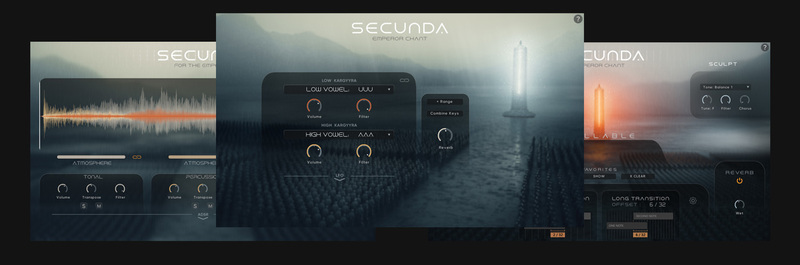
Introducing "Secunda", a massive toolkit for Kontakt Player based on the mysticism of throat singing that dives into the foggy veil of distant realms. Graced by the presence of the Emperor's army, "Secunda" is saturated with the raw, pure power of the human voice. It invites you to dive into a vast palette of throat singing, rich in organic textures, ancient vocal harmonics, and massive sonic storytelling instruments.

Wavelet's Audio Secunda is the perfect instrument for adding depth, crunch, and haunting resonance to any type of sound project - soundtracks, film scores, trailer music, folk music, electronic music, and more. In addition to every facet of throat singing, Secunda also offers a huge amount of organic, modern sound design based directly on the sound of throat singing.
Features

  •     True legato
  •     Multiple Round Robins
  •     Multiple dynamic layers
  •     Bonus Stems
  •     24-bit / 48 kHz lossless NCW format
  •     Snapshots

System Requirements

  •     Works with Free Kontakt Player
  •     NI Kontakt 7.5.0 +
  •     6.2 GB of hard drive space (9.4 GB of original sample material)
  •     Compatible with hardware by Native Instruments

Installation Instructions

Note: Sonuscore Time Textures is used as an example. The installation process for Wavelet Audio products is exactly the same.

Mac

1. Download the .dmg installer file from your Plugin Boutique account.

2. Double-click the .dmg file to install Native Access.

3. Open Native Access > Create a new Native ID if you do not have one already. If you do, skip ahead to step 5.

4. You will then receive an email with a confirmation link > Open the email and click 'CONFIRM EMAIL'.

5. Log in to Native Access with your Native ID.

6. Click 'Add a serial'

7. Enter your Serial Number found in your Plugin Boutique account > Click 'ADD SERIAL'.

8. Click the 'Not installed' tab > Locate Time Textures > Click 'INSTALL'.

9. Time Textures is now installed on your system.

10. Open Kontakt in your DAW > You should see Time Textures on the left sidebar > Click the drop-down bar and drag the .nki file into the middle of the window.

Your software is now ready to use in your DAW!

Windows

1. Download the .zip installer file from your Plugin Boutique account.

2. Double-click the extracted .exe file to begin the installation process > click ‘Run’.

3. Read the welcome message > click 'Next'.

4. Click 'Next' to begin the installation.

5. Native Access has now been installed > Click 'Finish'.

6. Open Native Access > Create a new Native ID if you do not have one already. If you do, skip ahead to step 8.

7. You will then receive an email with a confirmation link > Open the email and click 'CONFIRM EMAIL'.

8. Log in to Native Access with your Native ID.

9. Click 'Add a serial'.

10. Enter your Serial Number found in your Plugin Boutique account > Click 'ADD SERIAL'.

11. Click the 'Not installed' tab > Locate Time Textures > Click 'INSTALL'.

12. Your new Kontakt Instrument is now installed on your system.

13. Open Kontakt in your DAW > You should see Time Textures on the left sidebar > Click the drop-down bar and drag the .nki file into the middle of the window.

Your software is now ready to use in your DAW!

Bundle & Save

Wavelet Ultimate Bundle
$949.00

Plugin Boutique Rewards

Discover the most rewarding loyalty programme among all plugin retailers.

  • Free Loopmasters Samplepacks
  • Discounts on products and courses
  • Extra Virtual Cash claimed immediately at checkout
Find out more

Follow us:

X (Twitter) Facebook YouTube Instagram
Logo Logo

Plugin Boutique Limited, Part of the Beatport Group LLC.

Copyright © 2011-2025 Plugin Boutique. All rights reserved




















