/ Kontakt Instrument / Empire Breaks
Native Instruments

Empire Breaks

5.0 (2 Reviews)
$24.50 $49.00

50% off until Dec 08

Native Instruments Empire Breaks
EMPIRE BREAKS Walkthrough – KOMPLETE NOW | Native Instruments gallery thumbnail
Buy Now
Product information

Classic Hip Hop Beats

Feel the Realness

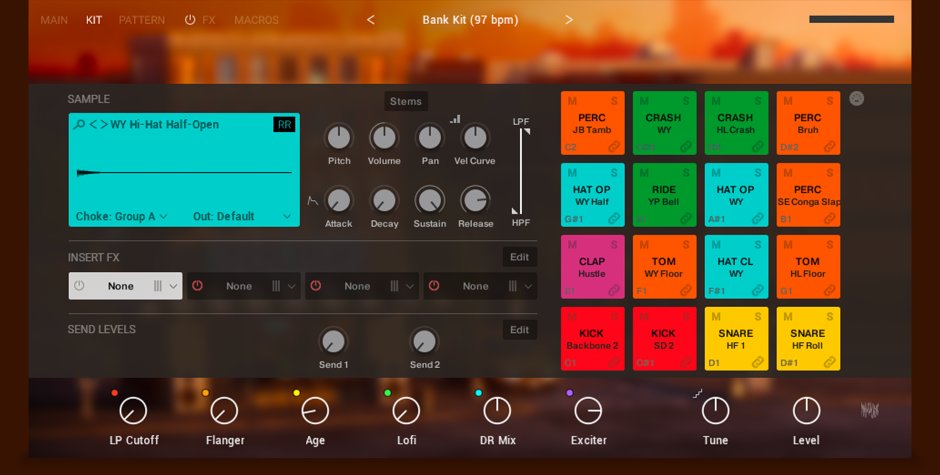
EMPIRE BREAKS packs the timeless essence of classic, sample-based drums into an inspiring Play Series instrument that unlocks the rhythmic sound of golden-era hip hop. Every kick, clap, tom, and hat is captured from brand-new, vintage-style drum recordings, processed with classic gear, and delivered with multiple velocity layers for kits that sound totally natural. Play beats live the old-school way, or draw from a range of custom-made patterns, then dial in extra grit, groove, and swing with a range of easy-to-use macro controls for bodega-dwelling, boombox-blasting beats.

EMPIRE BREAKS was created in collaboration with creating the sound.
About the Play Series

When inspiration strikes, just play. The Play Series instruments put outstanding sound quality in an easy-to-use package. Each has a distinctive sound and character, offering a comprehensive selection of carefully designed presets and focused controls for modifying them. Whether you’re new to production or a seasoned pro, the Play Series can inspire your tracks.

Features

  • Dig deep into golden-era boom bap drums; punchy kicks, solid snares, and crispy hats
  • Recorded from original live drum breaks and then re-sampled with love, for 90s-style crunch and character
  • Unlock 480 groove patterns that can be edited in any DAW with MIDI drag and drop
  • Part of the Play Series: Great-sounding presets and real-time control with an intuitive interface

System Requirements

  • FREE Kontakt Player or Kontakt is required to use this instrument
  • Download size: 3.11 GB

Installation Instructions

Note: Massive is used as an example.

Windows

1. Download the .zip installer file from your Plugin Boutique User Account.

2. Double-click the extracted .exe file to begin the installation process > click ‘Run’.

3. Read the welcome message > click 'Next'.

4. Click 'Next' to begin the installation.

5. Native Access has now been installed > Click 'Finish'.

6. Open Native Access > Create a new Native ID if you do not have one already. If you do, skip ahead to step 8.

7. You will then receive an email with a confirmation link > Open the email and click 'CONFIRM EMAIL'.

8. Log in to Native Access with your Native ID.

9. Click 'Add a serial'.

10. Enter your Serial Number found in your Plugin Boutique User Account > Click 'ADD SERIAL'.

11. Once your serial has been registered, click 'VIEW PRODUCTS NOT INSTALLED'.

12. Click the 'Not installed' tab > Locate Massive > Click 'INSTALL'.

Your software is now activated and ready for use within your DAW.

Mac

1. Download the .dmg installer file from your Plugin Boutique User Account.

2. Double-click the .dmg file to install Native Access.

3. Open Native Acces > Create a new Native ID if you do not have one already. If you do, skip ahead to step 5.

4. You will then receive an email with a confirmation link > Open the email and click 'CONFIRM EMAIL'.

5. Log in to Native Access with your Native ID.

6. Click 'Add a serial'

7. Enter your Serial Number found in your Plugin Boutique User Account > Click 'ADD SERIAL'.

8. Click the 'Not installed' tab > Locate Massive > Click 'INSTALL'.

Your software is now activated and ready for use within your DAW.

Plugin Boutique Rewards

Discover the most rewarding loyalty programme among all plugin retailers.

  • Free Loopmasters Samplepacks
  • Discounts on products and courses
  • Extra Virtual Cash claimed immediately at checkout
Find out more

Follow us:

X (Twitter) Facebook YouTube Instagram
Logo Logo

Plugin Boutique Limited, Part of the Beatport Group LLC.

Copyright © 2011-2025 Plugin Boutique. All rights reserved
