Log In

Free gifts available with your purchase
A library of playable two-note slurs for creating expressive string textures.
Play overlapping pairs of notes within a perfect 4th of each other to trigger the two-note slurs, or "ripples"
On string instruments, there’s a kind of energy and life you can put into the sound as you travel between two notes, especially if you play them in a single bow stroke. You can lean into the first note expressively, and then let the second note fold into the release of the first note so that they sound like one gesture. If these notes were recorded separately, then stitched together later, it wouldn’t have the same nuance.
It’s gratifying to play these two-note slurs across different dynamics. To capture this feeling, the samples are all recorded as swells. At the beginning of the swell, the second note can be played so lightly that the pitch is hardly perceptible. It’s like a ghost note. Then, as the sound grows, the slurs naturally change and adapt to keep it fresh.
Like many other Osterhouse Sounds libraries, these are not standard string articulations. It’s a specific playing style which happens to work well when mapped to a piano keyboard. The hope is that this particular style of playing inspires you to explore new ways of using strings in your music, either in sample libraries, or when working with session musicians.
Midi Clip Browser
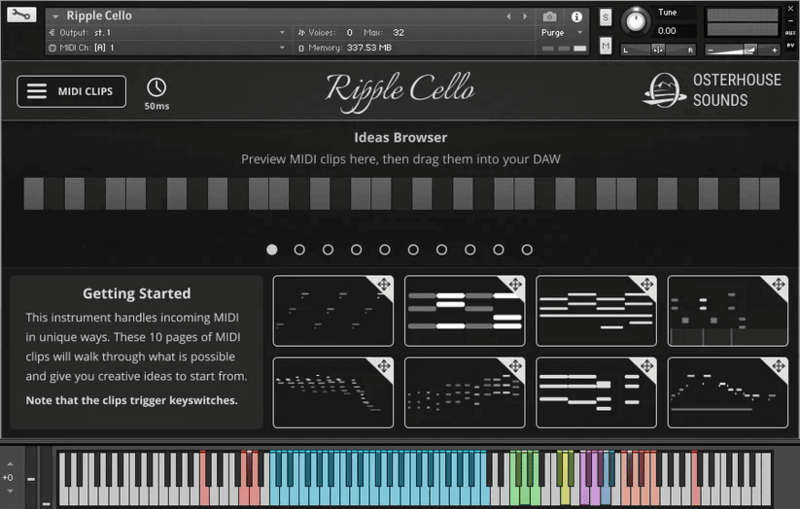
The Midi Clip Browser features a collection of midi clips which show the types of things that make this library truly shine. The midi clips can be dragged straight into your project, or previewed in the interface.
Features
- Quarters, Eighths, and Sixteenths articulations
- Midi clips, available from a built in "ideas" browser. 80 total.
- Natural and intuitive sample playback, using the ripple engine.
- Samples tempo-sync to your DAW’s bpm, using Kontakt’s tmpro
- 345 MB (compressed)
- 684 samples, recorded at 110 BPM (each sample is a 2 or 4 measure loop)
System Requirements
- Full Version of Kontakt 6.8 and above (Not the free Kontakt Player)
- Windows 10/11
- Mac 10.13
Important Notes:
- The FULL Version of Kontakt 6.8+ is required in order to use this instrument.
- You will be stuck in DEMO MODE if trying to use this instrument in the FREE Kontakt Player.