


 Log In

Free gifts available with your purchase
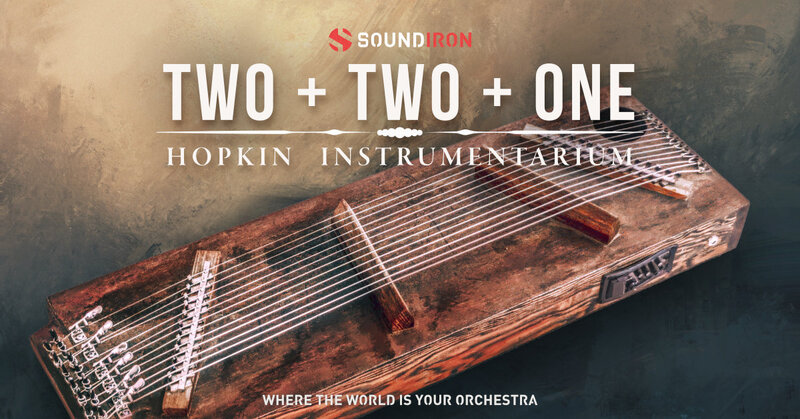
A bespoke 14 string acoustic zither library built for Kontakt
2+2+1 is a 14-string zither featuring multiple bridges that divide each string into three segments. Two of these segments are longer, producing a lower-octave tone, while the shorter segment, half the length of the others, resonates in the octave above. When you pluck any segment, sympathetic vibrations occur across all three segments, amplifying the instrument's unique sound. These vibrations, combined with the way the bridges drive the soundboard, create a warm, woody, and resonant acoustic timbre.
The unison and octave relationships between the segments generate shared resonances whenever one is plucked, while the natural imperfections in tuning produce subtle chorusing effects. This interplay of harmonics results in a distinctive tonal quality.
In this library, each note is sampled in two distinct ways. The first captures the natural, open-string sound with its rich sympathetic reverberations. The second features the plucked sound of a single segment with damping. To achieve this, Soundiron have used a foam rubber pad placed under the strings near the bridge of the plucked segment. The damped sound is notably percussive, decaying quickly, but is enriched by the reverberation of the adjacent undamped segments, giving it an extra layer of warmth and an appealing natural reverb tail.
The team at Soundiron have faithfully sampled every interesting sound they could get out of this zither, with two stereo microphone positions: Close mics and Pickups. Upper and Lower plucks (open or damped), and glisses (harmonic or atonal) are available in all four layers of our flexible GUI to easily mix and match. With up to 8x round robin and 6 velocity layers per note, you’ll be swimming in lush timbres in no time. Also included are a wide selection of custom FX presets and plenty of Soundiron's signature sound-designed ambient content, crafted from the raw acoustic source to give you complete creative freedom. If you’re looking to solve your next musical equation, 2+2+1 is the perfect addition to your sound palette!
The Kontakt interface includes a suite of automation-ready sound-shaping controls to give you total creative flexibility. You have control over swell, attack, release, offset, vibrato, filter, pitch (coarse & fine), articulation switching, cross-fading and layering, and so much more.
Features
- Experimental Zither pluck and gliss articulations in two mic positions: Close, Pickups
- 20 ambient pads and evolving drones created from the source content
- 21 Powerful Kontakt .nki instrument presets
- 5,544 stereo samples in unlocked .WAV format
- 10.5 GB Installed
- Made for the full retail version of Kontakt (version 6.5+)
System Requirements
- The full retail version of Native Instruments Kontakt version 6.5+ is required to use .nki instrument presets included in this library. The free Kontakt "Player" and "Add Library" import process do not support this standard open-format Kontakt library.
- Windows 7 or higher.
- Mac OSX 10.12 or higher.
- Dual Core CPU
- 2 GB System Ram
- SATA or SSD hard drive recommended for this library.





















