


 Log In

Product information

FREE
A Cut-Down Version of Output Signal
The New Way To PULSE
Fat analog synths and beautifully recorded live instruments combined in a groundbreaking way

Features
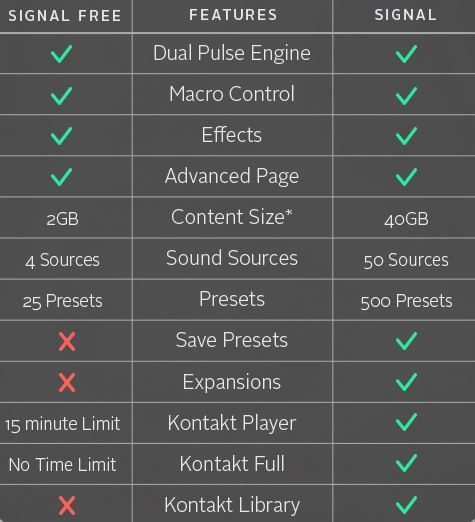
- 4 sound sources
- 2GB of content (uncompressed)
- 25 Pulse Instruments
- LFOs, Step, Arpeggiator, Looper™
- Basic & Advanced modes
Compare the Difference
System Requirements
- Signal runs in Kontakt (no play limit) or Free Kontakt player (15-minute play limit) version 5.3.1 or higher
- Mac OS X 10.8 or higher
- Windows 7 or higher
- At least 4 GB of RAM (8 GB recommended), and 22 GB of free drive space
- Access to a stable internet connection for digital delivery
Please note: This product is compatible with the FREE Kontakt Player.


Installation Instructions
Customer Reviews
(7)
Reviews Summary
This AI-generated summary is based on an analysis of verified customer reviews. It identifies recurring themes, strengths, and potential considerations mentioned by users.
While it aims to provide a helpful overview, it may not capture every perspective or detail. We encourage you to read individual reviews to make an informed decision.
While it aims to provide a helpful overview, it may not capture every perspective or detail. We encourage you to read individual reviews to make an informed decision.
Users highly appreciate this free, lite version of the software, praising its creative capabilities and solid performance. Despite being a scaled-down version, reviewers find it to be an excellent showcase of the product's potential, offering the freedom to explore and proving valuable enough to keep on their devices.


