


 Log In
.jpg)
Free gifts available with your purchase
GRAVITY is not just another virtual instrument - it's like having an award-winning sound design team at your fingertips. Experience the most dynamic collection of Modern Scoring Tools ever assembled.
Developed by Heavyocity’s award-winning team of professional composers and sound designers (Interstellar, Gone Girl, Godzilla), GRAVITY covers the gamut of intangible scoring elements; complex Pads, evocative Risers, other-worldly Stings, and earth-shattering Hits. With over 12GB of production-ready instruments in an inspiring new interface, GRAVITY delivers a stunning sound and visual aesthetic. Get Pulled In and make the Heavyocity sound your own.
Motion
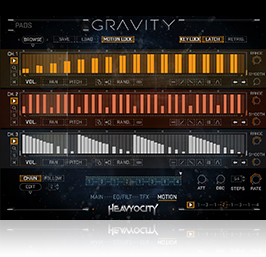
Break the boundaries of static sound with the all-new MOTION feature. From smooth, tempo-synced swells and rhythmic pulsing motifs, to complex stutters and glitch effects, MOTION delivers fully customizable control of volume, pan, and pitch modulation.
But don't stop there. Craft additional complex sequences with the feature's Pattern Chainer and the hypnotic Volume Modulator. Experience unlimited possibilities with the richest set of sound features ever offered in a Heavyocity instrument.
Designer
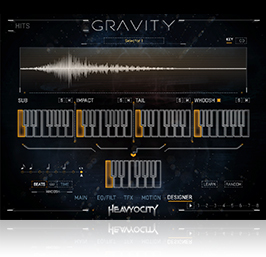
As composers for film, television, and video game trailers, we realize that great-sounding Hits and Hybrid Risers are in short supply.
Enter the DESIGNERS.
The new DESIGNERS offer deep customization, providing the perfect accents for your score. The Hits are presented in four layers; sub, impact, tail, and whoosh - with the ability to combine and control each element for maximum impact. Risers are presented in three layers; Organic, Synth, and FX - each of which can be stacked simultaneously with length/timing and tempo-sync options. Get GRAVITY and never run out of these essential tools again.
Pads
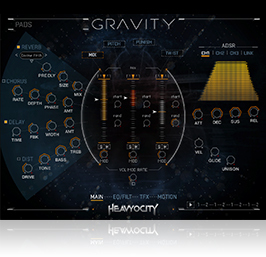
Feel the emotional pull of GRAVITY. With playable atmospheric textures, evolving tonal pads, and intricate SFX beds, GRAVITY will immediately become your go-to instrument for ambient composition.
The pads are presented in three-channel complex, menu, and single channel formats to support multiple workflows. Complex presets have been expanded with up to six snapshots, accentuating the uniqueness of each individual sound. GRAVITY provides flexible design features flat-out unparalleled by any other virtual instrument on the market today.
Risers

For the first time in a Heavyocity product, we are proud to include fully customizable Risers. Combine evocative string sections (Organic) with ripping synth (Synth) and dramatic effects layers (FX) to quickly craft unique Risers on the fly.
Further manipulate the Risers using the MOTION tab; even change the duration of the Riser, syncing to beats or time, for total control over ascending tension and suspense. Use the DESIGNER to stack up to three layers to 12 user-customizable slots for quick and easy playback. Master the creation of hair-raising sound design elements with Heavyocity's first-ever customizable Riser experience.
Hits & Strings
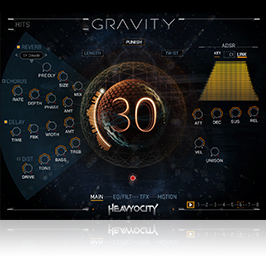
Add weight to your dramatic moments with GRAVITY's Hits & Stings. Combine up to four of the 192 distinct elements to create virtually limitless combinations of unique Hits. Turn "Whoosh" on or off and adjust length seamlessly. Not enough customization for you? Introduce complex glitch and stutter effects with the motion sequencer and Trigger FX.
The fourth center of GRAVITY is, arguably, the most unique - Stings. Four hundred individual Stings cover a vast range, from reverse hits and whooshes, to disturbing metals and aggressive tonal sweeps. When it comes to punctuated textures and impacts, GRAVITY covers it all.
Organic

GRAVITY's distinct sound is comprised of a massive collection of organic source material captured both out in the field and in controlled environments. We spent over a year bowing, bending, resonating, smashing, dropping, and colliding at Bunker Studios in Brooklyn, Brick Hill Studios in Mass, and here at Heavyocity HQ. The result is a highly-detailed collection that's been carefully mixed and mastered for immediate use in your scores.
In GRAVITY, you'll find the full range of meticulous hybrid scoring elements: orchestral/hybrid Risers, complex textural Pads, earth-shattering Hits, and dramatic signature Stings.
Processing
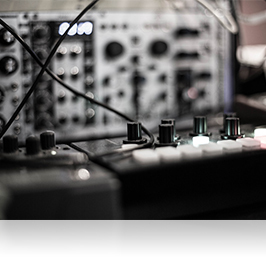
It's no secret we love our analog gear, and GRAVITY wouldn't be a Heavyocity instrument without some serious mangling and processing. Custom-built modular analog units were fed source material from our rich library, and then layered and tweaked until they screamed that signature Heavyocity sound. We shaped each and every sonic millisecond so that your next score is flush with the finest cinematic sound design elements in the industry.
Heavyocity Design
GRAVITY was designed to inspire. As with all of our instruments, our focus is to provide the very best sound in an inspiring and easy-to-use interface.
The all-new MOTION feature joins the reimagined Punish and Twist knobs to even further spark your musical imagination. A brand new interface designed by the digital artists behind Marvel Studios' film graphics and several SpaceX initiatives provides the perfect creative platform. Redefine your sound with GRAVITY. Get Pulled In.
Features
- 12 GB uncompressed (9.2GB on Disk with NI lossless compression)
- Available as direct download only
- 2200+ Sound Sources
- 815+ Snapshots
- 325+ Motion Presets (NKA’s)
- 1200+ NKIs
- 780+ Pads
- 390+ Stings
- 19 Riser Menus
- 9 Hit Menus
- Two new “Designers” for Hits and Risers
- Motion page for advanced volume, pitch, and pan pattern creation
- Playable Trigger FX™ for real-time control
- Stand-alone, VST, AU, AAX
System Requirements
- Powered by the Kontakt 5 Engine
- Kontakt 5 (Player) ver 5.5.1.451 or later
- Komplete Kontrol integrated (NKS-ready)
- Mac: OS X 10.9 or higher, Intel Core 2 Duo, 4 GB RAM
- PC: Windows 7 or higher (latest Service Pack, 32/64 Bit, Intel Core Duo or AMD Athlon 64 X2, 4GB RAM
Awards


Bill Brown (Captain America: Super Soldier (Game), Dominion (TV Series), Wolfenstein (Game)
(Captain America: Super Soldier (Game), Dominion (TV Series), Wolfenstein (Game)
“GRAVITY is a cutting-edge, unique design tool that uses intensely well-recorded live orchestral and analog sources to create modern ambiences, pulses, risers and more."
Jason Graves
(Dead Space Series, Evolve, The Order: 1886, Tomb Raider)
"GRAVITY is an epic twist on creative sound sources and rafter-shaking drama.”
Ramin Djawadi
(Game of Thrones, Pacific Rim, Safehouse)
"The diversity of sound within GRAVITY is astonishing. Any musician will benefit with GRAVITY in their toolbox."























