Log In

Free gifts available with your purchase
Moving. Expressive. Chamber Strings.
Overview
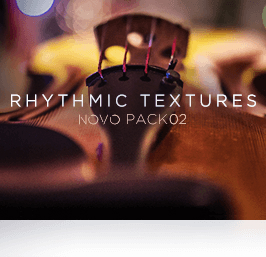
There's a subtle and certain magic that occurs when the right mics and the right preamps, in the right room, capture bow meeting string in just the right way. Heavyocity's goal, when developing Rhythmic Textures, was to capture that magic. Rhythmic Textures is the moving, expressive counterpart to 2017's Intimate Textures - focused on delivering carefully and deliberately crafted rhythmic elements, played together in intimate chamber string ensembles. From cellos layering sul pont tremolos over swells, to violin staccatos played over col legno tapping, Rhythmic Textures delivers 16 truly unique ensemble articulations, with 12+ GB of chamber strings content, production-ready for your next score.
Inspiring Environment
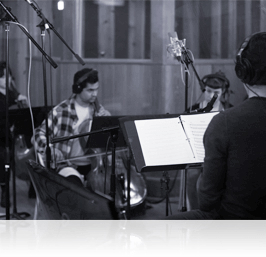
Heavyocity once again returned to the intimate confines of Reservoir Studios in NYC for Rhythmic Textures, capturing world-class players, performing in three and four person violin, viola, and cello ensembles. Working in conjunction with acclaimed Film Score Mixer Satoshi Mark Noguchi (Lion, Lone Survivor, Oblivion), Rhythmic Textures achieves a level of detail and clarity that is unprecedented for a chamber-style group - a richness and realism not yet achieved in a chamber strings virtual instrument before. Feel like you're in the room with each key depressed, with every stroke of the bow, as Rhythmic Textures serves as the inspirational center of your next cinematic score.
Award-Winning Engine
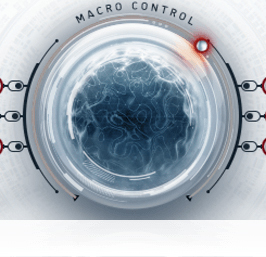
A collection of thousands of meticulously recorded samples is great, but what sets Heavyocity's virtual instruments apart are the serious sound-shaping capabilities of their engines. And the award-winning NOVO engine is no exception. Armed with the pristine organic content from Rhythmic Textures, the ability to create synthetic-style strings and deeply unique rhythmic pulses is right at your fingertips. From the awesome modulating power of the instrument's central MACRO CONTROL to the granular sample playback possibilities of CYCLE, the NOVO engine puts a cutting-edge arsenal of sound-design tools directly into the composer's hands.
Features
- 17.2 GB uncompressed (12 GB on Disk with NI lossless compression)
- Available as direct download only
- 2,476 Samples
- 221 Snapshot Presets
- 10 NKIs
- 48 unique articulations across three sections:
- Violins – 16 Articulations: Tremolo Pushes, Bow Drops, Tremolo Swells, Sul Pont Waves, Pulse Waves, Sliders, Tremolo Waves, Rhythm Soup, Pedal Waves, Pedal Swells, Tremolo Pulses, Tense Pulses, Off Echoes, Off Accent, Col Legno Brushes, Raindrops
- Violas – 16 Articulations: Tremolo Pushes, Bow Drops, Tremolo Swells, Sul Pont Waves, Pulse Waves, Sliders, Tremolo Waves, Rhythm Soup, Pedal Waves, Pedal Swells, Tremolo Pulses, Tense Pulses, Off Echoes, Off Accent, Col Legno Brushes, Raindrops
- Celli – 16 Articulations: Tremolo Pushes, Bow Drops, Tremolo Swells, Sul Pont Waves, Pulse Waves, Sliders, Tremolo Waves, Rhythm Soup, Pedal Waves, Pedal Swells, Tremolo Pulses, Tense Pulses, Off Echoes, Off Accent, Col Legno Brushes, Raindrops
- Intuitive Sample Browser
- CYCLE page for advanced granular & rhythmic playback
- MACRO knob for dynamic multi-parameter control
- Stand-alone, VST, AU, AAX
System Requirements
Powered by the Kontakt 5 Engine
- Kontakt 5 (Player) ver 5.6.8 or later
- Komplete Kontrol integrated (NKS-ready)
Mac
- Mac OS X 10.10, 10.11 or macOS 10.12 (latest update)
- Intel Core 2 Duo
- 4 GB RAM
PC
- Windows 7, Windows 8, or Windows 10 (latest Service Pack, 32/64-bit)
- Intel Core 2 Duo or AMD Athlon 64 X2
- 4GB RAM