Buy NOVO Essentials, get a free gift with purchase:

- A curated selection of core orchestral strings content from NOVO: Modern Strings
- Lush traditional strings for quick composition
- Creative string designer for cinematic sound design
- Hand-crafted loops for instant inspiration
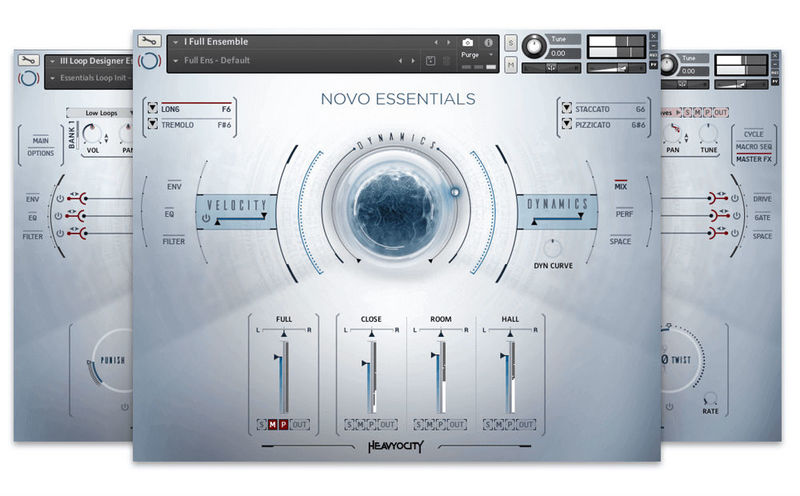
Features
Traditional (Clean Engine)
- 1 Full Ensemble Section (1 NKIs, 4 Snapshots)
- I Full Ensemble
- 44 Players - 18 Violins, 10 Violas, 10 Cellos, 6 Double Basses (Articulations: Long Sustain, Tremolo,
- Staccato, Pizzicato)
Evolved Content
- I String Designer - 3 Channel Based Sound Browser (1 NKI, 43 Snapshots)
- II String Loop Designer - 3 Channel Based Loop Browser (1 NKI, 36 Snapshots)
Full Ensemble (24 Sources)
- Ens Long (Mix, Close, Room, and Hall)
- Ens Trem (Mix, Close, Room, and Hall)
- Ens Stacc (Mix, Close, Room, and Hall)
- Ens Stacc RR (Mix, Close, Room, and Hall)
- Ens Pizz (Mix, Close, Room, and Hall)
- Ens Pizz RR (Mix, Close, Room, and Hall)
Processed (20 Sources)
- Atmospheric (4 Sources)
- Dirty and Distorted (4 Sources)
- FX & Textures (4 Sources)
- Synth (4 Sources)
Straight Loops (36 Total)
- 12 Ambient (4 Low, 4 Mid, 4 High)
- 12 Motif (4 Low, 4 Mid, 4 High)
- 12 Rhythmic (4 Low, 4 Mid, 4 High)
Tech-Specs
- 10.02 GB uncompressed (6.1 GB on Disk with NI lossless compression)
- Available as direct download only
- 5,668 Samples
- 54 All-New Snapshot Presets
- 3 NKIs
- One Full Ensemble Preset featuring 4 Core Articulations (Long, Tremolo, Staccato, Pizzicato)
- String Designer
- Loop Designer
- Intuitive Sample Browser
- CYCLE page for advanced granular & rhythmic playback
- MACRO knob for dynamic multi-parameter control
- Stand-alone, VST, AU, AAX
System Requirements
- Powered by the Kontakt 6 Engine
- Kontakt 6 (Player) or later
- Komplete Kontrol integrated (NKS-ready)
- Mac: macOS 10.12, 10.13 or 10.14 (latest update), i5
- PC: Windows 7, Windows 8, or Windows 10 (latest Service Pack), Intel Core i5 or equivalent CPU, 2 GB RAM
Plugin Boutique Staff Picks - Nicholas Heavyocity introduce NOVO Essentials, a compact, streamlined version of their sonically stellar string Kontakt Player instrument, NOVO Modern Strings. Drawing the key features from their flagship product, Heavyocity have produced a beautiful sounding ...
Read MoreNote: This product requires a Native Instruments Account and a free copy of Native Instruments Kontakt Player, which you can download here.
Mac
Registration
1. Visit https://heavyocity.com/my-account/ and fill out the account registration form > Click 'Register'.

Installation
1. Download the Heavyocity Product Portal Installer from within your Plugin Boutique User Account
2. Double-click the .pkg file to begin the installation > Click 'Continue'.

3. Click 'Continue'.

4. Click 'Agree'.

5. Click 'Install'.

6. Enter your computer Username and Password > Click 'Install Software'.

7. Click 'Close'.

8. Open the Heavyocity Portal and enter your Heavyocity-registered Username (Email Address) and Password > Click 'Login'.

9. Click 'Register Now', located at the bottom of the Product Portal.

10. Complete the form and enter the serial number found in your Plugin Boutique User Account > Click 'Register'.

11. Click 'Install' on the far right of the portal.

12. Select an installation location for your Heavyocity product > Click 'Install'.

Activation
1. Log in to Native Access.

2. Click 'Add a serial' in the top left corner of Native Access.

3. Enter the serial number found in your Plugin Boutique User Account > Click 'Add Serial'.

4. Click 'Close'.

5. Click the 'Not Installed' tab on the left-hand side of Native Access.

6. Locate NOVO Essentials > Click 'Add Library'.

7. Click 'browse' and locate the recently installed product > Click 'Install'.

Your product is now activated and ready to use.

Windows
Registration
1. Visit https://heavyocity.com/my-account/ and fill out the account registration form > Click 'Register'.

Installation
1. Download the Heavyocity Product Portal Installer from within your Plugin Boutique User Account > Double-click the .zip file to extract the contents.
2. Double-click the .exe file to begin the installation > Click 'Next'.

3. Select 'I accept the terms in the license agreement' > Click 'Next'.

4. Click 'Next'.

5. Click 'Install'.

6. Click 'Finish'.

7. Enter your Heavyocity-registered Username (Email Address) and Password > Click 'Login'.

8. Click 'Register Now', located at the bottom of the Product Portal.

9. Complete the form and enter the serial number found in your Plugin Boutique User Account > Click 'Register'.

10. Click 'Install' on the far right of the portal.

11. Select the installation location for your Heavyocity product > Click 'Ok'.

12. Click 'Install'.

Activation
1. Log in to Native Access.

2. Click 'Add a serial' in the top left corner of Native Access.

3. Enter the serial number found in your Plugin Boutique User Account > Click 'Add Serial'.

4. Click 'Close'.

5. Click the 'Not Installed' tab on the left-hand side of Native Access.

6. Locate NOVO Essentials > Click 'Add Library'.

7. Click 'browse' and locate the recently installed product > Click 'Install'.

Your product is now activated and ready to use.