Log In

Free gifts available with your purchase
Shiny Metal Strings
The Instrument
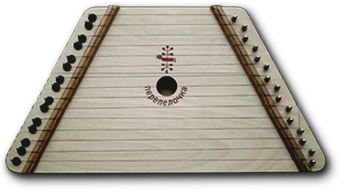
The Lap Harp is a music instrument from eastern Europe also known as 'Perepyolochka' in Cyrillic, which literally translates to „Little Quail“. Due to its easy playability, it is popular with musical beginners.
In nature, it has 15 diatonically tuned strings, which are often in the key of G major. In the Kontakt patch, you can play it chromatic and well-tempered.
The Engine
Cinematique Instruments recorded the Lap Harp with 3 Articulations, 4 Round Robins and 2 Velocities at a quiet, low volume. For the articulations, they chose a plectrum, the fleshy side of a thumb and a piano hammer.
As a microphone, they chose a Schoeps condenser and positioned it pretty close to the strings in order to get a direct and detailed sound.
As an additional gimmick, they implanted a Glissando and a Tremolo function via the script, which affects the midi behaviour and enables you to get a step closer to the natural playability of the real instrument.
Furthermore, they added several effects such as the control of reverb, delay, lo-& hi-cut, chorus, octave and rotary, which expands the entire sound of the Lap Harp and gives you some further options to kick-start your creative process.
All in all we came out with an instrument which enriches your music with a nice and organic feel whether you used it as a solo or just as a background instrument.
The Package
One complex patch including 34 sound sources and over 50 presets. Approx. data 0.4 GB compressed data. For more details please read the reference manual. Kontakt 5.8.1+ FULL version or higher is required!
Update Note
With update 1.5, Cinematique Instruments added presets, some new features (like Arp), and effects. They have also taken the design to a new level.
System Requirements
- Approx. data 0.4 GB compressed data
- The FULL Version of Kontakt 5.8.1 or higher is required.
Important Notes:
- The FULL Version of Kontakt 5.8.1+ is required in order to use this instrument.
- You will be stuck in DEMO MODE if trying to use this instrument in the FREE Kontakt Player.