/ Kontakt Instrument / VENTO Modern Woodwinds
Heavyocity

VENTO Modern Woodwinds

5.0 (11 Reviews)
$149.00 $449.00

66% off until Dec 12

Heavyocity VENTO - User Interface 1
Vento by Heavyocity | How to Produce Pop Music with Classic Woodwind Instruments gallery thumbnail
Heavyocity - VENTO: Modern Woodwinds - Content Overview gallery thumbnail
Heavyocity - VENTO: Modern Woodwinds - Demo Walkthrough gallery thumbnail
Heavyocity - VENTO: Modern Woodwinds - Preset Playthrough gallery thumbnail
Heavyocity VENTO - User Interface 2
Heavyocity VENTO - User Interface 3
Heavyocity VENTO - User Interface 4
Buy Now
Product information

Past. Present. Future.

Like it’s string and brass predecessors, NOVO and FORZO, VENTO is Heavyocity’s answer to the traditional; in this case, delivering a fresh and original take on what woodwinds are capable of in modern scores. Featuring over 160 organic articulations, 100 hybrid snapshots, and 400 tempo-synced loops, VENTO is brimming with musical possibility, transforming conventional woodwinds into a deep well of cinematic inspiration.

Completely Unique

Through unique ensembles, instruments, and articulations, VENTO creates a thrilling canvas for you to morph pristine woodwind sources into dynamic and evolving hybrid cues. From the growl of Contrabass Ensemble Swells (contrabass clarinet and contrabassoon) to the unnerving suspense of High Ensemble Flutters (piccolo, flute, clarinet, oboe), VENTO embodies the lyricality and complex textures your modern scores require.VENTO Engine

Superior Sound Design
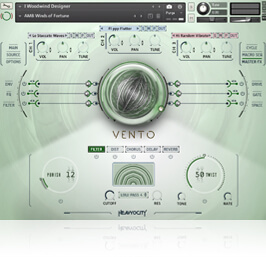
Whether it be their proprietary in-house processing techniques or sourcing from the powerful VENTO engine itself, the sound design team at Heavyocity is unparalleled in the industry. With a host of sound-shaping features, VENTO elevates these colourful woodwinds sources into dynamic hybrid content, fit for any score. This much is clear: VENTO transforms the traditional into an inspiring new hybrid instrument.

Features

  • 27.2 GB (18.5 GB on Disk with NI lossless compression)
  • Available as direct download only
  • 11,213 Samples
  • 163 Articulations
  • 110 Snapshot Presets
  • 57 NKAs
  • 432 Tempo-Synced Loops
  • 7 NKIs
  • 5 Traditional Sections:
    • Flutes x 4
    • Clarinets x 4
    • High Ensemble (Flute, Piccolo, Clarinet, Oboe)
    • Low Ensemble (2 Bass Clarinet, 2 Bassoon)
    • Contrabass Ensemble (2 Contrabass Clarinet, 2 Contrabassoon)
  • Hybrid Woodwind Designer
  • Woodwind Loop Designer
  • Intuitive Sample Browser
  • CYCLE page for advanced granular & rhythmic playback
  • MACRO knob for dynamic multi-parameter control
  • Stand-alone, VST, AU, AAX

System Requirements

  • Mac: macOS 10.12, 10.13 or 10.14 (latest update), i5
  • PC: Windows 7, Windows 8, or Windows 10 (latest Service Pack), Intel Core i5 or equivalent CPU, 2 GB RAM
  • Powered by the Kontakt 6.1 Engine
  • Latest Kontakt 6 (Player)
  • Komplete Kontrol integrated (NKS-ready)

Note: This software requires the Kontakt 6 Engine (full) or latest free Kontakt 6 Player.

Testimonials

Richard Jacques

"You have definitely not heard woodwinds like this before! Superb!"

Installation Instructions

Notes: 

  • This product requires a Native Instruments Account and a free copy of Native Instruments Kontakt Player, which you can download here.
  • NOVO Essentials is used as the example.

Mac

Registration

1. Visit https://heavyocity.com/my-account/  and fill out the account registration form > Click 'Register'.

Installation

1. Download the Heavyocity Product Portal Installer from within your Plugin Boutique User Account

2. Double-click the .pkg file to begin the installation > Click 'Continue'.

3. Click 'Continue'.

4. Click 'Agree'.

5. Click 'Install'.

6. Enter your computer Username and Password > Click 'Install Software'.

7. Click 'Close'.

8. Open the Heavyocity Portal and enter your Heavyocity-registered Username (Email Address) and Password > Click 'Login'.

9. Click 'Register Now', located at the bottom of the Product Portal.

10. Complete the form and enter the serial number found in your Plugin Boutique User Account > Click 'Register'.

11. Click 'Install' on the far right of the portal.

12. Select an installation location for your Heavyocity product > Click 'Install'.

Activation

1. Log in to Native Access.

2. Click 'Add a serial' in the top left corner of Native Access.

3. Enter the serial number found in your Plugin Boutique User Account > Click 'Add Serial'.

4. Click 'Close'.

5. Click the 'Not Installed' tab on the left-hand side of Native Access.

6. Locate NOVO Essentials > Click 'Add Library'.

7. Click 'browse' and locate the recently installed product > Click 'Install'.

Your product is now activated and ready to use.

Windows

Registration

1. Visit https://heavyocity.com/my-account/  and fill out the account registration form > Click 'Register'.

Installation

1. Download the Heavyocity Product Portal Installer from within your Plugin Boutique User Account > Double-click the .zip file to extract the contents.

2. Double-click the .exe file to begin the installation > Click 'Next'.

3. Select 'I accept the terms in the license agreement' > Click 'Next'.

4. Click 'Next'.

5. Click 'Install'.

6. Click 'Finish'.

7. Enter your Heavyocity-registered Username (Email Address) and Password > Click 'Login'.

8. Click 'Register Now', located at the bottom of the Product Portal.

9. Complete the form and enter the serial number found in your Plugin Boutique User Account > Click 'Register'.

10. Click 'Install' on the far right of the portal.

11. Select the installation location for your Heavyocity product > Click 'Ok'.

12. Click 'Install'.

Activation

1. Log in to Native Access.

2. Click 'Add a serial' in the top left corner of Native Access.

3. Enter the serial number found in your Plugin Boutique User Account > Click 'Add Serial'.

4. Click 'Close'.

5. Click the 'Not Installed' tab on the left-hand side of Native Access.

6. Locate NOVO Essentials > Click 'Add Library'.

7. Click 'browse' and locate the recently installed product > Click 'Install'.

Your product is now activated and ready to use.

Plugin Boutique Rewards

Discover the most rewarding loyalty programme among all plugin retailers.

  • Free Loopmasters Samplepacks
  • Discounts on products and courses
  • Extra Virtual Cash claimed immediately at checkout
Find out more

Follow us:

X (Twitter) Facebook YouTube Instagram
Logo Logo

Plugin Boutique Limited, Part of the Beatport Group LLC.

Copyright © 2011-2025 Plugin Boutique. All rights reserved