


 Log In

Free gifts available with your purchase
Vintage Soul Modern Vibe
Put Some Soul Into Your Tracks
The warmth and character of a vintage electric piano combined with avant-garde features. Electric R works perfectly in Hip-Hop, House or Pop. Use the powerful sound transformation tools to shape this classic in ways you wouldn't imagine possible.
The Mark I
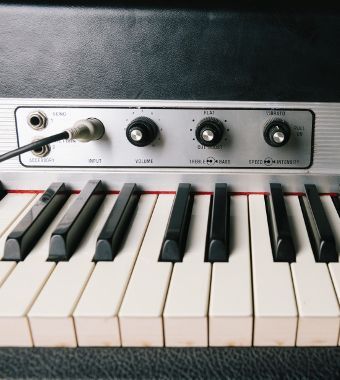
From Lounge to Fusion, from Jazz to Electro - the Mark I is omnipresent. Its unique sound fits in a variety of genres but remains unmistakably recognizable. SESSION KEYS Electric R is based on a vintage 1976 Mark I Stage Piano, specially modified with eight individual outputs to capture every nuance of its classic sound.
Sound Design
Electric R offers great customization options. Details such as sustain resonance, key noises, release, and reverse samples are quickly and easily manipulated. Electric R even allows for virtual adjusting of the distance between tines and pick-ups, and control of the quantity of "unplugged" miked sound.
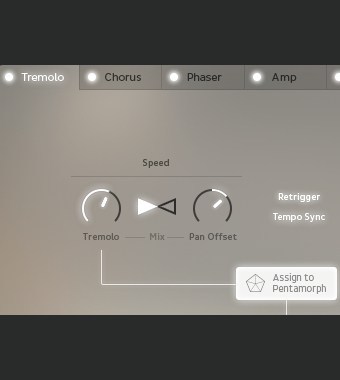
In addition to recording electrical output signals, an extensive microphone set-up was used to capture the pure, unaltered acoustic sound of the instrument. The FX section of Electric R features classic electric piano effects such as Tremolo, Chorus, Amp Simulation, Delay and Reverb.
Studio and Live
The tonal landscape of the Electric R offers everything from mellow soundscapes to barking riffs, and you even can switch instantly between two different sample sets: Studio and Live. Studio was recorded directly through high-end pre-amps and A/D converters, reproducing the piano’s clear, bell-like character. Live uses classic vintage outboard equipment and pre-amps for an edgier, rougher version of the instrument.
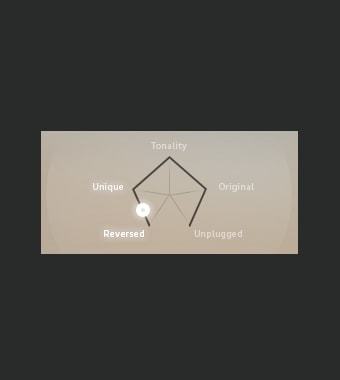
Pentamorph
The stylish Pentamorph can give the classic stage piano a new, complex voice in a matter of seconds using a single control: select one of the five main characteristics or any position between. Morph from pure acoustic sound via electric to reverse in realtime. Instant flexible control in a single knob.
Animator
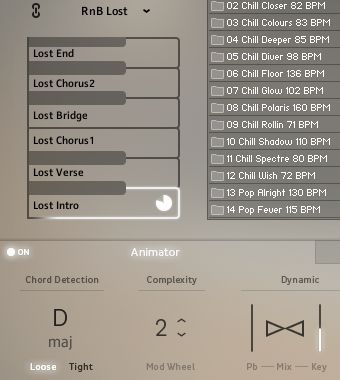
Animator boasts more than 400 ready-to-play licks and phrases in different genres and styles. Find new ideas to start or finish your tracks in no time, following keys and harmonies with complete control over dynamics and complexity.
Smart Chord
Stuck in a black hole of inspiration and need some suitable chord changes? This clever feature is a huge help in the songwriting process. Full chords or Animator riffs can be played either via a pad controller or single keys. Just set the key of your song and let Smart Chord create the harmonies.
Features
- 1976 Stage Piano.
- Two separate sound banks: Studio and Live.
- Pentamorph control to transform the entire sound with a single knob.
- Animator with more than 400 flexible piano phrases.
- Smart Chord function to create instant piano chords from single keys or pads.
- Effects chain with tremolo/auto-pan, chorus, phaser, amp simulator, compressor and convolution reverb.
- Native Instruments NKS compatible.
-
10.6 GB / 5.6 GB download (lossless sample compression) .
-
24-bit/44.1 kHz samples.
System Requirements
PC
- Windows 7/8.1/10 (Latest Service Pack, 32/64-bit).
- VST 2, VST 3 or AAX compatible host application to use as a plugin.
- Intel Core 2 Duo or AMD Athlon 64.
- 4 GB RAM.
-
Requires FREE Kontakt 5 Player or Kontakt 5 Version 5.5.1 or higher.
Mac
- OS X 10.9 or later (Latest Update).
- VST, AAX or AU compatible host application to use as a plugin.
- Intel Core 2 Duo.
- 4 GB RAM.
- Requires FREE Kontakt 5 Player or Kontakt 5 Version 5.5.1 or higher.


Recording RedaktionStipp
A source for German high-quality audio news, reviews, interviews and workshops for music makers.
“The sound encourages you to improvise.”

Sound On Sound
The world's premier music recording technology magazine.
“This fastidiously-sampled instrument could be the only e-piano you’ll ever need.”






















