Log In

Free gifts available with your purchase

This is Future Retro
Karanyi Sounds is giving a major boost to it’s most popular instrument Wavesynth with the retro-futuristic Wavesynth Glow sound pack.
It includes 70+ contemporary pop music-ready artist presets ranging from basses, plucks, leads, keys, and more for the next dance hits.
Inspired by Dua Lipa, The Weeknd, The Bad Dreamers or Kavinsky
You can explore the charm of retro-futurism through authentic wavetable synthesis, but with a modern, intuitive user interface.
Advanced waveshaper tools
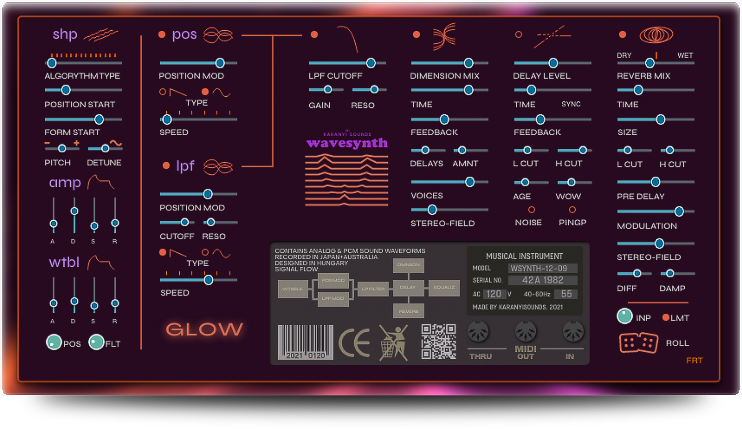
Wavesynth Glow is almost as flexible as an analog synth: you have plenty of possibilities to shape, twist, stomp your sounds. With over 60 parameters (all MIDI-learnable) and an intuitive interface design and Roll (Karanyi's built-in intelligent randomizer), you can go wild and create new inspiring patches in seconds.
Features
- 70+ Meticulously designed artist presets
- Ranging from basses to leads, plucks, percussions and more
- Professional, studio-grade quality sample content
- Recorded in 96kHz, 24bit (converted to 44kHz, 16bit)
- Sounds from classic analog and FM synths
- 14 type of wavetable algorithms
- Amp & wavetable envelopes
- 2 LFO: Wavetable position & Prophet-type low pass filter
- Moog-type low pass filter
- 3 customizable effects: dimension, tape delay & hall reverb
- Master EQ, Compressor & Limiter
- ROLL (intelligent randomizer) for creating super sharp pluck sounds
System Requirements
- Mac OS X 10.11 or higher is recommended
- Windows 7 or higher 4 GB of RAM, 8 GB is recommended
- All products require Kontakt 6.2.2 or higher (Free Kontakt Player is NOT supported)
- 64 bit DAW is recommended for optimized performance
Important Notes:
- The FULL Version of Kontakt 6.2.2+ is required in order to use this instrument.
- You will be stuck in DEMO MODE if trying to use this instrument in the FREE Kontakt Player.