Log In

Free gifts available with your purchase
Important note: This product requires a FULL version of Native Instruments' KONTAKT 6.5.2. The free Kontakt Player is not sufficient.
NASTRO SOUNDSCAPES
Ready to enter a realm of analog beauty?
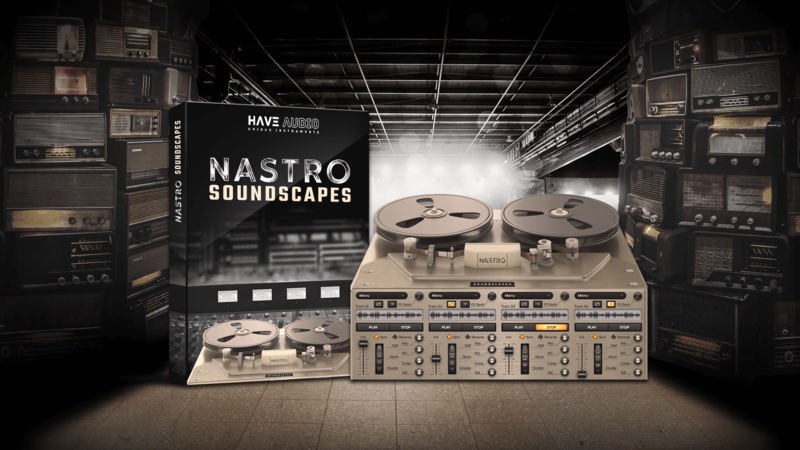
NASTRO is the reel experience for Kontakt 6 Full Version!
NASTRO means “tape” in Italian and Soundscapes is the first release of an exciting new series, dedicated to the long-gone world of tapes and reels, bringing a powerful 4-track tape machine experience right on your computer.
For NASTRO Soundscapes, Have Audio sampled some of their favorite instruments and designed synthetic lead sounds, loops, textures, noises and arpeggios using some of the best analog synthesizers out there. Then, they re-processed all material through lots of vintage tape devices, walkmans, boomboxes, VHS and rare cassette players to get that authentic, noisy tape sound.
4 independent tracks to channel your creativity, a selection of 64 sound sources, 4 playback modes, adjustable speed, 80 factory presets, 58 unique IR effects created from vintage devices and 4 additional FX macros to control panning, EQ, compression and distortion. Reel up and feed your nostalgia!
SOUND SOURCES
64 sound sources, slightly different on each track and for each playback mode, just like in the analog world! Just do your maths and here you got 1024 unique-flavored sources and you still can adjust playback speed for each of the 4 tracks to slow down, accelerate and stretch the reel, deteriorate the sounds and customize the quality of the artifacts.
The 64 sound sources are organized in 6 thematic categories:
- SYNTHETIC TONES
Have Audio used a wide array of Synths to create these playable patches. From warm vintage analog to modern, cutting edge digital machines, everything was carefully captured, manipulated and re-processed into different tape machines to catch the magic artifacts of the long gone, golden era of
tape recording.
- SYNTHETIC CHORDS
A tonal set with one-chord-per-key synth sounds, delivering a great starting point for pad and droney stuff. You can choose between minor, major, maj7, min7, sus2, sus4 and augmented. Load chords, engage looping and start composing!
- SYNTHETIC TEXTURES
Richly detailed layers of synth textures crafted by using rare and obscure pieces of equipment, often mixed with sounds of nature to add an organic touch. Add a pinch of built- in FX and turn textures into lush washes.
- ARPEGGIATION
Let Arpeggiation take the creative strain out of your patches. Multi-note blocks have been sampled into beaming cascading melodies, bringing a luminous and vibrant life to static chords.
- HYBRID
These sound sources were created with super creative phrases performed on electro-acoustic instruments such as sax, electric guitar, bouzouki, saz baglama and persian santoor, subsequently heavily-processed through tape machines in order to get that out of tune, wobbling and nostalgic
tone.
- REEL NOISE
A set of noises carefully sampled directly from various vintage tape machines with no input: cassette walkmans, dictaphones and big reel to reel units. Add magic to your patches, tones of hiss, wobble and crackling motor sound. Have Audio also added a peculiar synth patch made out of a pitched hiss!
58 UNIQUE IR EFFECTS
NASTRO's Send FXs are a big part of the game. So many hours were spent creating and fine-tuning unique convolution reverbs and IR effects to push even further Nastro’s capability. Have Audio sampled both real environment responses for organic results, and vintage pedals and devices for extremely unrealistically huge/small halos. There’s also plenty of tuned resonating IRs to enrich your patches with pedal notes of your choice.
Back in the days, iffy frequency response, distortion, tape hiss and noise were unwanted side-effects for everyone recording music on tape. Nowadays, all these artifacts are long gone and often badly missed. For this reason, Have Audio decided to develop a Kontakt instrument capable of bringing all the possibilities and "limitations" of their most beloved tape machines. Those that once were limitations can finally become enhancements in this new engine.
You will find synthetic and hybrid samples painstakingly processed through legendary devices like R2R Akai GX210-D, Sony TC630, Philips 4307, and rare cassette players such as National RQ210-S and boombox Grundig RR1140 just to name a few.
- 4 playback modes (normal / reverse / loop normal / loop reverse)
- 3 playback speeds for each track in sync mode: normal speed half / double
- Control speed manually with the free mode
- 58 unique IR effects created from analog equipment and tape devices
- Built in FX Macros: Pan / EQ / Comp / Sat
80 factory presets/snapshots organized into 8 categories:
- Arp
- Atmosphere
- Chords
- FX noise
- Motion
- Perc
- Synthetic
- Textures
64 SOUND SOURCES/PATCHES organized into 6 thematic categories:
- 15 SYNTHETIC TONES Patches
- 21 SYNTHETIC CHORDS Patches
- 4 SYNTHETIC TEXTURES Patches
- 7 ARPEGGIATION Patches
- 11 HYBRID Patches
- 6 REEL NOISE Patches
System Requirements
- For Kontakt Full Version 6.5.2+
- Library uncompressed size: 2,78 GB
- 821 Samples in .ncw format
Please note: this product will not work in Kontakt Player