Buy PSI Kick, get a free gift with purchase:
Please Note: This product requires the full version of Kontakt. It will not work with the free version of Kontakt Player.
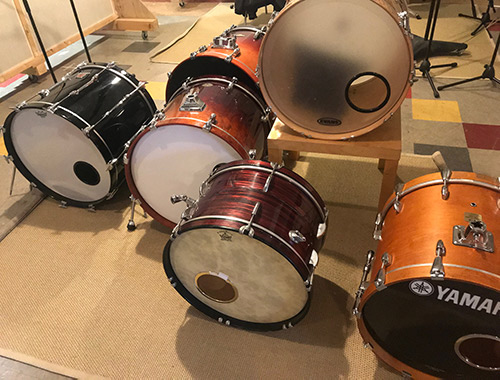
Deeply Sampled Kick Drum Library
The PSI Kick Drum is a massive collection of kick drums with loads of added control and functionality to enable you to sculpt the perfect kick drum.
Super Flexible Blend System
Blend and control each drum with additional Trigger and Sub Samples.
Use the trigger samples to add extra bite to the attack with a selection of acoustic and electronic triggers to choose from. Control the Tuning, Pan, Attack, Release, High and Lo Pass Filters for each trigger independently to the main kick. Each Trigger also has two microphone positions to blend together to craft the perfect trigger.
Use the Sub to add bottom end to the core kick sound with an additional 13 tuned subs and 13 misc subs to choose from. Control the tuning and release for each sub individually.
Each Drum has 5 microphone positions and up to 27 Velocity Layers. If you've ever used the PSI snare you'll know just how flexible this system is for producing perfect drums for any purpose.
Recording Equipment Used
- Position/Mics/Pres/Converters
- IN- Telefunken M82- API 3124MB/ Prism Conversion
- OUT- Original Neuman FET 47- API 3124MB/ Prism Conversion
- FRONT - RE20- API 3124MB/ Prism Conversion
- OVERHEADS - C414 BULS- Neve 1073 /Prism Conversion
- ROOM - Neuman KM184 - ISA 428/ Prism Conversion
Features
- 6 Multisampled Kick Drums
- 6/7 options/treatments for each Drum
- 5 Mic positions
- Rock Solid Phase alignment
- 4135 Samples.
- Over 1GB data
- 2 trigger sections
- 52 trigger options
- Up to 27 Velocity Layers
- Intuative user interface
- World Class recording equipment
- 1600sq ft live room
- Improved velocity sensitivity at lower velocity levels for a more solid dynamic response
System Requirements
- Full Kontakt 5.8.1 and above

![]()
Important Note: Full version of NI Kontakt 5.8.1 and above is required.
Please Note: Pulse Downloader is used to download the software and must be installed.
Mac
1. Visit the Pulse Downloader website by clicking the El Dorado: Legato Ambient Guitar 'Download' link in your Plugin Boutique User Account or by clicking HERE, and download the correct installer for your system (either 'OS X or later' or 'M1 System').

2. Open the downloaded file and run the installer 'Pulse-XX.X.X.dmg'.
3. Drag 'Pulse' to 'Applications'.
4. Log in to your Pulse account, or create a new account by clicking 'Register' at the bottom of the window.
5. If registering, input your email and password, agree to the terms of use and click 'Register'.
6. Click the '+ Add a Product' button located in the top right-hand corner of the window.
7. Copy and paste your serial number from your My Account page, click 'Install Now', then click 'Redeem'.
8. Select a location for Pulse to download the software by clicking the file icon on the right-hand side of the window.
9. Select the location you would like your software to download and install to.
10. Click 'Download and Install'.
11. The instrument is now downloading.
12. Once the instrument has finished downloading, open Kontakt, then open the 'Files' tab and navigate to the location that you downloaded the Kontakt Library to. Then click and drag the .nki file into the empty window.
Your Kontakt instrument is now installed and ready to use.

Windows
1. Visit the Pulse Downloader website by clicking the El Dorado: Legato Ambient Guitar 'Download' link in your Plugin Boutique User Account or by clicking HERE, and download using the 'Download for Windows' link.

2. Open the downloaded file and run the installer 'Pulse Web Setup X.X.X.exe'.
2. Log in to your Pulse account, or create a new account by clicking 'Register' at the bottom of the window.
3. If registering, input your email and password, agree to the terms of use and click 'Register'.
4. Click the '+ Add a Product' button located in the top right-hand corner of the window.
5. Copy and paste your serial number from your My Account page, click 'Install Now', then click 'Redeem'.
6. Select a location for Pulse to download the software by clicking the file icon on the right-hand side of the window.
7. Select the location you would like your software to download and install to.
8. Click 'Download and Install'.
9. The instrument is now downloading.
10. Once the instrument has finished downloading, open Kontakt, then open the 'Files' tab and navigate to the location that you downloaded the Kontakt Library to. Then click and drag the .nki file into the empty window.
Your Kontakt instrument is now installed and ready to use.


