


 Log In
Free gifts available with your purchase
The Libraries Bundle includes all of Applied Acoustic System's Sound Packs for their Ultra Analog VA-3, String Studio VS-3, Strum GS-2 and Chromaphone 2 Virtual Instruments.
(Please Note: The bundle does not include the Ultra Analog VA-3, String Studio VS-3 or Chromaphone 2 Plugins, only their Sound Bank Libraries)
All Sound Packs Included
Tremendous value and an enormous amount of sound from the best sound designers - a fantastic way to start exploring AAS’ sound universe.
6100+ Professionally Crafted Presets
With more than 5500 signature sounds on tap, Libraries will become an original and bountiful source of inspiration that you’ll want to visit again and again.
Over 50 Sound packs
With over 50 packs, Libraries explores many genre and themes for an incredible amount of variety. Whether it’s for a specific production task or a new type of music you would like to wander in, the collection will prove to be an invaluable resource.
The Benefits of Physical Modelling
Libraries brings you inspiring and animated sounds that reacts dynamically to your playing. Small memory footprint, flash-loading presets, and no velocity switching ensure a smooth workflow and natural-sounding performance.
20 Top Sound Designers
AAS are very proud to have parterned with Daniel Stawczyk, Christian Laffitte, Thiago Pinheiro, Richard Devine, Sean Divine, Andre Ettema, Gregory Simpson, Simon Stockhausen, Martin Walker, Deadbeat, David Kristian, Adam Pietruszko, Francis Preve, Yves Frulla, David of MixbusTV, Niall McCallum, Emeric Zubar, and Amon Tobin—some of the industry’s top sound designers.
Super-Fast Download & Installation
Install and authorize all sound packs at once from a single custom installer file. At less than 75 MB, you'll be up and running in no time.
The Included Sound Packs of Libraries
All Sound Packs for Ultra Analog VA-3
ALL Sound Packs for String Studio VS-3
All Sound Packs for Chromaphone 2
All Sound Packs for Strum GS-2
Works Four Ways
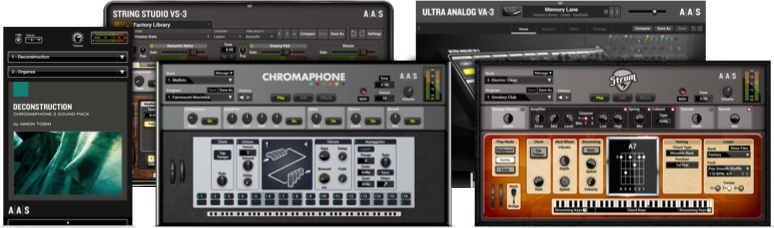
The sound packs in Libraries were created with Chromaphone 2, String Studio VS-3, and Ultra Analog VA-3. You can obviously play and edit the sounds in their respective synth engine, but you can also access and play them via the free AAS Player included with your purchase.
AAS Player
- Free - Included with purchase
- Distraction-free playing experience
- More than an hundred free extra presets via Swatches
3 Unique Synthesizer Engines
- Sold separately
- Sound manipulation at the source core
- Starting point for new sound design ideas
Operating Systems:
- Windows
- Mac OS X
Plugin Formats:
- VST
- AU
- RTAS
- AAX Native
- Standalone
The Modeling Collection instruments run in both 32 and 64-bit on Mac OS X and Windows making them compatible with nearly all DAWs.
These DAWs include:
- Ableton Live
- Apple GarageBand
- Apple Logic Pro
- Apple MainStage
- Avid Pro Tools
- Bitwig Studio
- Cakewalk Sonar
- Cuckos Reaper
- Image-Line FL Studio
- MOTU Digital Performer
- Native Instruments Komplete Kontrol
- Native Instruments Maschine
- Presonus Studio One
- Propellerhead Reason
- Steinberg Cubase
System Requirements
- Ultra Analog VA-3
- String Studio VS-3
- Chromaphone 2
- Strum GS-2
These preset collections can be used with the above three AAS Plugins as well as their free player alternatives.
Mac minimum system requirements*
- macOS 10.11 (El Capitan) or later
- Intel Core i5 (circa 2015), Apple M1 processor or later
- 64-bit DAW
PC minimum system requirements*
- Windows 10 64‑bit or later
- Intel Core i5 (circa 2015) processor or later
- 64-bit DAW
Please Note: The minimum system requirements mentioned above are for standalone usage. For plug-in usage, please refer to your DAW software requirements (Sonar, Pro Tools, Cubase, Live, Digital Performer, Logic Pro, etc.)
Neat Features:
- Standalone operation for quick jams and experimentations
- Real-time control over any parameters via your MIDI controller knobs, faders, and switches
- MIDI clock, tap, and host tempo synchronization for effects and modulations
- Relaxed editing with unlimited undo/redo capability
The Benefits of Physical Modelling:
- Sound manipulation at the source core
- Presets load in a flash
- Super smooth dynamics - no velocity layers!
- Small memory footprint - less than 256 MB of RAM per instance
- Installs in less than a minute
After you have installed the sound bank, there are two options to use it:
- With the AAS Plugins - These banks will automatically be added to either Ultra Analog VA-3, String Studio VS-3, Strum GS2 or Chromaphone 2 if they are already installed on your computer.
- AAS Player - If you don't own either Ultra Analog VA-3, String Studio VS-3, Strum GS2 or Chromaphone 2, you will be able to play the banks from the AAS Player plug-in or standalone application.

















