


 Log In

Free gifts available with your purchase

Wintergatan Music Box
For all the melodies you have in you
Speldosa is the result of a unique collaboration between Klevgrand and the Swedish artist Wintergatan/Martin Molin. Wintergatan has primarily worked in the physical world (the Marble Machine is probably the most astonishing example), while Klevgrand has performed its craft within the digital sphere. When these two worlds now meet, it results in a product that both visually and audibly inspires the creation of music that you didn’t know you had in you.
Speldosa (Swedish for "Music Box") is the essence of the shared beliefs of Klevgrand and Wintergatan, and their fascination with minimalism. A simple melody played on a music box can contain an equal amount of emotional power as any symphonic work. There is something about the music box sound that never ceases to fascinate.
The instrument itself has been meticulously recorded by Wintergatan and transformed into a playable digital instrument plugin. It features four different models (Modern, Vintage, Antique, and Eternal = Reversed), two different Room models, and an algorithmic reverb.
Wintergatan on Speldosa
"I created the sound by sampling a music box using an acoustic guitar as resonance box. I chose the best samples and it was instant magic. The Music Box went on to become the sonic signature for my two bands, Detektivbyrån and Wintergatan, both recognised for their unique sound. The Speldosa has been the secret sauce in my music career and I hope other musicians finds it as useful as I have.
There is a special quality to this exact music box sound that lifts it above the novelty feeling of a toy and turns it into a real music instrument. It just sounds so good, that’s really it. And it is a sound that makes you write music instantly - the music comes from the sound itself.
During the collaboration with Klevgrand, when they sent me the first beta version of the plugin, I ended up playing around with the sound for three hours, losing track of time. I wrote three songs that day when I was scheduled to actually do something else. That's what the sound does to me, and I think it will do the same for others."
Anatomy
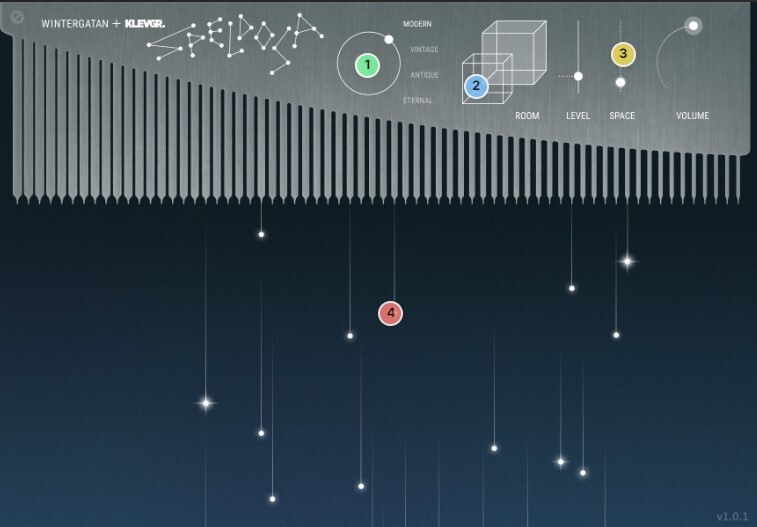
1. Four models
If you want a fresh music box, try the "Modern" model. For a music box that have lived, try "Vintage" or "Antique". For a music box going backwards, use "Eternal".
2. Get two rooms!
For placing the music box in a spatial context.
3. Space out
When a room just isn't enough.
4. Falling stars
Dreamy visualization of the played notes. Useful for enjoyment, if your volume is down or if your memory is short.
Speldosa v.1.0.3
In this new update of Speldosa v1.0.3 , Klevgrand have added damping possibilites to provide even more tonal variations and to enhance playability even more. The popularity of Speldosa truly proves that there’s something uniquely special about the sound of this music box. Its sounds never fail to fascinate, and now, thanks to this update, they’ve made it even more flexible—making it even more useful in a variety of musical contexts.
Features
- Four different instrument models
- Two different room simulations
- Algorithmic reverb
- Simple UI
- Carefully recorded samples by Wintergatan
- (v1.0.3) Damper setting
System Requirements
Mac
- 64 bit AU/VST/AAX plug-in
- macOS 10.10+
- OpenGL
Windows
- 64 bit VST/AAX plug-in
- Windows 7+ with SP1 or higher

























Reviews Summary
While it aims to provide a helpful overview, it may not capture every perspective or detail. We encourage you to read individual reviews to make an informed decision.
Users highly praise this music box plugin for its gorgeous, delicate, and authentic sound quality, noting that it is inspiring, simple to use, and well-designed. While it features a minimal set of presets and options—with one reviewer mentioning it can be slightly out of tune for certain tracks—customers find every mode genuinely useful across genres like lo-fi and appreciate the company's responsive customer support.


